EasyManua.ls Logo

IRiver T6 - Page 21

IRiver T6
41 pages
Print Icon
To Next Page IconTo Next Page
To Previous Page IconTo Previous Page
Loading...
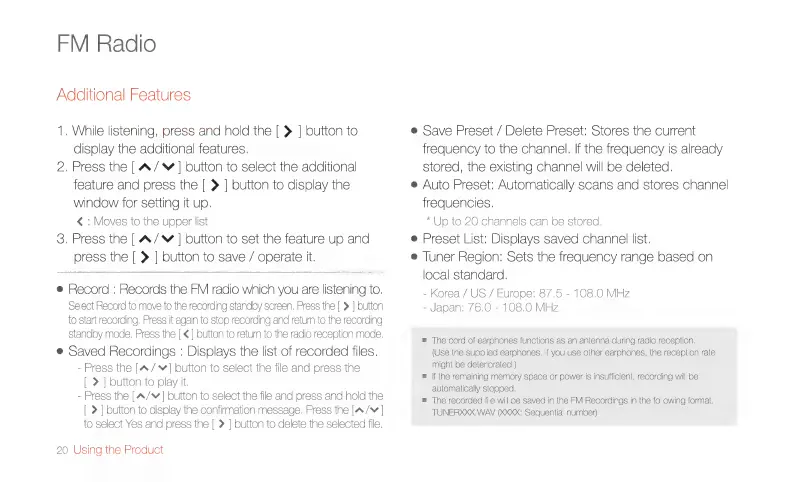
FM
Radio
Additional
Features
1.
While
listening,
press
and
hold
the
|
>
|
button
to
display
the
additional
features.
2.
Press
the
|
A/
©
|
button
to
select
the
additional
feature
and
press
the
[|
>
|
button
to
display
the
window
for
setting
it
up.
<
:
Moves
to
the
upper
list
3.
Press
the
[
A/v
|
button
to
set
the
feature
up
and
press
the
|
>
|
button
to
save
/
operate
it.
e
Record
:
Records
the
FM
radio
which
you
are
listening
to.
Select
Record
to
move
to
the
recording
standby
screen.
Press
the
[
>
|
button
to
start
recording.
Press
it
again
to
stop
recording
and
retum
to
the
recording
standby
mode.
Press
the
[<
|
button
to
retum
to
the
radio
reception
mode.
e
Saved
Recordings
:
Displays
the
list
of
recorded
files.
-
Press
the
[A/¥]
button
to
select
the
file
and
press
the
>
|
button
to
play
it,
-
Press
the
[A/~
]
button
to
select
the
file
and
press
and
hold
the
>
|
button
to
display
the
confirmation
message.
Press
the
[A/¥
|
to
select
Yes and
press
the
[
>
|
button
to
delete
the
selected
file.
20
Using
the
Product
e
Save
Preset
/
Delete
Preset:
Stores
the
current
frequency
to
the
channel.
If
the
frequency
is
already
stored,
the
existing
channel
will
be
deleted.
e
Auto
Preset:
Automatically
scans
and
stores
channel
frequencies.
*
Up
to
20
channels
can
be
stored.
e
Preset
List:
Displays
saved
channel
list.
e
Tuner
Region:
Sets
the
frequency
range
based
on
ocal
standard.
-
Korea
/
US
/
Europe:
87.5
-
108.0
MHz
-
Japan:
76,0
-
108.0
MHz
=
The
cord
of
earohones
functions
as
an
antenna
during
radio
reception.
(Use
the
supplied
earphones.
If
you
use
other
earphones,
the
reception
rat
might
be
deteriorated.)
m
İf
the
remaining
memory
space
or
power
is
insufficient,
recording
will
be
automatically
stopped.
m
The
recorded
file
will
be
saved
in
the
FM
Recordings
in
the
following
format.
TUNERXXX.
WAV
XXX:
Sequential
number)