11
USING THE MOBILE APP
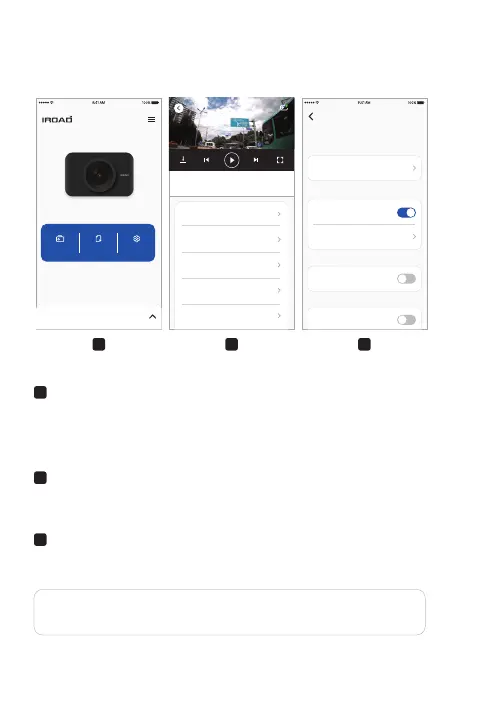
Main Screen
- Displays information about the connected product.
- Access to the live view screen.
- Access to the recorded videos.
- Configuring the dashcam settings.
A
Playback recording for Front / Rear Camera
- Playback the recorded videos.
- Choose video clip from the list and save it.(Video or Image)
B
Configuration System
- Configuring the dashcam settings.
(Once settings change the device will be rebooted)
C
CBA
2021.07.30 10:30:15
2021.07.30 10:30:15
2021.07.30 10:30:15
2021.07.30 10:30:15
2021.07.30 10:30:15
Normal
Normal
Normal
Normal
Normal
2021.07.30 10:30:15
0 km/h
Normal
info
Security LED
Battery Protection
Power OFF
12V / 24V
LOW BATTERY PROTECTION
System
SECURITY LED
high temperature shutdown
HIGH TEMPERATURE SHUTDOWN
Connect with Dash cam
IROAD DASH CAM
live view Recording list Settings
2CH QXD / FHD
Setting Language : Dash cam setting > System > System language > Change language.
English is the default language.
●
●



 To Next Page