EasyManua.ls Logo

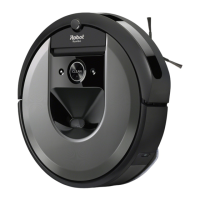
iRobot Roomba i5+ - User Manual

iRobot Roomba i5+
49 pages
Print Icon
To Next Page IconTo Next Page
Loading...
i5+
Owner’s Guide
Guide du propriétaire
Guía del usuario
Robot Vacuum
Robot aspirateur
Robot aspirador

Questions and Answers

  • M
    Mr. Antonio RamirezJul 29, 2025
    What to do if iRobot Vacuum Cleaner bag is full or missing?
    • E
      Erin OchoaJul 29, 2025
      If the iRobot Vacuum Cleaner's bag is full or missing, replace it. Ensure the bag is securely inserted. If the problem continues, clear any debris from the port on the bottom of your robot and the dirt disposal.
  • C
    Crystal AguilarAug 2, 2025
    What to do if my iRobot Roomba i5+ Vacuum Cleaner says low battery?
    • J
      Jessica JenkinsAug 3, 2025
      If your iRobot Vacuum Cleaner indicates a low battery, please charge it.
  • B
    blevinsstephanieAug 7, 2025
    What to do if iRobot Roomba i5+ thermal protector operates and the motor stops?
    • V
      victor45Aug 7, 2025
      If the thermal protector operates and the motor stops running in your iRobot Vacuum Cleaner, unplug the unit and let it cool down for about 30 minutes. Then, make sure to remove any blockages from the evacuation port and tube. After doing that, plug the unit back in.
  • A
    Amanda LynchAug 13, 2025
    What to do if there is a leak or clog in iRobot Vacuum Cleaner dock evacuation path?
    • B
      Brianna AndersonAug 13, 2025
      If you notice a leak or clog in the iRobot Vacuum Cleaner dock evacuation path: 1. Ensure the canister lid is pushed down and firmly sealed. Hold the CLEAN button on your robot down for 2–5 seconds to manually empty the bin. 2. Remove any debris from the port on the bottom of your robot and dirt disposal. 3. Unplug the dirt disposal from the wall, place it on its side, and inspect the debris evacuation tube for blockages. If needed, remove the tube to clear any debris.
  • E
    Eric HansenAug 18, 2025
    What to do if iRobot Vacuum Cleaner thermal protector operates due to overheating?
    • E
      Elizabeth MarksAug 18, 2025
      If the thermal protector activates due to overheating, unplug the unit. Allow it to cool down for about 30 minutes. Clear any blockages from both the evacuation port and the evacuation tube. After completing these steps, plug the unit back in.
  • C
    Crystal AllisonAug 22, 2025
    How to fix a leak or clog in the dock evacuation path of iRobot Roomba i5+ Vacuum Cleaner?
    • C
      cruzscottAug 23, 2025
      To address a leak or clog in the dock evacuation path: 1. Ensure the canister lid is firmly sealed by pushing it down. Manually empty the bin by holding the clean button on your robot for 2-5 seconds. 2. Clear any debris from the port on the robot's bottom and the dirt disposal. 3. Unplug the dirt disposal, lay it on its side, and inspect the debris evacuation tube for obstructions. Remove the tube if needed to clear any debris.

Summary

Safety Information

General Warnings and Precautions

Safety warnings and precautions for general use, robot operation, and notices.

Using your Roomba Robot Vacuum

Positioning the CleanBase

Guidelines for placing the CleanBase for optimal Wi-Fi and safety.

Download and Connect to Wi-Fi

Instructions for downloading and connecting the Roomba via the mobile app.

Charging the Robot

Explains the charging process, indicators, and long-term storage.

Cleaning Operations

Care and Maintenance Tasks

Cleaning the Filter

Instructions for cleaning the robot's filter.

Specific Cleaning Procedures

Component Maintenance

Cleaning the Multi-Surface Brushes

How to remove, clean, and reinstall the main brushes.

Advanced Maintenance and Replacement

Troubleshooting Guide

Automatic Dirt Disposal Errors

Troubleshooting common errors with the automatic dirt disposal system.

Robot Error Alerts

How to interpret robot audio alerts and red light ring indicators.

iRobot Roomba i5+ Specifications

General IconGeneral
ShapeRound
Product colorBlack, Grey
Dust container typeDust bag
Efficiency90 %
Noise level- dB
Wet mopping-
Brush materialRubber
Number of brushes2
Programming functionYes
Dust capacity (total)- L
Battery capacity- mAh

Videos

How to Properly Install the Filter in Your iRobot Roomba i5+

Related product manuals