2- OPERATING THE PRODUCT
Setting Celsius (°C) or Fahrenheit (°F) Format
• Press °C/ °F button to toggle in between Celsius or Fahrenheit readout.
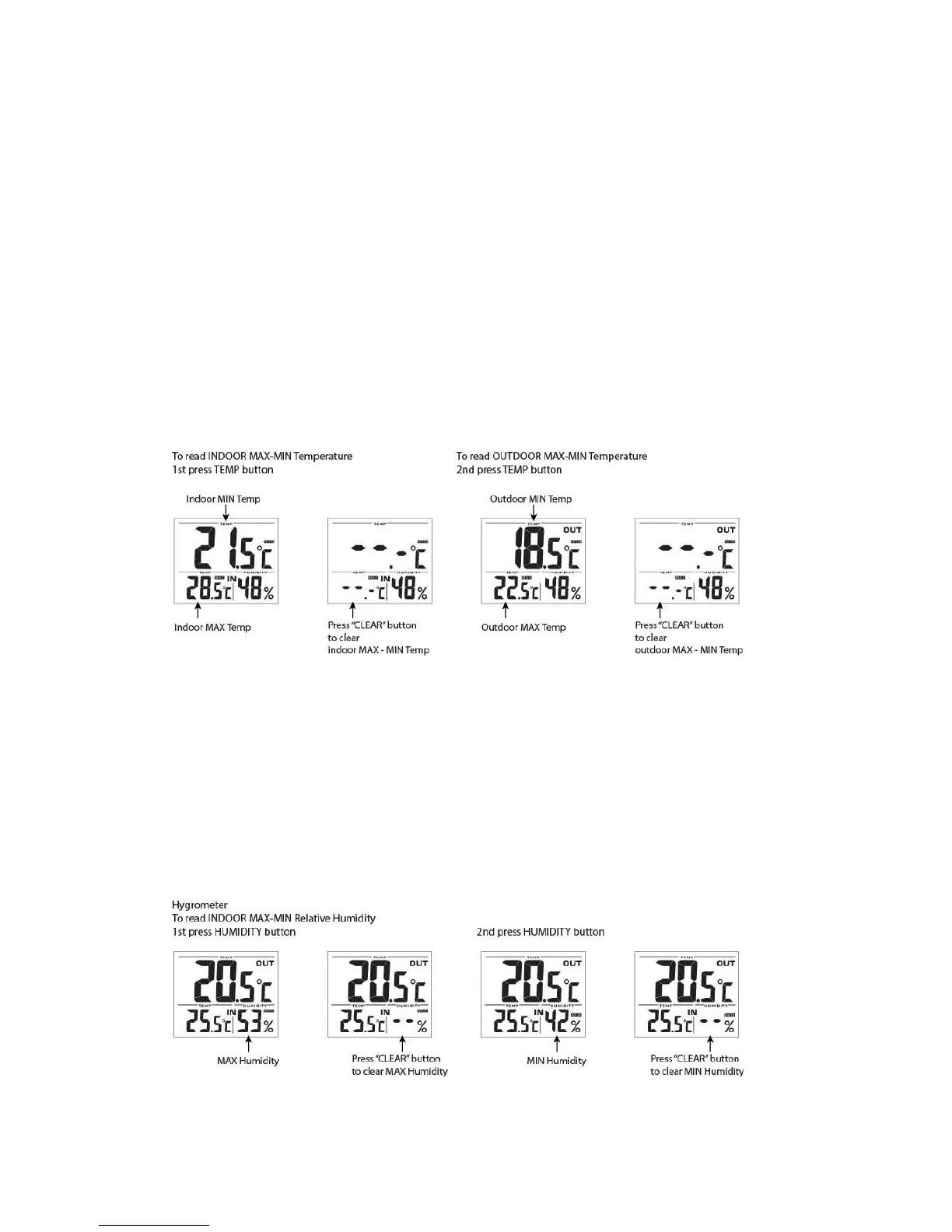
Viewing Indoor and Outdoor Temperature Record
• Press TEMP button once to read indoor Max and Min temperature. Press CLEAR button
to clear indoor Max/Min temp data.
• Press TEMP button again to read outdoor Max and Min temperature. Press CLEAR
button to clear outdoor Max/Min temp data.
• Press TEMP button again or wait for 5 seconds, display will resume to normal temp
display mode.
Viewing Indoor Humidity Record
• Press HUMIDITY button once to read indoor MAX relative humidity. Press CLEAR
button to clear the MAX record.
• Press HUMIDITY button once to read indoor MIN relative humidity. Press CLEAR
button to clear the MIN record.
• Press HUMIDTY button again or wait for 5 seconds, display will resume to normal
hygrometer display mode.



 To Next Page