14 of 30
3.5.3 Setting the cycle duration
Proceed as described for the cabinet set point, after pressing area for the cycle duration.
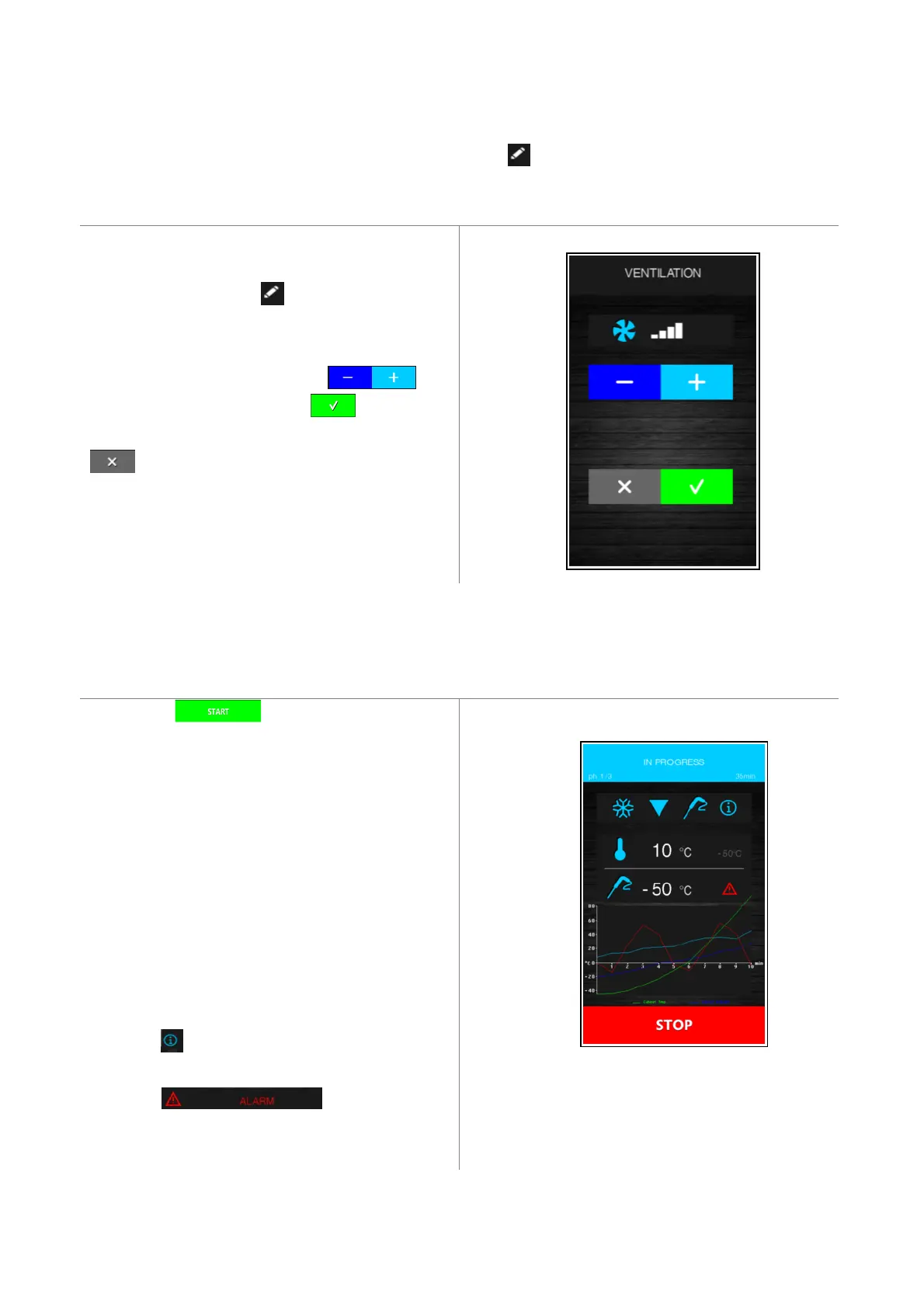
3.5.4 Setting the fan speed
To modify this, press area for the fan speed and the
screen shown below will open.
Set the desired value pressing the key.
Once set-up is complete press the key to confirm
the value and return to the previous screen, or press the
key to reload the pre-set values and return to
the previous screen.
3.6 Running the cycle
Pressing the key starts up the cycle as it
has been set. If it is a temperature controlled cycle, the
blast chilling/blast-freezing phases terminate when the
needle probe, or probes, reach the set temperature.
If it is a time controlled cycle, it ends when the timer
period, or periods, have elapsed.
The screen shows a summary of the features of the cycle
in progress and a chart with the various values required
(cabinet temperature and product temperature for
temperature controlled cycles and cabinet temperature
and time period for time controlled cycles).
Press area to see the probe values, input and output
status and any alarms underway.
Press area , which is only active
when an alarm is underway, to see the type of alarm in
progress.


 To Next Page