23 of 30
4.9 Slow cooking
Pressing this area enables selection of a slow
cooking cycle. This function can only be enabled if an
expansion has been set (parameter E12 = 1).
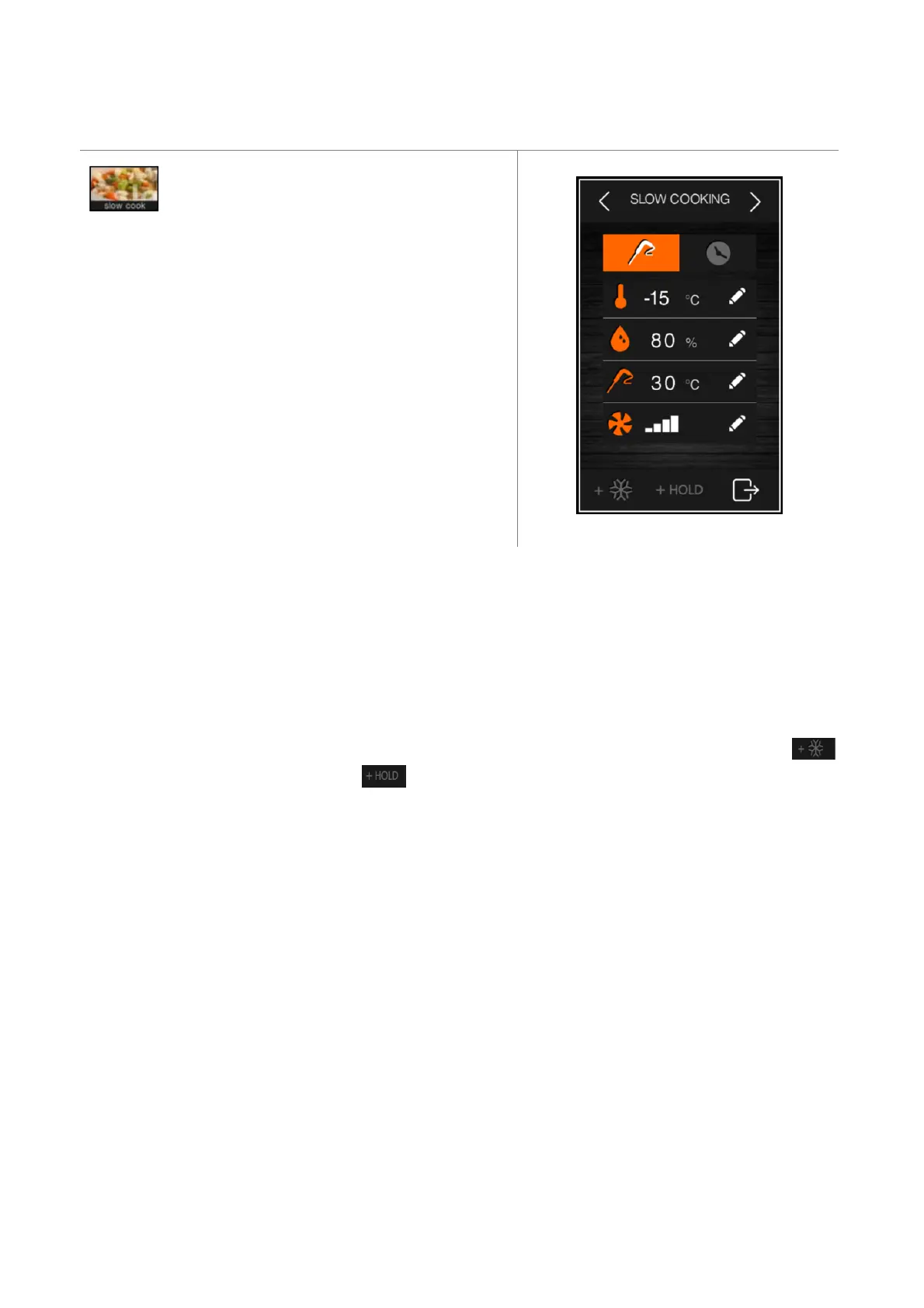
After selection of the slow cooking function, a screen will appear
on which it is possible to view and modify the relevant set points
and to decide whether to set up a temperature or time controlled
process. It is not possible to modify the set points while the cycle
is in progress.
The slow cooking pre-settings use the following parameters:
rH10 cabinet set point
rH11 product temperature set point
rH12 cycle duration
rU9 % humidity
F40 fan speed
Two areas at the bottom of the screen make it possible to add a subsequent blast chilling/blast-freezing phase
and a product holding/conservation phase .
For blast chilling or blast-freezing, the pre-settings are those for the cycle, whereas the following parameters are used
to set up a holding or conservation phase:
rH13 cabinet set point for holding phase
rU10 % humidity in holding
F41 fan speed
If a holding phase has been enabled following a slow cooking cycle, this will be activated at the set temperature and
humidity and it will have an indefinite duration. If blast chilling or blast-freezing has been enabled, this will be
performed according to the procedures for the cycle in question (blast chilling/blast-freezing and moving on
automatically to conservation).


 To Next Page