2
TranzIt LINK
1. Introduction
Thank you for choosing the iSimple TranzIt LINK as your audio input solution. The TranzIt LINK
is designed to provide the connecting link between your portable audio device and your FM
radio. Using the supplied accessories, you can connect virtually any audio source into any FM
equipped radio.
The TranzIt LINK will route the audio from your device through your factory radio. If your
audio source is an iPod, iPhone, or iPad featuring a Lighting connector, this interface will also
provide battery charging when connected.
2. TranzIt LINK Components
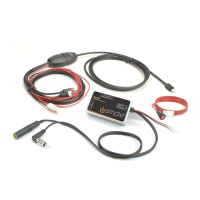
• One Radio Input Interface
• One Power Cable with on/off switch
• One Audio Cable (6ft) with Lightning Connector
3. Installation
Connecting an iPod, iPhone, or iPad
iPod Specic installation instructions
1)Connect the audio connector from the Lightning cable to the audio input on the
TranzIt LINK.
2) Connect the two-pin power connector on the Lightning cable to the connector labeled
“Connect to cable” in the TranzIt LINK wiring harness.
3) Route the connector for iPod, iPhone, or iPad to your chosen location in your automobile.
Common locations are the glove box, center console or in a mounted cradle for iPod, iPhone,
or iPad. You will need to access the iPod, iPhone, or iPad in order to change music selections.
Antenna Out
Antenna In
Connects to
On/Off Switch
Audio Cable
(6 ft.)
Fuse
Connect to
switch
Connect to
cable
RCA
connectors
Connects to
iPod, iPhone, or iPad
TranzIt LINK
*
*
* Some radios require the addition of antenna connection adapters


 To Next Page