Need help?
Do you have a question about the ISOtunes SPORT CALIBER and is the answer not in the manual?
Functionality mapping for touch controls on the left earbud.
Functionality mapping for touch controls on the right earbud.
Steps for correctly fitting earbuds for optimal comfort and noise reduction.
Instructions to reset earbuds to factory settings to resolve issues.
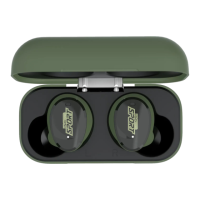
The ISOtunes Sport CALIBER are tactical hearing protector earbuds with Bluetooth connectivity, designed to offer both hearing protection and audio functionality in noisy environments. They incorporate Tactical Sound Control™ Technology, which allows users to hear their surroundings at a safe listening level while attenuating harmful ambient noise.
The primary function of the ISOtunes Sport CALIBER is to provide hearing protection in loud settings. The Tactical Sound Control™ (TSC) Technology uses microphones to allow the user to hear the world around them at a safe listening level. When ambient noise exceeds a safe threshold, the microphone technology automatically attenuates the sound to a safe level, protecting the user's hearing. This feature is particularly useful in environments where situational awareness is important but noise exposure is a concern.
In addition to hearing protection, the earbuds offer full Bluetooth audio functionality. Users can listen to music, make and receive phone calls, and interact with voice assistants like Siri or Google Assistant. The earbuds are designed for true wireless use, with independent control surfaces on each earbud.
The earbuds feature touch surfaces for control. The left earbud's touch surface (2L) primarily manages Aware Technology: a single tap increases Aware Volume (UP +), and a double tap decreases Aware Volume (DOWN -). The right earbud's touch surface (2R) handles music playback and phone calls. For music, a single tap plays/pauses, a double tap skips to the next track, and a triple tap goes to the previous track. For phone calls, a single tap answers, a long press ends/rejects, a double tap places calls on hold or switches between calls, and a single tap mutes/unmutes the microphone. Volume for music and phone calls is controlled directly by the connected device (e.g., smartphone), not by the earbuds themselves.
There are two methods for powering the earbuds on and off.
Upon powering on, the earbuds automatically enter pairing mode. A voice prompt "Bluetooth Pairing Mode" will be heard, and the LED indicator lights (3) on both earbuds will flash alternating blue and red. To pair, users need to open their device's Bluetooth settings, search for "ISOtunes CALIBER," and select it to connect. A "Bluetooth Connected" voice prompt confirms successful pairing.
Proper fit is crucial for effective hearing protection and sound quality. The manual provides a four-step fitting guide:
The ISOtunes Sport CALIBER system includes three batteries: one in the charging case, one in the left earbud, and one in the right earbud.
The earbuds should be cleaned by gently wiping them with a clean, damp cloth and mild soap. They should not be immersed in water, and abrasive cleaning solvents should be avoided. If the earbuds get wet from sweat or rain, they should be discontinued from use and allowed to dry completely.
The TRILOGY™ foam eartips are disposable and should be replaced every three months or when they become soiled to maintain peak performance. They can be cleaned between uses with a damp cloth and water. The battery should not be fully discharged before long-term storage, and the product should be stored in a clean, dry location between -20 °C and 50 °C.
For issues related to powering off, pairing, or touch surface functionality, a factory reset is recommended. The steps are:
The ISOtunes Sport CALIBER are designed to block outside noise effectively. Therefore, they should NOT be used in environments where full awareness of surroundings is critical for personal safety, such as while driving a car, riding a motorcycle, or cycling outdoors. The user is solely responsible for ensuring the earbuds are used only in safe environments. The earplugs should also not be used in situations where there is a risk of the connecting cord (if any, though these are true wireless) being caught up. The product may be affected by certain chemical substances, and further information should be sought from the manufacturer if needed.
 General
| Type | In-Ear |
|---|---|
| Bluetooth Version | 5.2 |
| Water Resistance | IP67 |
| Microphone | Yes |
| Charging Time | 2 hours |
| Warranty | 1 year |
| Noise Reduction Rating | 25 dB |
| Battery Life | Up to 13 hours (music), Up to 12 hours (talk), Up to 22 hours (with charging case) |

 To Next Page