DETAILED OPERATION:
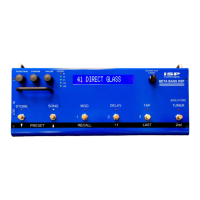
Refer to the figure above for the hardware drawings which show the locations of
the switches, knobs, and jacks when reading the following. Refer to Figure 2 for
the signal flow diagram which shows the flow of the signal through the unit from
the input to the outputs. The following text explains the operation of the unit
organized by the software functions and parameters, but it also incorporates
explainations of the hardware functions where they are interrelated to the
software. Also, many important operational details are contained in the Quick
Start section, so reading and understanding that section is essential.
PRESET MODE:
This is the default mode when the unit is first turned on. It allows direct recall of
presets by name, adjustment and programming of presets, mapping of switches
and the expression pedal, MIDI Dump and Load, and setting of Global
parameters. The other mode of the unit is SONG MODE, which will be described
later.
Functions and Parameters:
Note that the titles of the functions do not always appear on the display, but most
of them are contained within the first parameter of that function. The following list
of functions are accessed in order by turning the FUNCTION knob clockwise.
The parameters are then accessed by turning the PARAM knob. The values
displayed are changed by turning the VALUE knob.
A) Mixer Function
1. OUTPUT LEVEL (OFF to +10 dB): Controls the output level
feeding all outputs from the unit. This is to allow the presets to be
set to nominally equal levels given different gains, compression,
EQ, and effects. It also allows adjustment to prevent clipping of the
4 channel output DAC. When the Function is turned to display this
or any parameter other than the titles, the LEVEL leds will display
the maximum output level of the 4 DAC channels. The OUTPUT
LEVEL can then be adjusted to prevent clipping of the DAC by
keeping the red 0 dB led from lighting.
2. DIRECT PAN (0 to 100): Pans the direct signal (the signal before
the stereo effects) from Left (0) to Right (100). The primary use for
this is to have the direct sent to one channel and the delay sent to
the other.


 To Next Page
 Loading...