4-26
CONTROLS AND INSTRUMENTS
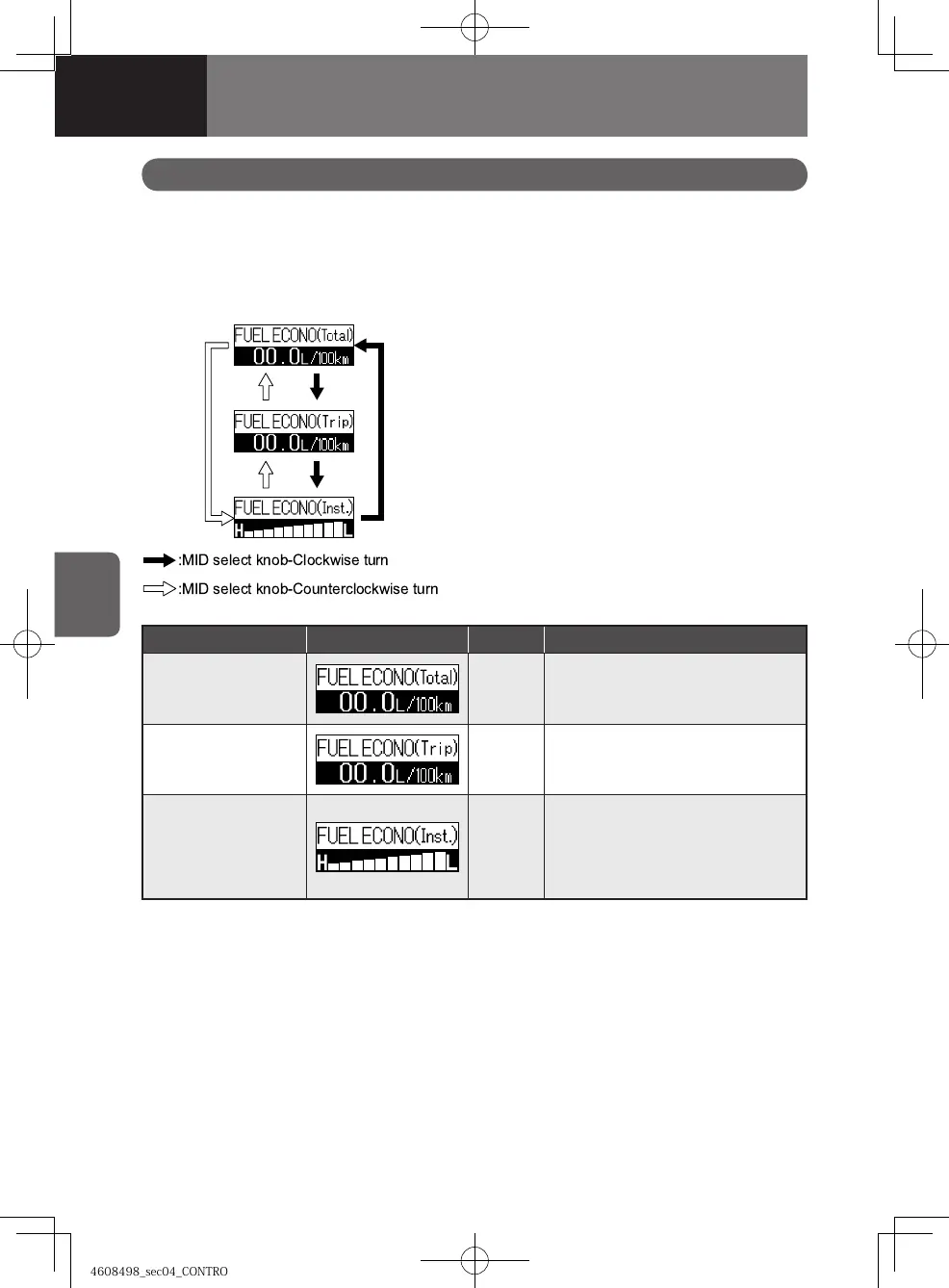
Message Display indication Color Descriptions
Total fuel economy Green
This indicates the average fuel
economy over the total distance
traveled.
Per trip fuel economy
Green
This indicates the fuel economy
over a specific distance traveled.
Instantaneous fuel
economy
Green
This indicates the fuel economy at
a given moment while driving.
More fuel is being consumed as
more segments are added to the
right.
This function displays vehicle operation related information on such items as fuel
economy, battery voltage, calendar and clock, which is useful for efficient management
of your vehicle operation.
Operation-Related Information Display
Fuel Economy
The system calculates and stores the
distance traveled and fuel consumption
while driving to encourage the operator to
drive the vehicle economically.
Fuel economy for the "TRIP B" distance is
displayed.
Press the MID select knob to select the fuel
economy display.
How to Reset the Per Trip Fuel
Economy
Per trip fuel economy is also cleared when
you reset the "TRIP B" to zero.
4608498sec04CONTROLSANDINSTR4-264-264608498sec04CONTROLSANDINSTR4-264-26 2015/11/0213:58:382015/11/0213:58:38



 To Next Page