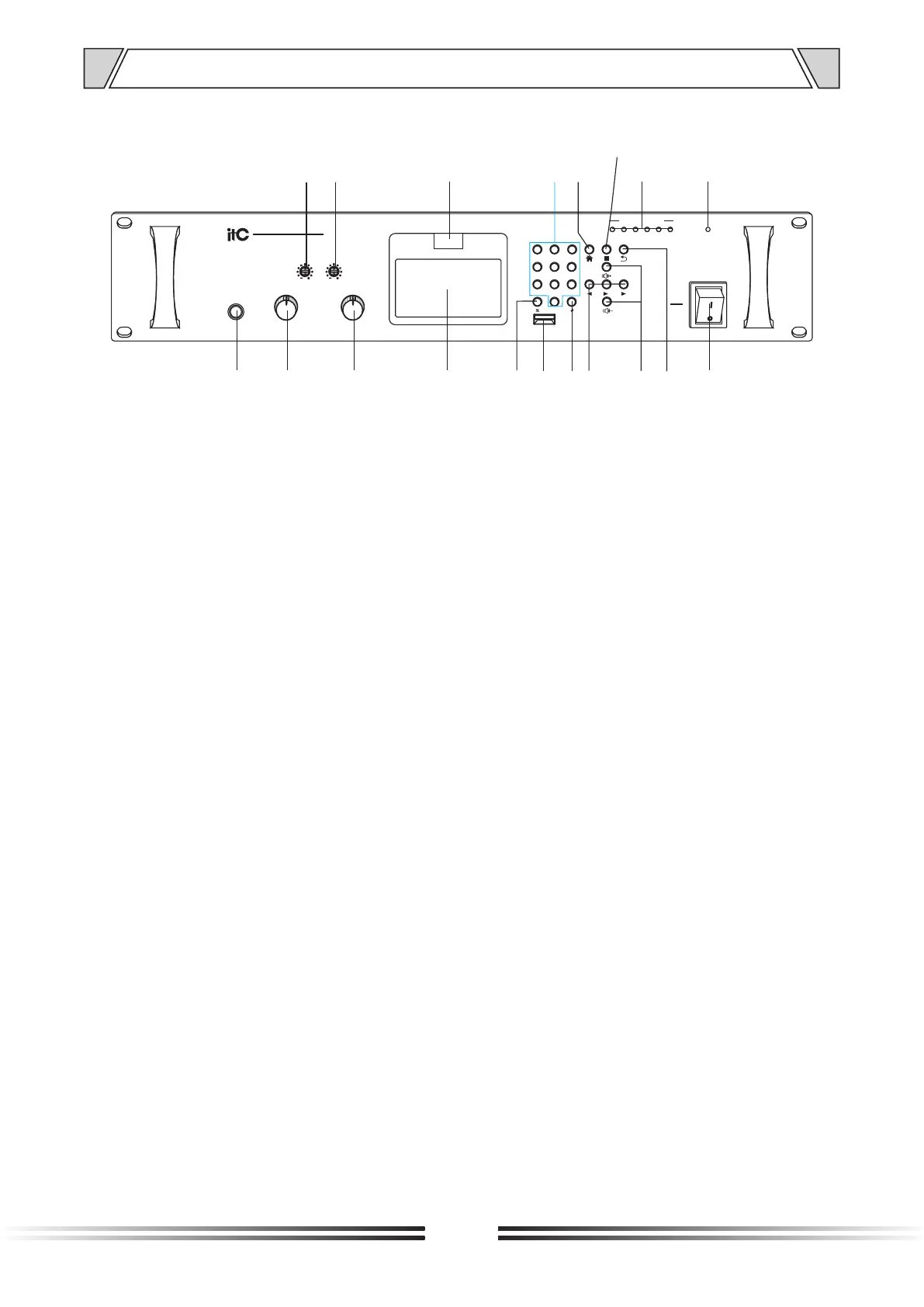
4. NOMENCLATURE AND FUCTIONS
4.1 Front panel
6
1. Local MIC input Adopting 6.35mm MIC input interface.
2. Volume control of MIC input.
3. Volume control of AUX input.
4. Working status display screen, Mainly used for showing the different status in different quests.
5. "*" key - clear the fill code.
6. USB interface - used to read the U disk to store MP3 audio signals.
7. "#" key.
8. Left/right direction key and pause key.
9. Volume plus / minus keys, its function is:
Volume plus key - press and hold the volume up button to zoom in on the volume;
Volume down key - Press and hold the volume down button to make the volume decrease.
10. Back button - mainly used to press the button to return to the previous step when selecting errors
or entering errors.
11. Power switch,Mainly used for start up and shut down the equipment. Turn ON to switch on the
equipment, OFF to shut down the equipment.
12. Power indicator, Mainly used for indicating of the power startup and shutdown. The LED lights on
when switches on the equipment, it lights off when shuts down the equipment.
13. OUTPUT LEVEL—Level indicator.
14.Stop button.
15.The main menu button - mainly used to enter the menu after the corresponding function settings.
16.0-9 number keys ,It is mainly used for the corresponding options of the home page.
17.Remote control receiver window.
18. TREBLE—Adjust the response of treble. Increase treble output by knob clockwise rotation and
decrease it by knob anticlockwise rotation.
19. BASS—Adjust the response of bass. Increase bass output by knob clockwise rotation and decrease
it by knob anticlockwise rotation.
,
MIC
ON
OFF
POWER
AUX
1
2
3
4
5
6
7
8
9
10
0
MIC
8
1
2
3
4
5
6
7
9
100
BASS TREBLE
2 4
6
8
10 12
OUTPUT LEVEL
T-7701
NETWORK AUDIO ADAPTER
IR
2
5
8
1
4
7
3
6
9
0
USB
14
1
2 3
4
11
121317
18
19
5
6
7
8
9
10
1516



 To Next Page