EasyManua.ls Logo

ITech ACTIVE 2 - User Manual

ITech ACTIVE 2
13 pages
Print Icon
To Next Page IconTo Next Page
Loading...
(US)
USER MANUAL VERSION 1.0
FITNESS TRACKER
“This iTech Wearables smartwatch is NOT a medical device. This device and related software and applcations are NOT intended for use
in the diagnosis of disease or other conditions, or in the cure, mitigation, treatment or prevention of disease. Users should NOT interpret
or take clinical action based on the device output without consultation of a qualified healthcare professional. “
Question and Answer IconNeed help?

Do you have a question about the ITech ACTIVE 2 and is the answer not in the manual?

Summary

Getting Started with Your iTech Active 2

Whats in the Box

Lists the contents of the iTech Active 2 package, including the device and charging cable.

Charging Your Fitness Tracker

Instructions on how to charge the iTech Active 2 and its estimated charging time.

Setting Up Your Fitness Tracker

Getting Started with the App

Guide on downloading the iTech Wearables App and finding it on app stores for initial setup.

Powering the Device On and Off

Steps to turn the iTech Active 2 on and off using the one-touch button.

Apps and Features: Notifications and Activity

Notifications and Messaging

How to set up, view, and manage call, text, and app notifications from your smartphone.

Apps and Features: Health Monitoring

Apps and Features: Exercise and Connectivity

Updating, Restarting, and Erasing

Updating Fitness Tracker Firmware

Process for updating the device's firmware via the iTech Wearables App.

Restarting and Resetting Your Device

Instructions for restarting or factory resetting the iTech Active 2.

Overview

The iTech Active 2 is a fitness tracker designed to help users monitor their daily activity, sleep, and heart rate, as well as receive smartphone notifications. It is not a medical device and should not be used for diagnosis, treatment, or prevention of disease. Users should consult a qualified healthcare professional before taking any clinical action based on the device's output.

Function Description:

The iTech Active 2 continuously tracks various statistics throughout the day and night. Key functions include:
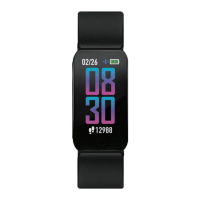
  • Timekeeping: Displays time and date, with customizable watch faces.
  • Notifications & Messaging: Displays call, text, social media, and app notifications from a paired smartphone. It stores up to 5 notifications, replacing the oldest as new ones arrive. Users can manage notification preferences and mute all notifications via the "Do Not Disturb" mode.
  • Activity Tracking: Records steps taken, calories burned, and distance covered. It tracks progress towards daily goals set by the user, providing celebratory badges upon achievement.
  • Sleep Monitoring: Automatically tracks time asleep, sleep stages (deep sleep, light sleep, and time awake), and provides an overall sleep quality score. Detailed sleep history and summaries are available in the iTech Wearables App.
  • Heart Rate Monitoring: Tracks heart rate throughout the day. Users can measure real-time heart rate on demand or enable continuous heart rate detection (recording every 30 minutes) for more accurate sleep statistics. Continuous heart rate detection consumes more battery.
  • Fitness & Exercising (Multi-Sports Mode): Features 4 sports modes (Basketball, Baseball, Football, Soccer) and 4 workout modes (Running, Elliptical, Cycling, Hiking). Each mode tracks specific details such as steps, total time, average heart rate, and calories. Activities must be performed for at least 3 minutes to be saved.
  • Connected GPS: Utilizes the smartphone's GPS sensors to provide complete workout stats, recap, route, and pace information for outdoor activities.
  • Sedentary Reminder: Alerts users to move during specified hours (10:00 AM - 6:00 PM) to encourage activity.
  • Music Remote: Allows users to play/pause, skip forward, or skip to previous music from compatible apps (Apple Music, Spotify, Pandora).
  • Camera Remote: Enables users to snap photos on their smartphone by tapping or shaking their wrist while the app's camera function is open.
  • Weather: Displays current and next-day weather forecasts, updated hourly when connected to the smartphone.
  • Find Device: Vibrates the iTech Active 2 when activated from the app, helping users locate it.
  • Language Selection: Allows users to change the language on the fitness tracker.
  • Time Format: Users can select between 12 and 24-hour time formats.
  • Unit Format: Allows selection between metric and imperial systems for measurements.
  • Hydration Reminder: Reminds users to stay hydrated throughout the day, with customizable start/end times and frequency.
  • Hygiene Assistant: Reminds users to wash their hands during the day, with customizable start/end times and frequency.

Important Technical Specifications:

  • Battery Life: Up to 7-10 days (standby time). Battery life and charge cycles vary based on usage.
  • Charging Time: Approximately 1-2 hours for a full charge.
  • Connectivity: Bluetooth. Requires the free iTech Wearables App, compatible with most iPhones and Android phones.
  • Water Resistance: IP65 water resistant. It is not IP68 waterproof, meaning it should not be submerged in water or used for swimming. It can withstand splashes, rain, and daily activities like washing dishes. If the device gets wet, it should be removed and dried.
  • FCC ID: 2AS3P-ITACT2.
  • Display: Features 3 interchangeable built-in watch faces.
  • Input: One-touch button for navigation and feature activation.

Usage Features:

  • Navigation: The iTech Active 2 is a one-touch device. Tapping the one-touch button navigates through menus, while tapping and holding activates features or enters sections (e.g., Settings). A vibration confirms activation.
  • Exiting Sections: To exit a section, tap the one-touch button until a back button icon appears, then tap and hold the button.
  • Motion Gesture: Allows the screen to turn on by rotating the wrist. This feature can be configured with specific active times or set to be always on (which consumes more battery).
  • Haptic Feedback Control: Users can turn vibrations on or off for notifications and reminders. Turning off vibrations can extend battery life. The change takes 5 minutes to become active.
  • MAC ID Address: Each device has a unique MAC ID, visible by tapping and holding the one-touch button on the main clock face for 3 seconds. This ID helps ensure correct pairing with the app.
  • App Integration: The iTech Wearables App is central to the device's functionality, used for setup, data syncing, settings adjustments, and accessing detailed statistics.
  • Power On/Off: To power on, tap and hold the one-touch button for 5 seconds until the iTech Active 2 logo appears. To power off, navigate to the Settings screen, then to the Power Off icon, and tap and hold the one-touch button.

Maintenance Features:

  • Charging: Use the provided clamp charging cable. Plug the USB end into a computer's USB port or a UL-certified USB wall charger. Insert the iTech Active 2 into the charging cable section. A charging screen indicates the device is charging.
  • Firmware Updates: New firmware updates are delivered via the iTech Wearables App. Users will receive a notification, or can manually check for updates in the app's settings. The device must remain within Bluetooth range of the phone during updates.
  • Restarting: If syncing or tracking issues occur, the device can be restarted. Navigate to the Power Off icon in Settings, tap and hold to power off, wait a few minutes, then tap and hold for 3-5 seconds to power back on.
  • Resetting: For persistent issues, the device can be reset. Navigate to the Reset icon in Settings, then tap and hold the one-touch button.
  • Cleaning: The band and wrist should be cleaned regularly, especially after intense workouts or sweating. Rinse with water or wipe with a small amount of rubbing alcohol. Avoid hand soap, dish soap, hand sanitizer, cleaning wipes, or household cleaners, as these can get trapped and irritate the skin. Always pat the band dry before re-wearing.
  • Skin Care: If users experience skin irritation or redness, they should remove the device. If symptoms persist for more than 2-3 days, consult a dermatologist. This is particularly important for individuals with allergies, asthma, or eczema.

ITech ACTIVE 2 Specifications

General IconGeneral
BrandITech
ModelACTIVE 2
CategoryWatch
LanguageEnglish

Related product manuals