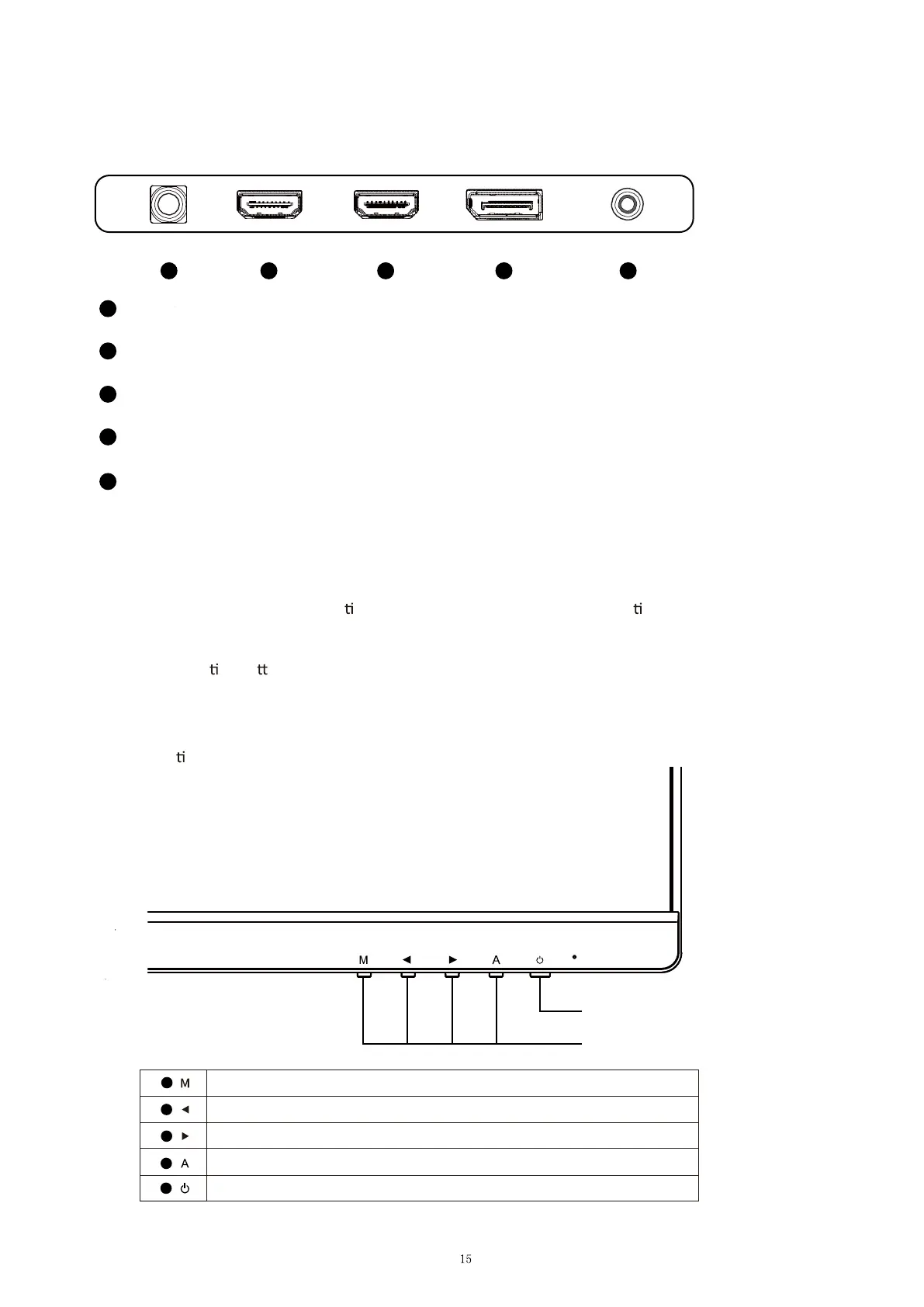
CONNECTIONS AVAILABLE ON THE MONITOR
WALL MOUNTING
The monitor is provided with moun ng holes for a VESA approved wall moun ng bracket (not
supplied)
The VESA moun
ng pa
ern is: 100x100mm and the size of the screws is 4 x M4 x 10 (not supplied) Do not
use screws longer than specied or damage will occur to the internal components.
NOTE: As the monitor is considered heavy, please consult with a professional wall mount installer to perform
the installa
on.
GETTING STARTED
MONITOR CONTROLS
Select signal source or Exit OSD
Go Up on the Main OSD Menu increase the value of a selected item
Go Down on the Main OSD Menu and decrease the value of a selected item
Open the Main OSD Menu Select submenu
Turn the monitor on or O
1
2
3
4
5
DC
12V
1
2 3 4 5
HDMI
2
HDMI
1 DP
AUDIO
OUT
1
Power
2
HDMI2 (HDMI1.4, FHD 100Hz, FreeSync)
3
HDMI1 (HDMI2.0, FHD 100Hz, FreeSync)
4
DP (DP1.2, FHD 100Hz, FreeSync&G-sync)
5
AUDIO OUT
Power Button
OSD Control Buttons


 To Next Page