83
Section 7. Managing Batteries and Power
79-0003-003 22 October 1999
Removing and Replacing Batteries
Replace the battery in your computer with a new one if your existing
battery does not hold a charge. If your battery is drained, replace it with
a charged one. When operating on battery power, the computer is
equipped with enough internal backup power to maintain memory
contents for about 5 minutes each time you exchange batteries.
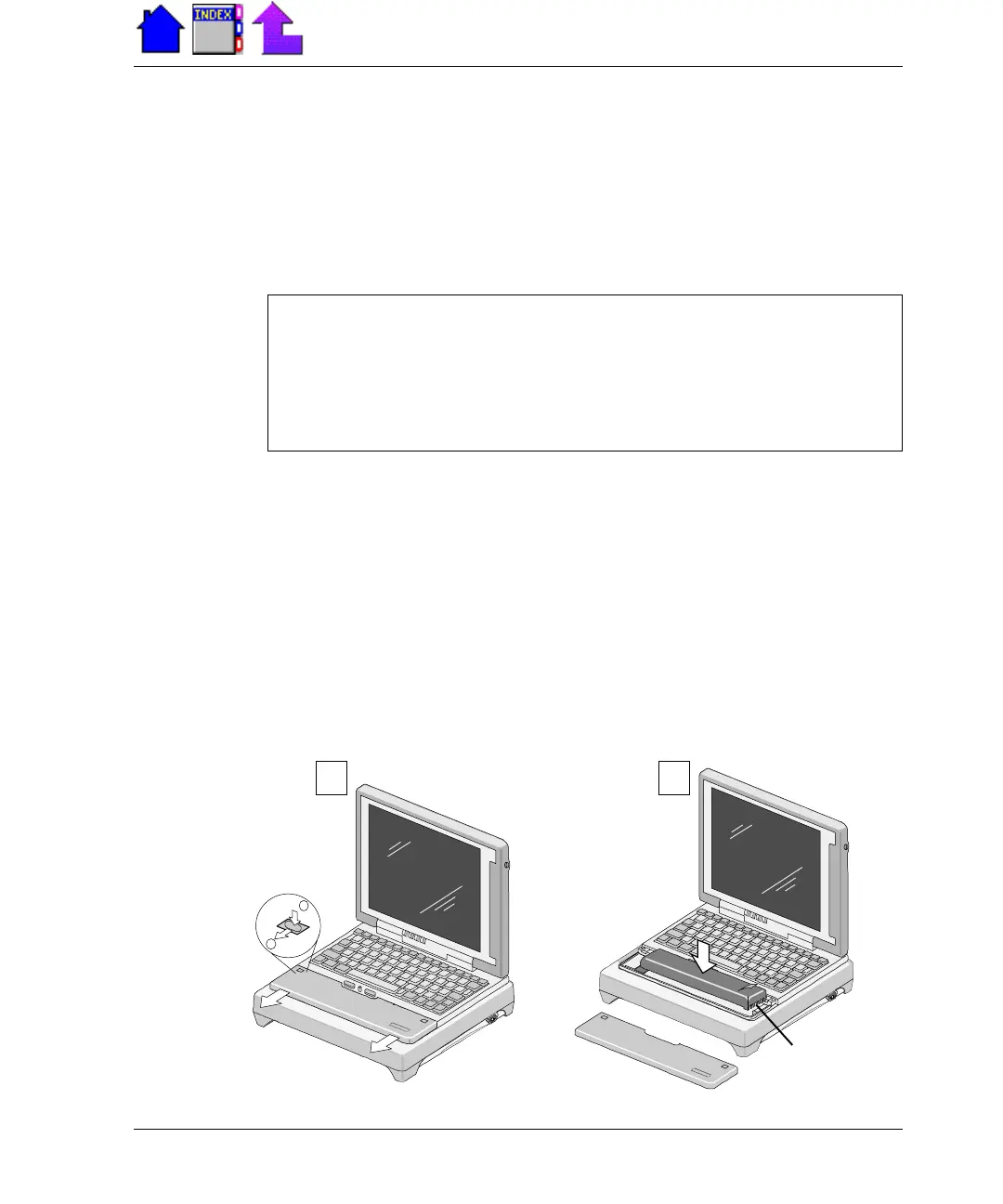
To remove and replace the battery
1 Turn off the computer by pressing FN+OFF, and then locate the
battery door in front of the keyboard.
2 Push the two battery door latches down to unlatch the door and slide
it away from the unit (C).
3 Grasp the ribbon and pull up on the battery to remove it.
4 Align the battery connectors and place a new battery in the
computer (D).
5 Replace the battery door and make sure it is securely latched.
Velcr o
Pad
A
B
CAUTION You can lose data if you remove the battery while the
mobile computer is operating on battery power. Turn off the
computer by pressing FN+OFF before you remove the battery. You
can also lose data if the battery is removed from the unit for more
than 5 minutes.
C D
Connectors



 To Next Page