22
6. How do I make the alarm stop ringing once it sounds, but still make sure
it rings again tomorrow?
You can touch any button to make the alarm stop ringing except for SNOOZE
(the LCD screen). Pressing SNOOZE (the LCD screen) will activate the
snooze feature. You can also say "Turn Off Alarm [1 or 2]" in between the
pauses during the alarm sound.
7. What happens if the power goes out?
ivee
is equipped with a back-up battery that will ensure that the alarms sound.
When the power is out the LCD backlight will not light up and a buzzer will
sound as the alarm sound.
8. How do I disable the alarm completely so it doesn't ring at all?
By voice, you can say "Turn Off Alarm [1 or 2]." Manually, you can also press
or . Pressing these buttons will switch between Alarm On and
Alarm Off. Press the button until you get to the Alarm Off option. When the
alarm is off, the alarm number (1 or 2) and icon ( ) will no longer appear on
the LCD screen.
9. How do I interrupt ivee from speaking?
Touching any button.
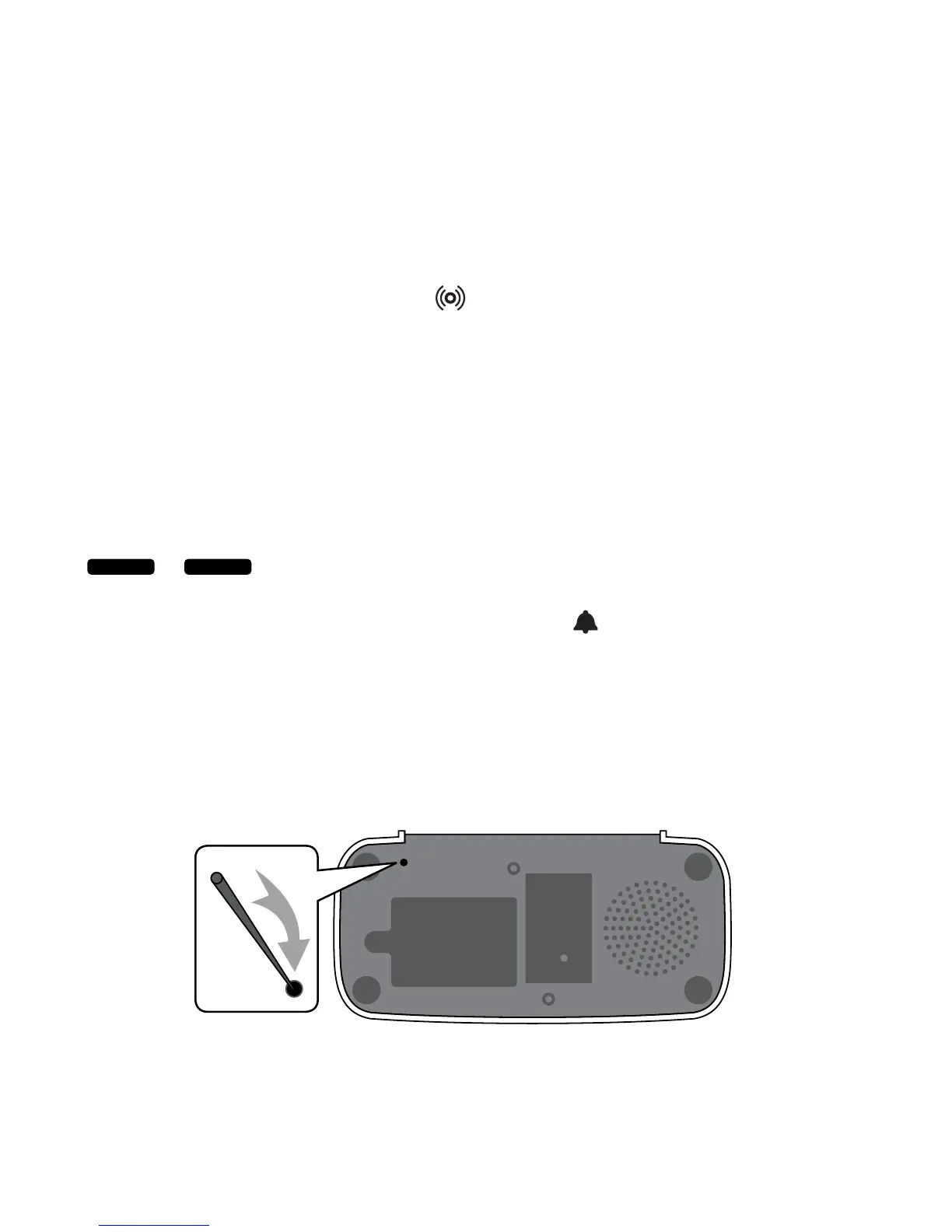
10. How do I reset ivee?
Press the reset button located on
ivee's bottom. Insert a pin into the reset pin
hole located on the bottom of
ivee.
Alarm 1 Alarm 2
a pin
reset hole
RESET



 To Next Page