3. Operation
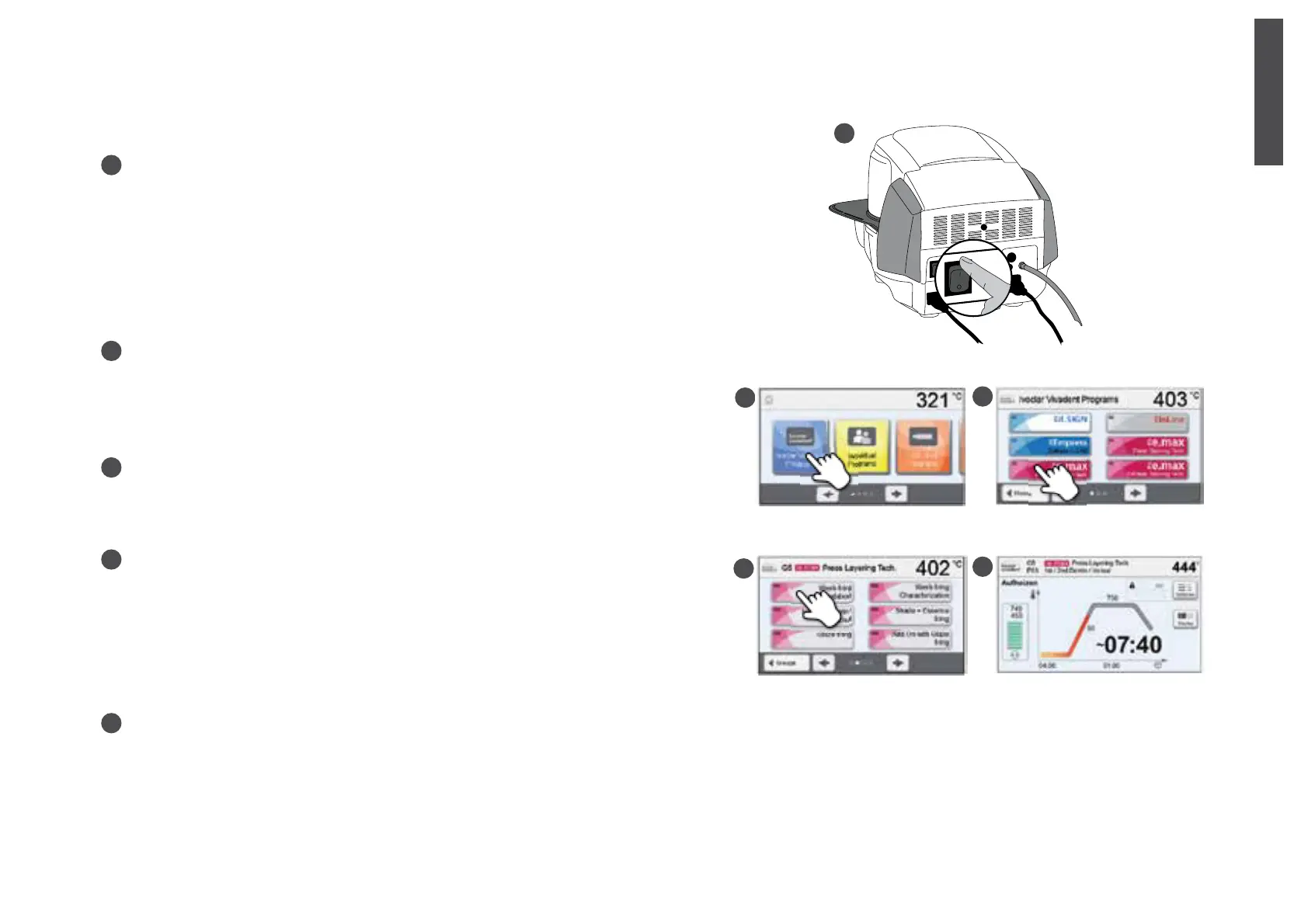
Turning the furnace on
Connect the power cord with the wall socket.
Switch the On/Off button to position «I».
After the self-test, the display shows the home screen. All functions of the
Programat can be selected from this screen. Click the HOME key in order
to return to the home screen.
Selecting program sections
The furnace comprises multiple program sections
a. Programs for Ivoclar Vivadent materials
b. 300 individually programmable programs
Selecting the program group
The program sections are divided into program groups.
Each program group comprises 20 programs.
Selecting the program
Select the required program.
Loading the furnace
Open the furnace head by pressing the button OPEN FURNACE HEAD and
place the object to be fired with the firing tray in the furnace.
Starting the program
Press the START key to start the program. The LED lights up green. You can see the progress in the firing curve.
At the end of the program, the furnace head opens automatically. As soon as the OSD lights up green, the furnace is available for the
next program start.
A
A
B
B
C
C
E
D
D
E
english


 To Next Page