| 7ENGLISH
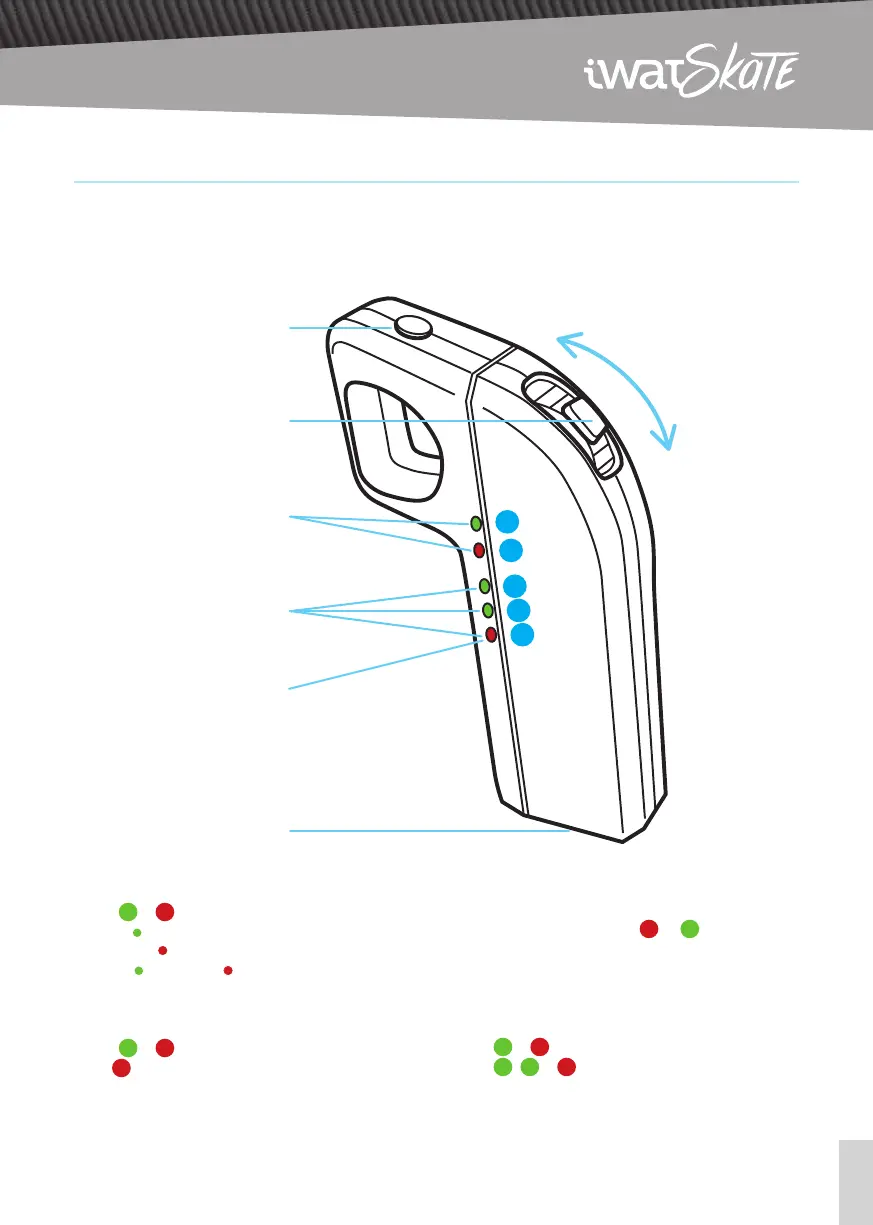
remote control
Lights
1
&
2
: indicate the three speed modes:
1) ECO (
Green)
2) STREET ( Red)
3) PRO ( Green and Red)
When the board is OFF, or the remote’s connec-
tion with the board is disconnected:
Lights
1
&
2
will flash to warn.
Light
5
indicate the remote’s battery level:
· Fixed Red Light: No battery in the remote control.
· Flickering Red Light: Low battery of the remote
control.
Charging the Remote:
The lights will turn on from
5
to
1
. When all the
lights are fixed, this means that the remote control
has finished charging.
When the board is ON and the remote’s connec-
tion is working normally:
Lights
1
&
2
will be ON
Lights
3
,
4
&
5
indicate the board’s battery
level.
Push forward
to Accelerate
Pull back
to Brake
Power Button,
Speed Selection or
Direction control
Throttle / Brake
Lights 1 & 2:
Speed mode
1
2
3
4
5
Lights 3, 4 & 5:
Skate and Remote
control battery
Micro USB
charging port
Light 5:
Remote control battery


 To Next Page