The HW12 smart watch is a versatile wearable device designed to enhance daily life through a range of smart features, health monitoring, and activity tracking. This manual provides a comprehensive guide to its functions, usage, and maintenance, ensuring users can fully leverage its capabilities.
Function Description
The HW12 smart watch serves as a personal assistant on your wrist, offering seamless integration with your mobile phone via Bluetooth. Its core functions include:
- Communication Management: When connected to your mobile phone, the watch allows you to synchronize contacts, make and receive calls directly from the watch, and view call records. This feature is particularly useful for quick communication without needing to pull out your phone.
- Notifications: The watch synchronizes notification messages from your mobile phone, ensuring you stay updated on important alerts, messages, and app notifications.
- Health Monitoring: A key aspect of the HW12 is its comprehensive health tracking. It includes a heart rate sensor for real-time heart rate measurement, blood pressure monitoring, and blood oxygen level measurement. These features provide valuable insights into your cardiovascular health and overall well-being. The watch records the last 7 measurements for each metric, noting the highest and lowest values for heart rate and blood oxygen.
- Sleep Tracking: The watch monitors your sleep status every night, helping you understand your sleep patterns and make adjustments for better rest.
- Activity and Sports Tracking: The HW12 is an excellent companion for fitness enthusiasts. It records daily exercise data, including calories burned, activity time, number of activities, steps taken, and distance covered. It supports a variety of sports modes, categorized into indoor and outdoor activities.
- Indoor Activities: Includes 6 regular sports such as indoor running, indoor cycling, pool swimming, sit-ups, push-ups, and free training.
- Outdoor Sports: Features 7 sports like outdoor running, outdoor cycling, open water swimming, sit-ups, hiking, and mountaineering. For these activities, it records 5 major sports data points: steps, calories, heart rate, cadence, and pace. Users can also set sports goals and get a comprehensive breakdown of their sports details.
- Breathing Training: To help users relax and manage stress, the watch offers breathing training. This feature provides three frequency options (slow, normal, slightly faster) and adjustable breathing time options (1-5 minutes) to quickly replenish oxygen to the body.
- Mett Function: The watch incorporates the Mett function, which converts daily exercise volume into a Mett value. This data is displayed on both the watch and the companion APP, recording the energy metabolism equivalent of one week of exercise. A visual icon helps users clearly understand their exercise volume.
- Pressure Monitoring: Continuous pressure monitoring tracks the user's 24-hour pressure changes. Scientific health algorithms display pressure as an icon, allowing users to adjust their status. The pressure range is categorized into relaxed (1-29), normal (30-59), medium (60-79), and high (80-99).
- Music Control: Connect the watch to the APP to control music playback on your mobile phone, offering convenience during workouts or daily commutes.
- Weather Synchronization: The watch synchronizes weather information from the APP, keeping you informed about current conditions.
- Stopwatch and Timer: Essential utilities like a stopwatch for timing activities and a timer that counts every second are included.
- Customization and Settings: The watch offers various settings for personalization, including brightness adjustment, constant on time, often off screen settings, phone settings, raise wrist to turn on screen, do not disturb mode, sound and vibration control, language switching, phone connection management, password protection, and device information. It also allows for restarting, factory resetting, and shutting down the device.
Usage Features
The HW12 smart watch is designed for intuitive interaction through its full touch display and a multi-functional knob button.
- Knob Button:
- Long press: Powers the watch on or off.
- Short press (on dial page): Enters the menu.
- Short press (in menu/other pages): Returns to the dial page.
- Double-click (on menu page): Switches between different menu styles.
- Rotation: Zooms icons, turns pages, and navigates through lists.
- Full Touch Display:
- Swipe right (on dial page): Activates the split-screen function, providing quick access to frequently used features.
- Swipe left (on dial page): Enters smart components. The system presets 3 components, and users can add up to 5. Long pressing a component allows for deletion.
- Swipe up (on dial page): Displays message notifications.
- Swipe down (on dial page): Accesses the shortcut button menu, where you can find the call Bluetooth switch.
- Dial Switching: Long press the screen on the dial page to bring up dial selection. Users can choose from preset dials or a "Custom" dial that changes with the APP's dial market and download settings.
- Menu Navigation: From the dial page, a single press of the side key enters the menu. Within the menu, double-pressing the side key switches between different menu layouts. A single press returns to the main dial page.
- Function Page Navigation: In the menu, tapping an application icon enters its corresponding function. Swiping right returns to the previous page, and pressing the side button returns to the main dial page.
Connecting the Watch:
- Download the APP: Search for "Wearfit Pro" in your mobile phone's APP store or scan the provided QR code to download the application.
- Connect the watch:
- Scan code connection: After turning on the watch and entering the dial page, slide right to access the split-screen function. Click the "scan code connection" shortcut button to display a QR code. Scan this code within the Wearfit Pro APP to connect.
- Manual connection: Enable Bluetooth on your mobile phone, then open the Wearfit Pro APP and search for the device to connect manually.
- Connect Call Bluetooth: Initially, the call Bluetooth is off, preventing call and music functions. Swipe down on the dial page to open the shortcut menu and tap the call Bluetooth switch to turn it on. Once activated, you can find the watch's call Bluetooth in your phone's Bluetooth settings (when your phone's Bluetooth is on), select the corresponding name, and connect. This enables call and music functions.
Maintenance Features
Proper care and charging are essential for the longevity and optimal performance of your HW12 smart watch.
-
Charging:
- The watch uses a magnetic charging cable. Align the metal contacts of the cable with the charging contacts on the watch. The cable will automatically attach, and charging instructions will appear on the watch screen.
- Important Charging Notes:
- Do not charge in humid environments.
- Ensure the metal contacts on both the watch body and the magnetic charging cable are clean and free from dirt or corrosion.
- Regularly clean the metal contacts on the back of the watch and the magnetic charging cable with a clean flannel to ensure full contact and normal charging.
- The product does not come with a power adapter. For safety, use a computer USB port or a power adapter with an output not exceeding 5V-1A. Purchase power adapters from formal channels to avoid low-quality, fake adapters that could cause bursting or fire.
-
Water Resistance: The watch has an IP67 waterproof rating. This means it is protected against dust and can withstand immersion in water up to 1 meter for 30 minutes. However, it is not suitable for deep diving or long-term soaking in water. Furthermore, it is not resistant to hot water, as water vapor can affect the device.
-
General Precautions:
- The measurement results from this product are for reference only and should not be used for medical purposes or as a basis for self-diagnosis and treatment. Always follow a doctor's instructions.
- The company reserves the right to modify the contents of the manual without prior notice. Minor functional differences may occur between different software versions, which is considered normal.
By following these guidelines for usage and maintenance, you can ensure your HW12 smart watch provides reliable performance and a rich user experience for an extended period.

 Need help?
 General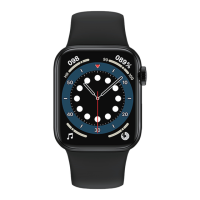

 To Next Page