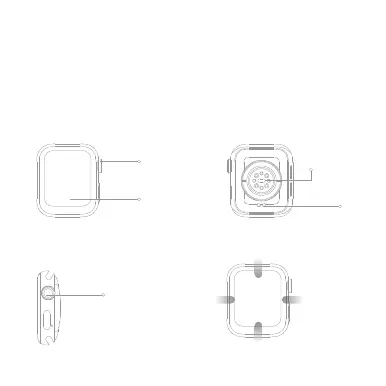
Product overview
Buttons and touch
Full touch display
Charging port
Heart rate sensor
Knob button
1. Long press the switch;
2. Short press on the dial page to enter the menu,
short press to return to the dial;
3. Double-click on the menu page to switch menus;
4. Rotate the button to zoom icons, turn pages, etc.;
5. Short press on the remaining pages to return to the dial page;
Knob button
product description
Please read this manual carefully before using the product and keep it
properly
Packing list: watch host (including strap) X 1, magnetic charging cable X 1,
product manual X 1
Down: shortcut button
Swipe up: message
notification
Sliding left:
Smart components
Swipe right: Split
screen function


 To Next Page