11
3.2 Installing and removing from DIN rail
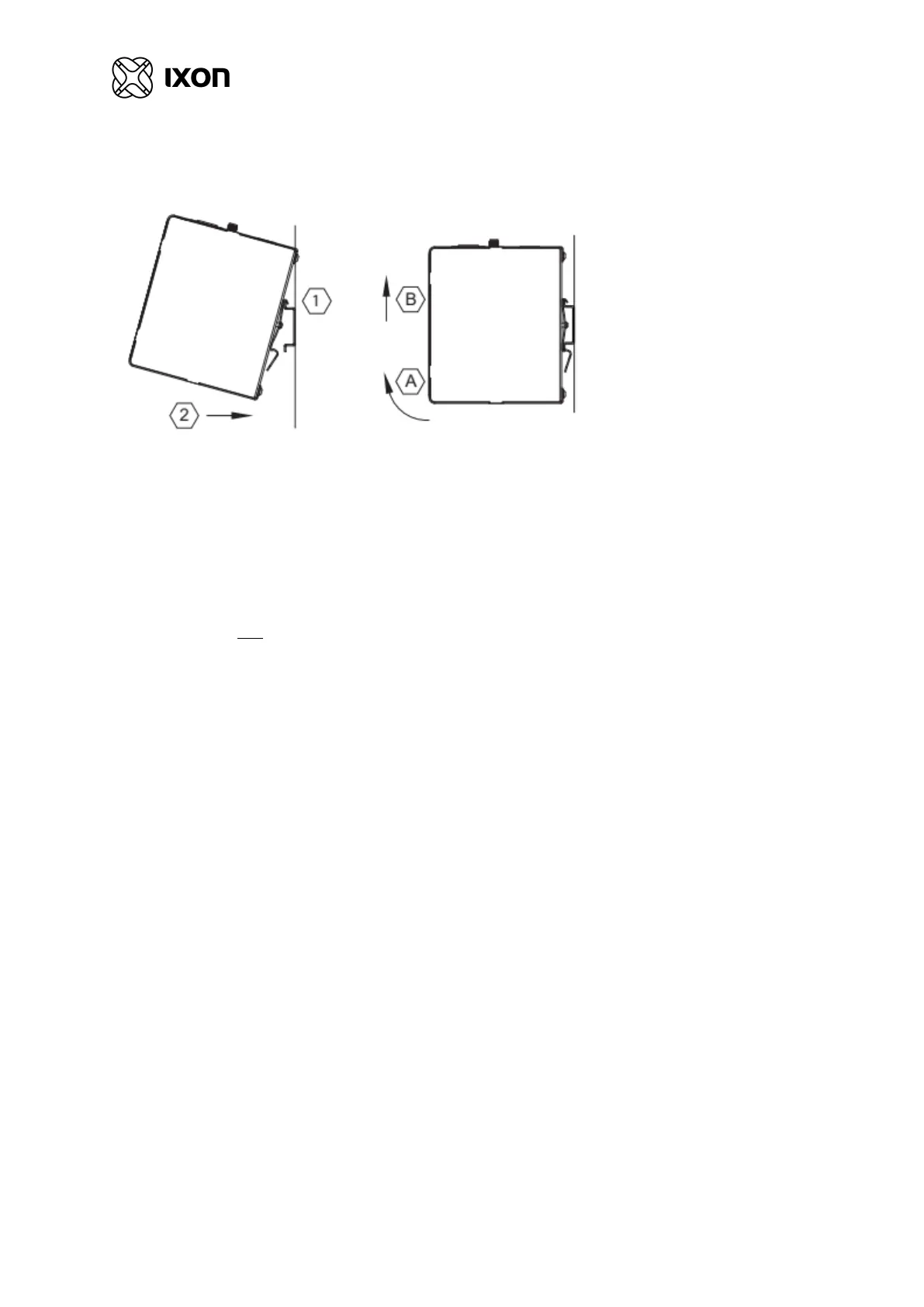
The IXrouter3 can be easily installed on a standard DIN rail. (1) Hang the device on the rail and (2) push the unit
down until you feel a click. To remove the unit, (A) pull the device up and (B) lift off the rail.
Figure 4: DIN-rail installation
3.3 Installing a SIM card
The SIM card slot suits a Full-Size SIM card (size 2FF).
To insert, push the SIM card into the slot until you feel a click. This is approximately when de card is fully
submerged 1 mm inside the device. Release the card and the card will stay in the device. The side of the SIM card
where you see a golden colored chip should be aligned with the outside of the enclosure as depicted on the router.
To remove, push the SIM card firmly into the slot until you hear a click. Releasing will cause the SIM card to
partially eject, allowing you to easily take out the card.



 To Next Page
 Loading...