EasyManua.ls Logo

iXsystems TrueNAS - Check the contents of the box; Become familiar with the system; Determine the type of EIA rack;cabinet

Default Icon
4 pages
Print Icon
To Next Page IconTo Next Page
To Previous Page IconTo Previous Page
Loading...
TrueNAS Unied Storage Array
Basic Setup & Deployment
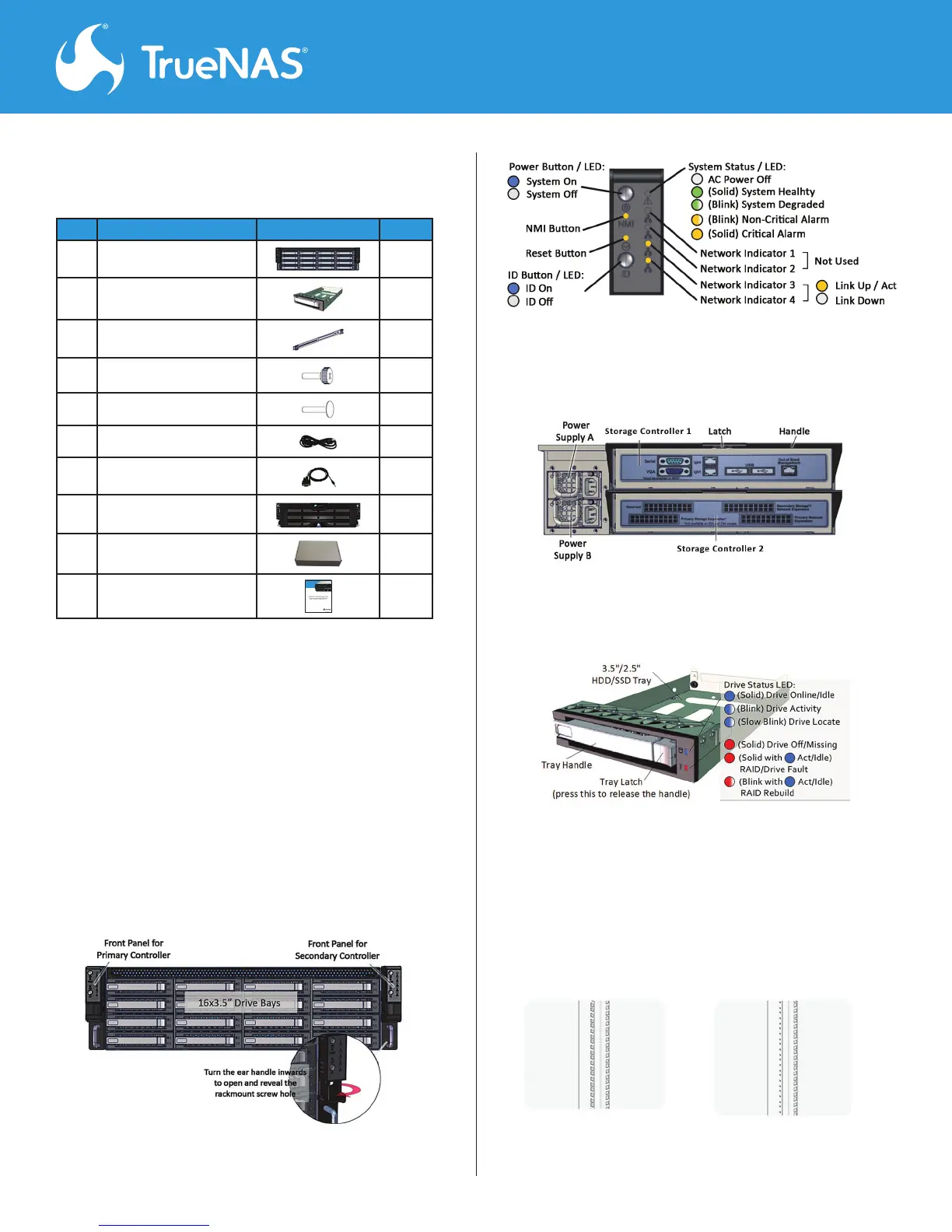
Step 1. Check the contents of the box. 

#
Description Image Qty
1 
1
2 


3 

4 
8
5 
2
6 
2
7 
1
8 
1
9 
1
10 
1




Note: 

support@iXsystems.com


Step 2. Become familiar with the system.
Front view of the Array
Step 3. Determine the type of EIA rack/cabinet.


Rear view of the Array
System Drive Tray
Front panel buttons and indicators

 

Related product manuals