Need help?
Do you have a question about the IXXAT CAN@net II and is the answer not in the manual?
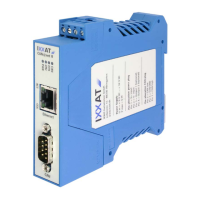
Provides an overview of the CAN@net II interface and its versions.
Lists the key technical features and specifications of the CAN@net II.
Details how to get support, website resources, and contact information.
Explains the procedure for returning hardware for repair or replacement.
Guides users through the process of installing the necessary driver software.
Outlines the simple hardware connection requirements for the device.
Details the pin assignments for the power and CAN connectors.
Specifies the pinout and wiring requirements for the power connector.
Details the pinout and connection specifications for the Ethernet RJ45 socket.
Describes the pinout for the Sub D-9 CAN bus connector.
Introduces the six LEDs that indicate device status and communication.
Explains the function and states of the Power (PWR) LED.
Details the function and states of the two-color Status (CPU) LED.
Describes the function and states of the Ethernet (ETH) LED.
Explains the function and states of the Collision (COL) LED.
Details the function and states of the Link/Data Activity (ACT) LED.
Explains the function and states of the CAN LED, including error conditions.
Discusses the absence of an onboard termination resistor and accessory options.
Introduces the configuration tool for setting network parameters.
Provides an overview of the CAN@net II configuration tool's functionality.
Explains how to use the configuration tool to set network parameters.
Details the step-by-step procedure to reset network parameters using DIP switches.
Lists detailed technical specifications of the CAN@net II device.
Outlines the default network parameters like DHCP, IP address, and hostname.
Lists available accessories for the CAN@net II.
Describes the CAN bus termination resistor accessory.
Provides important notes regarding Electromagnetic Compatibility (EMC) requirements.
Declares compliance with EC directives and applied harmonized standards.
Details the device's compliance with FCC rules and Class A digital device instructions.

 To Next Page

 General