Getting started
Download the iZettle app
Go to the App Store or Google Play and search
for iZettle.
Create your iZettle account
You can create an account in the app or at
izettle.com.
Set up shop
Add products to your Product Library to speed
up payments and keep track of your sales.
Get paid
Sign in at my.izettle.com and connect your bank
account. The money you make from sales goes
directly into this account.
Accessories
Complete your setup with an iZettle Dock, receipt
printer, cash drawer or barcode scanner. Find out more
about supported devices on accessories.izettle.com.
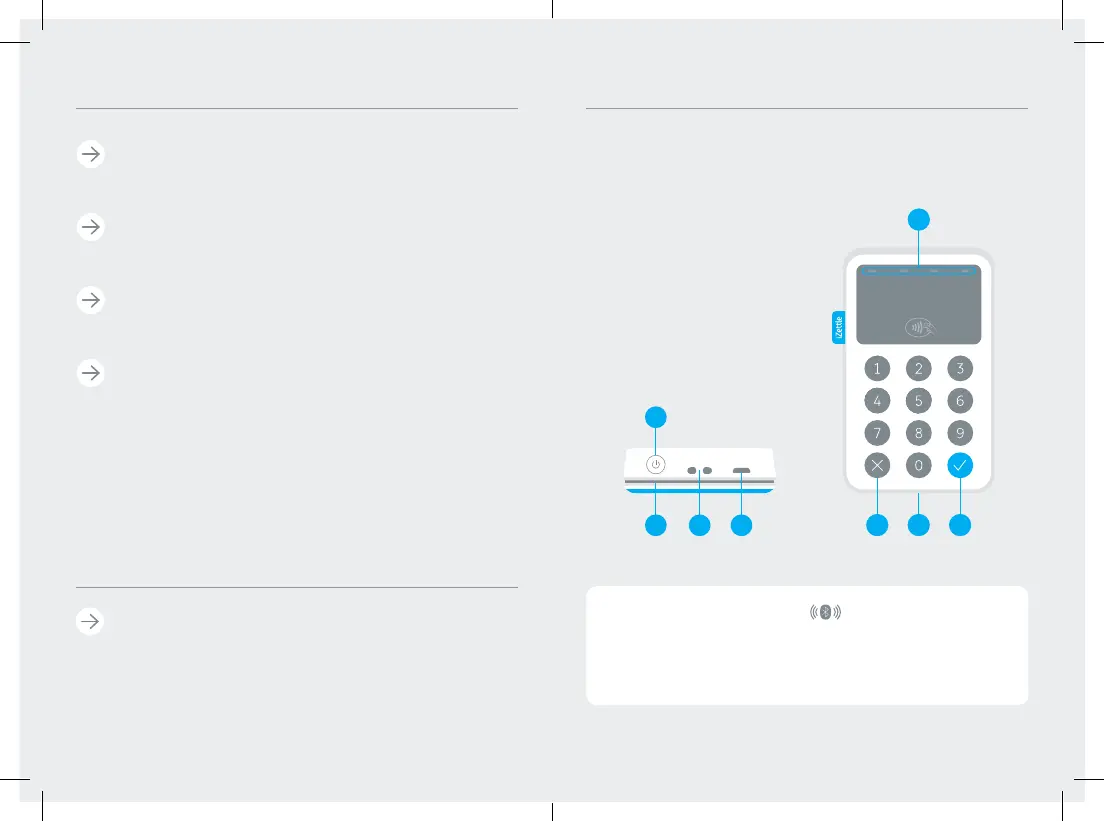
Battery status
Battery charging
Battery critically low
Bluetooth pairing
Contactless
Power button
Slot for magnetic stripe
Holes for strap
Charging port
Contactless payment indicators
Back/cancel
Slot for chip card
OK/confirm
1
2
3
4
5
6
7
8


 To Next Page