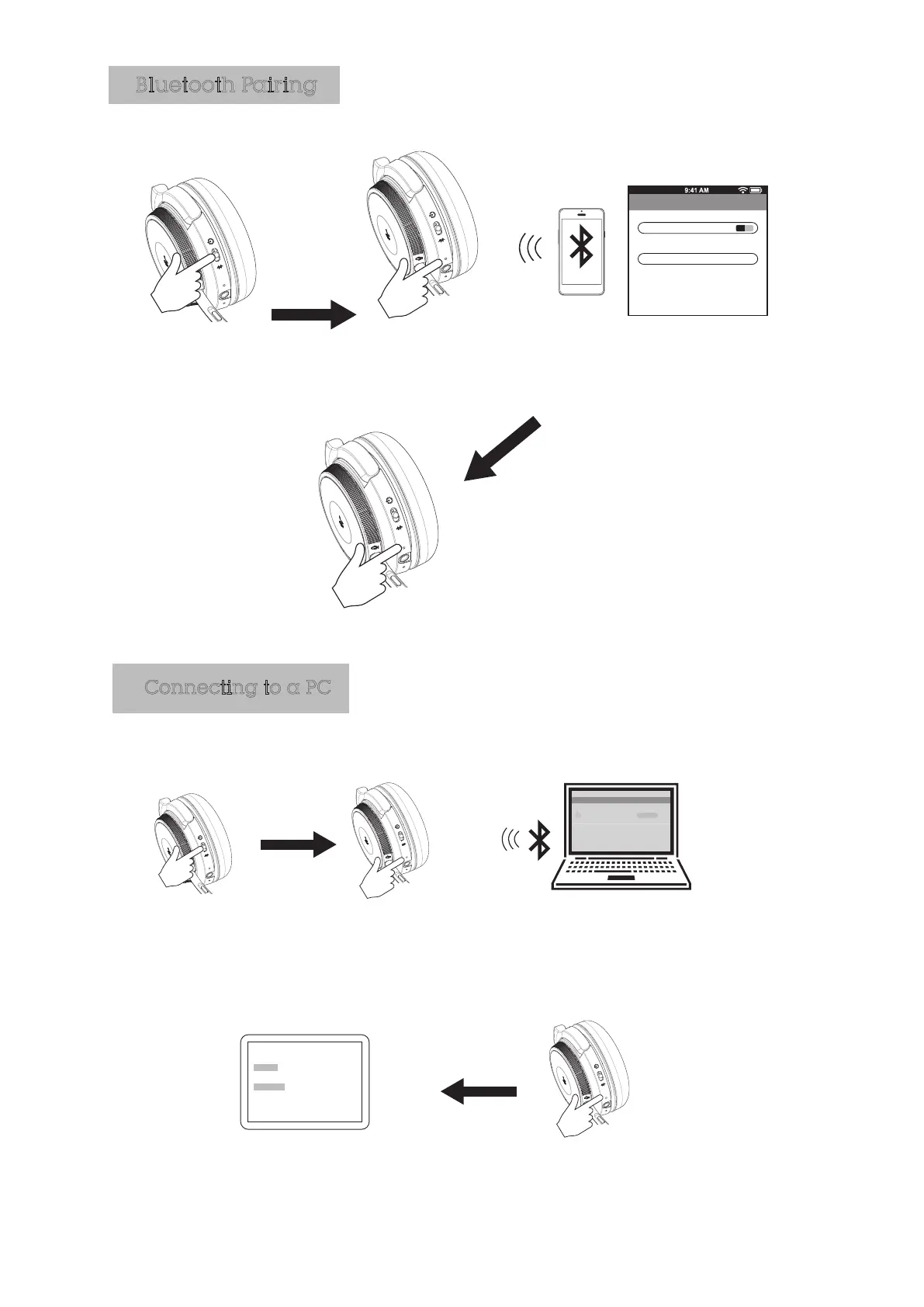
Slide the switch to the
CENTRE position
The blue LED light will flash to indicate
the headphone is connected
JB19BF18
Bluetooth
Bluetooth ON
Devices
Now discoverable
Paired
LED will flash red
and blue when ready
to connect
In your device‘s Bluetooth
settings activate bluetooth
and select ”JB19BF18” enter
the PIN ‘0000’ if needed
Bluetooth Pairing
Slide the switch to the
CENTRE position
The blue LED light will flash
to indicate the headphone
is connected
Please make sure the input and
output device are JB19BF18 in
your audio device setting of your
PC
LED will flash red
and blue when ready
to connect
If connected JB19BF18 before,
please remove it first, then In your
device‘s Bluetooth settings activate
bluetooth and select ”JB19BF18”
enter the PIN ‘0000’ if needed
Connecting to a PC
How to connect with the first Bluetooth device.
Devices
JB19BF18
Connect
Bluetooth
PC (Bluetooth pairing)
Audio Devices
Speaker
Output JB19BF18
Iutput JB19BF18
Miciophone



 To Next Page