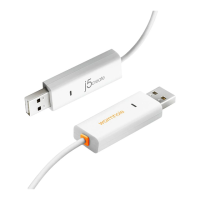
Need help?
Do you have a question about the J5create JUC500 and is the answer not in the manual?
Details the OS, USB port, CPU, RAM, and storage needed for Windows.
Details the OS, USB port, CPU, RAM, and storage needed for Mac.
Enables seamless cursor and input control between two computers.
Allows copy-pasting of text and data between connected computers.
Facilitates quick file and folder transfers between two computers via drag-and-drop.
Enables file transfers between connected computers using the software interface.
Configures the screen location of the connected PC for mouse flow.
Allows temporary disabling/enabling of keyboard/mouse sharing.
Allows temporary disabling/enabling of clipboard sharing between PCs.
Provides access to the full manual and latest software/updates online.
Contact details for phone assistance from technical support staff.
 General
| Category | Switch |
|---|---|
| Model | JUC500 |
| USB Ports | 4 |
| HDMI Port | 1 |
| Ethernet Port | 1 |
| Product Type | USB-C Multiport Adapter |
| Host Interface | USB-C |
| Data Transfer Rate | Up to 5 Gbps |
| Compatibility | Windows, macOS, Chrome OS |
| Interface | USB 3.0 |
| Resolution | 4K@30Hz |
| Hotkey Switching | Yes |
| Plug and Play | Yes |

 To Next Page