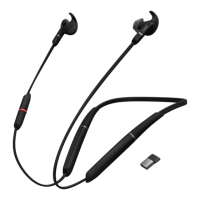
The Jabra Evolve 65e is a neckband-style wireless earbud headset designed for professional and personal use, offering a blend of UC-certified communication technology and everyday convenience. It provides a comfortable and secure fit with customizable ear gels and ear wings, ensuring optimal sound isolation and call quality.
Function Description:
The Jabra Evolve 65e serves as a versatile audio solution for calls, music, and voice assistance. It features UC-certified microphone technology for clear communication in professional environments and an integrated Busylight to signal availability to others, preventing interruptions during calls. The dual-connectivity feature allows simultaneous connection to two Bluetooth devices, such as a computer and a smartphone, enabling seamless switching between calls and music playback from the same earbuds. With a wireless range of up to 30 meters (100 feet), it offers true mobility, allowing users to move freely while staying connected. The HearThrough function is a key feature, enabling users to hear their surroundings without removing the earbuds, which is particularly useful for staying aware of the environment or engaging in quick conversations. The magnetic earbuds offer convenient cable and power management; when connected, they automatically pause music or end calls.
Important Technical Specifications:
- Connectivity: Bluetooth, dual-connectivity to two devices.
- Wireless Range: Up to 30 meters (100 feet).
- Battery Life: Up to 8 hours on a 2-hour charge.
- Charging Time: Approximately 2 hours for a full charge.
- Microphone: UC certified.
- Model: HSC090W/END040W.
- Included Accessories: USB charging cable, EarGels (small, medium, large), EarWings (small, medium, large), Jabra Link 370 Bluetooth adapter, pouch.
Usage Features:
- Wearing: Designed to be worn around the neck, with the microphone positioned close to the mouth for optimal call experience.
- Fit Customization: Comes with three sizes of EarGels and EarWings (small, medium, large) to ensure a secure and comfortable fit that seals out background noise. Users are encouraged to mix and match sizes for the best combination.
- Power On/Off: Hold the Multi-function button for 1 second to power on (LED flashes green, neckband vibrates) and 3 seconds to power off (LED flashes red, neckband vibrates).
- Connecting to Computer: Insert the Jabra Link 370 Bluetooth adapter into the computer. Power on the earbuds by holding the Multi-function button for 1 second. The earbuds and adapter are pre-paired and connect automatically. Users may need to select Jabra Link 370 as the audio device in their operating system settings.
- Pairing with Smartphone: Ensure earbuds are off, then hold the Multi-function button for 3 seconds until the LED flashes blue and an announcement is heard. Follow voice-guided pairing instructions.
- Calls & Music Control:
- Power On/Off: Hold Multi-function button (1 sec for on, 3 sec for off).
- Play/Pause Music: Hold Multi-function button (1 sec, smartphone only).
- Answer/End Call: Press Multi-function button.
- Reject Call: Double-tap Multi-function button.
- Open Microsoft Teams Notification (Teams Variant): Press Multi-function button.
- Answer/End Call or Play/Pause Music: Detach/attach magnetic earbuds.
- Adjust Volume: Press Volume up or Volume down buttons during music or calls.
- Next Track: Hold Volume up button (1 sec, smartphone only).
- Previous Track: Hold Volume down button (1 sec, smartphone only).
- HearThrough: Enables hearing surroundings without removing earbuds; music is not muted. Can be enabled/disabled via Jabra Sound+ app (smartphone) or Jabra Direct (computer).
- Siri or Google Assistant: Press the Mute/Voice button when not on a call to activate the smartphone's voice assistant.
- Multiple Call Handling:
- End Current Call & Answer Incoming Call: Press Multi-function button.
- Put Current Call on Hold & Answer Incoming Call: Hold Multi-function button (1 sec).
- Switch Between Held & Active Call: Hold Multi-function button (1 sec).
- Reject Incoming Call: Double-tap Multi-function button.
- Busylight: Automatically lights up during calls to indicate unavailability. Can be turned on/off by pressing both Volume up and Volume down buttons simultaneously, or via Jabra Direct.
- Vibrate Alert: Earbuds vibrate for power on/off, connection status, and incoming calls. Can be enabled/disabled via Jabra Sound+ app or Jabra Direct.
- Voice Guidance: Provides announcements for status updates (e.g., connection, battery). Enabled by default. To turn on/off, hold the Mute/Voice button for 5 seconds when earbuds are powered on.
- Firmware Update: Improves performance and adds functionality. Connect earbuds to a computer via USB cable or Jabra Link 370, or to a smartphone via Bluetooth. Use Jabra Direct (computer) or Jabra Sound+ app (smartphone) to check for updates.
Maintenance Features:
- Charging: Connect a USB charging cable to the neckband's USB charging port. It is recommended to use the supplied Jabra charging cable, but a smartphone charger can also be used. Always clean and dry the USB charging port before charging. Recharge at least once a month.
- Storage: Always store earbuds with power off and safely protected.
- Temperature Avoidance: Avoid storage at extreme temperatures (above 50°C/122°F or below -10°C/14°F) to prevent shortening battery life and affecting earbuds.
- Cleaning: Regularly clean the mesh on each earbud to prevent blockages.
- Resetting: To clear paired devices and settings, ensure earbuds are powered on and not on a call. Simultaneously hold the Volume up button and the Multi-function button for 5 seconds. After resetting, re-pair the earbuds to your smartphone and/or Bluetooth adapter (Jabra Link 370). Jabra Direct is required to re-pair with the Bluetooth adapter.
- Replacement Accessories: EarGels, EarWings, USB charging cable, Jabra Link 370, and a pouch are available for purchase online at jabra.com/accessories.
- Using a Replacement Bluetooth Adapter (Jabra Link 370): Download and install Jabra Direct 2.0 (build version 4.0 or later). Plug the new Jabra Link 370 into a USB port. Ensure earbuds are off, then hold the Multi-function button for 3 seconds until connection instructions are heard and the LED flashes blue. Open the Bluetooth tab in Jabra Direct, search for new devices, and select Jabra Evolve 65e to pair.

 Need help?





 To Next Page
 General