03
US
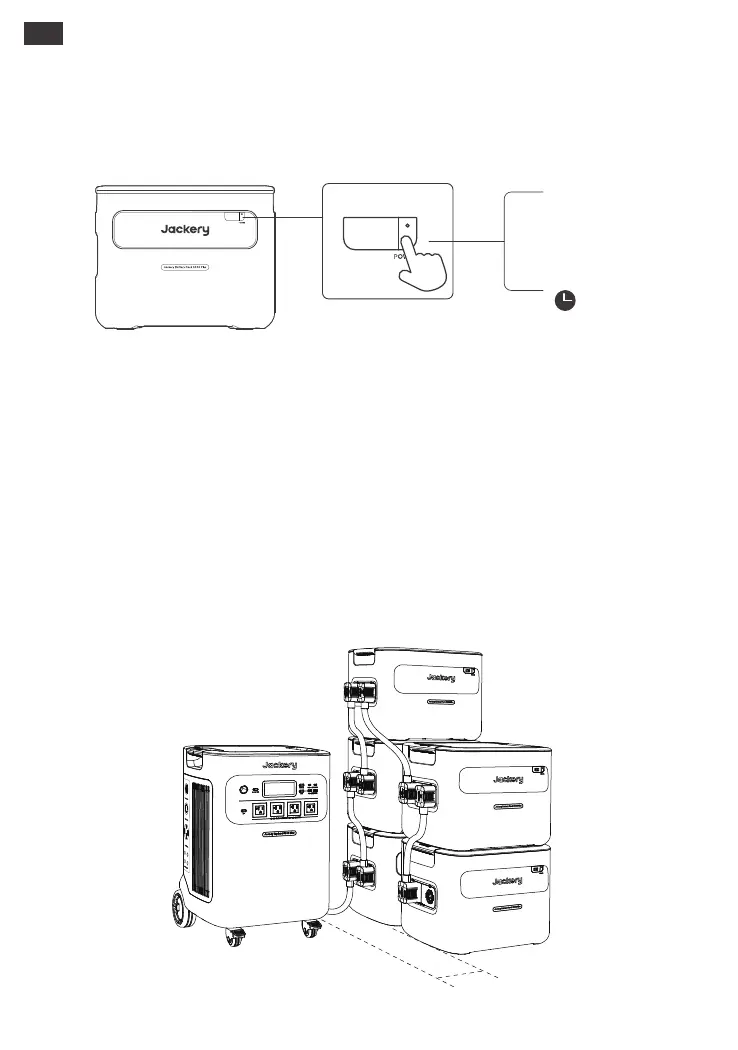
Up to 5 sets of these products can be used along with Jackery Explorer 5000 Plus to meet
the increased capacity needs.
Using with The Jackery Explorer 5000 Plus
Power on/o
Short-press the "Main Power Button" to turn on the product and illuminate the LCD. Press and
hold the "Main Power Button" for 3 seconds to turn it o.
LCD Display On/O
When you press the "Main Power Button" or when charging the product, the LCD display is
illuminated, and when you press it again, the LCD display will be switched o.
Notes:
1. When using with Jackery Explorer 5000 Plus, you can control the power on or o of Jackery
Battery Pack 5000 Plus through the "Main Power Button" of Jackery Explorer 5000 Plus.
2. The product will automatically shut down if it’s not charged or no loads are connected for 2
hours.
BASIC OPERATIONS
on
o
Short-Press
3S
*Please ensure the distance between
the main unit and the battery pack is at
least 200mm.
≥200mm


 To Next Page