03
Battery Power Indicator
When the product is being charged, the orange circle around the battery percentage will
light up in sequence. When charging other devices, the indicator will show the battery level.
Low Battery Indicator
When the battery is less than 20%, the Low Battery Indicator will stay on. When less than
5%, the Low Battery Indicator will flash. When it is being charged, the Indicator will be o.
Energy Saving Mode
To avoid forgetting to turn o the output which results in battery consumption, the product
turns the Energy Saving Mode on by default. This occurs when no device is connected or
the connected device is less than or equal to a certain value. (Refer to the table below for
more details), the device will automatically turn o all outputs after 12 hours.
Battery Saving Mode: When this feature is enabled, it limits the battery charging capacity to 85%
and the discharging capacity to 15%, and the battery will only be charged when the capacity is
below 80% to extend the battery life. Use the Jackery App for settings of this function.
Quiet Charging Mode: noise ≤ 30dB in this charging mode, you can set this function in Jackery App.
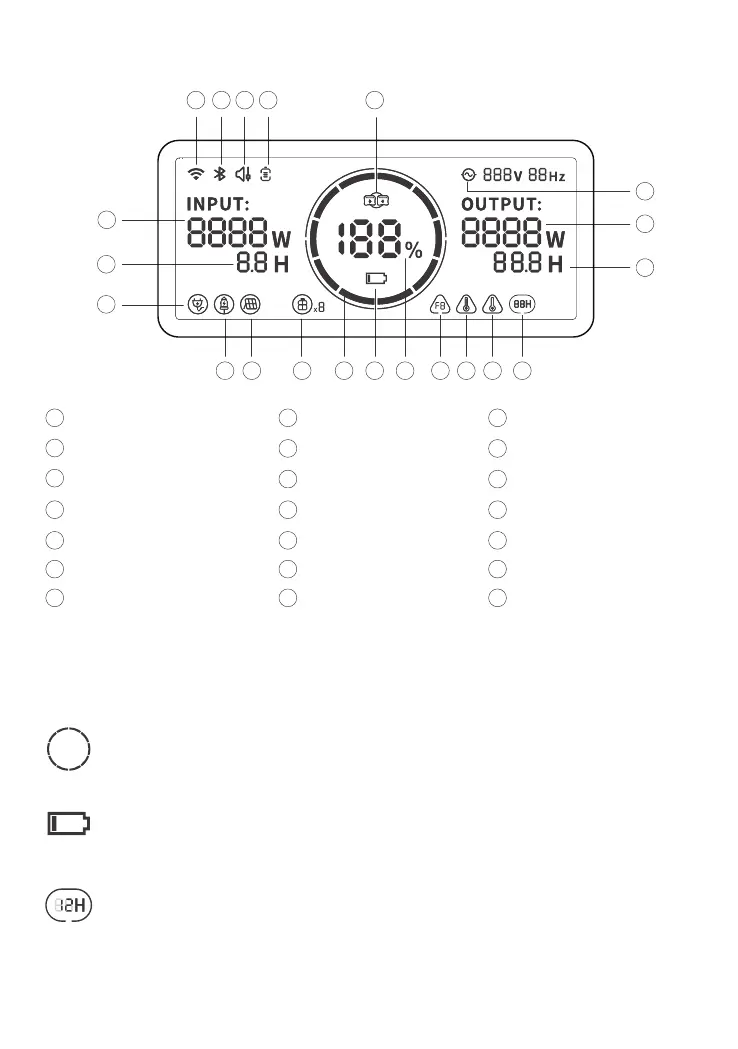
LCD DISPLAY
AC Expansion Indicator
1
7
4
WiFi
Solar Charging Indicator
Remaining Charge Time
Battery Saving Mode
10
13
Remaining Battery Percentage
AC Wall Charging Indicator
Bluetooth
Battery Power Indicator
2
5
8
11
14
Error Code
16
Low Temperature Warning
17
Energy Saving Mode
19
Output Power
20
Remaining Discharge Time
21
Battery Pack Indicator and
Connected Quantity
18
AC Power Indicator
3
6
9
12
15
Quiet Charging Mode
Input Power
Car Charging Indicator
Low Battery Indicator
High Temperature Warning
13
6
8
14 17
18
19
7
11
1 2
20
12
5
10 21 15 169
3 4







 To Next Page