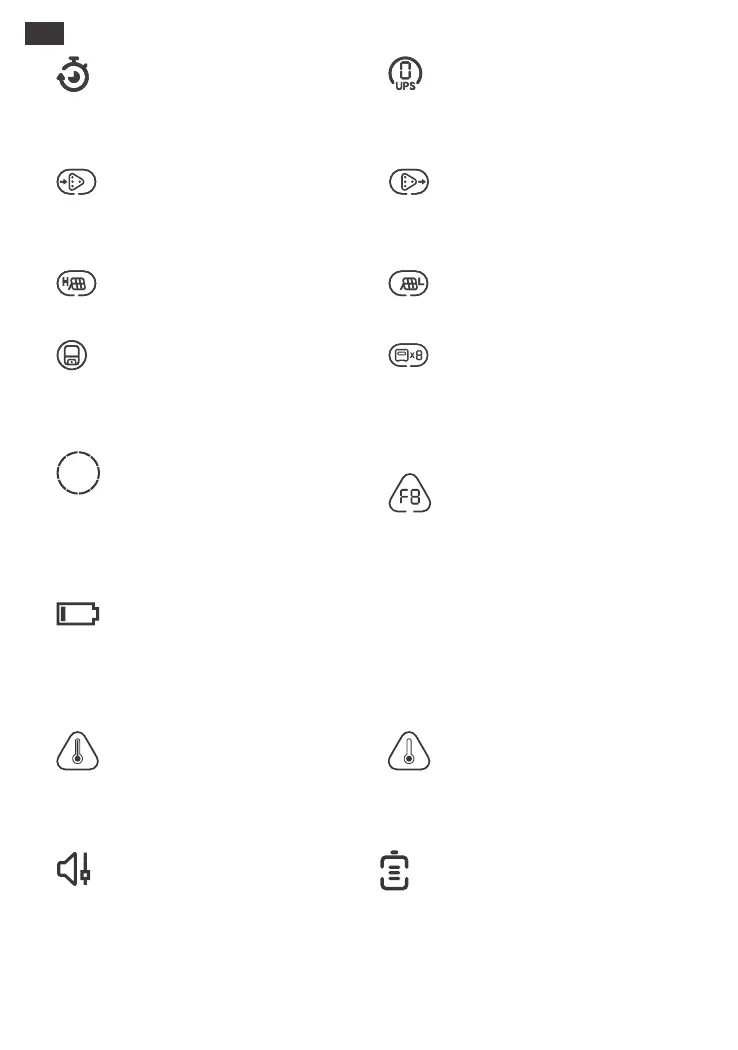
Battery Power Indicator
When the product is being charged, the orange
circle around the battery percentage will light
up in sequence. When charging other devices,
the orange circle will stay on.
Customize the charging and discharging time of
Jackery Explorer 5000 Plus (Please set in the
Jackery App).
This icon is displayed when utility power is
charging the power station via the Smart
Transfer Switch.
This icon appears when the product is
connected to Smart Transfer Switch to power
your home.
This icon appears when the product is
successfully connected to the Smart Transfer
Switch.
This icon appears when the product is
connected to the Jackery Battery Pack 5000
Plus and the number of connected battery
packs are also displayed.
This icon is displayed only when switching to
online UPS(0 ms).
This icon appears when there is high-PV input.
Low Battery Indicator
When the battery is less than 20%, the Low
Battery Indicator will stay on. When less than 5%,
the Low Battery Indicator will flash. When it is
being charged, this Indicator will be o.
05
If it appears on the screen, do not worry, the
battery will restore automatically after cooling.
If it is displayed on the screen, do not worry. It will
automatically restore after the ambient
temperature is restored.
Fault code
In order to respond to the feedback quickly, we
set up common fault codes F0-FE in the system:
If the F8 code appears, please remove the load
or unplug the charging plug, the product can
restore by itself, if not, please contact
after-sales service; If the F9 code appears,
please remove the load and the product can
recover by itself, if not, please contact
after-sales service. In case of any other code
appears, please contact our after-sales service.
High Temperature Indicator Low Temperature Indicator
Quiet Charging Mode
When Quiet Charging Mode is activated, the
charging power is reduced, charging speed is
slowed down, and noise during charging is
significantly reduced (please enable/disable
this feature in the Jackery App).
Battery Saving Mode
When Battery Saving Mode is activated, the
available battery capacity of the product
decreases, extending the lifespan of the battery
cells (please enable/disable this feature in the
Jackery App).
This icon appears when there is low-PV input.
US







 To Next Page