EasyManua.ls Logo

Jackson Systems The Green Zone Z-300-HPS - User Manual

Jackson Systems The Green Zone Z-300-HPS
5 pages
Print Icon
To Next Page IconTo Next Page
Loading...
Sequence of Operation:
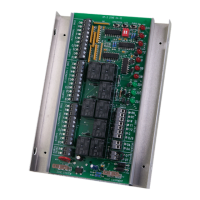
The Green Zone™ Z-300-HPS is a residential /
light commercial zone control system that allows
a single HVAC unit to have up to three separate
zones. Each zone is controlled by its own space
thermostat and motorized zone damper. If a zone
thermostat calls for heating or cooling, the zones
not calling will have their dampers powered
closed, and the zone calling will have its damper
opened. The heating or cooling equipment will
also be brought on at the same time. When the
zone calling is satisfied, the heating or cooling
equipment turns off. If one zone calls for heating
and another zone calls for cooling, the first zone to
call receives priority. When the first call is
satisfied, the system will changeover and take
care of the opposite call. If a zone being served
(heating or cooling) has not been satisfied within
20 minutes while an opposite call is taking place,
the system will changeover. When the zone is
satisfied or 20 minutes has elapsed, the system
will again changeover if an opposite call exists.
This is referred to as Auto Changeover - First Call
Priority - Time Share. In the event of a tie, cooling
will receive priority. The changeover valve only
changes position when the mode of operation
changes.
High and Low Limit Protection:
The Z-300-DAS Discharge Air Sensor should be
mounted on the discharge air plenum of the
HVAC unit and wired to the DAS terminals on the
panel. If the heating temperature rises above
140° F (160° F when fossil fuel is selected) or if
the cooling temperature falls below 45° F, the
sensor will cycle the equipment, while the fan
continues to run. When the system goes out on
low limit a 3 minute time delay is activated before
cooling is allowed to energize (providing the
discharge air temperature has risen above 45°
F). LIMIT LED blinks when high or low limit is
reached.
Ventilation Mode:
Zone ventilation is established by the individual
zone thermostat fan setting. Any thermostat set
in the fan AUTO mode will not receive ventilation
air when there are no heating or cooling calls.
Any thermostat set in the fan ON mode will
receive ventilation air whenever there are no
heating or cooling calls taking place.
Power Requirements:
The Z-300 requires a separate 24 Vac
transformer. A 40 VA transformer will power the
panel and up to four (4) dampers. A 75 VA
transformer will power the panel and up to seven
(7) dampers. If more than three (3) dampers for
an individual zone are required, a RY-1-HB relay
should be used with an additional properly sized
transformer. Jackson Systems HD-XXXX
rectangular and D-XX round dampers are
powered closed / spring return open. Damper
actuators are rated at 10 VA. If 3-wire dampers
(powered open / powered closed) are installed,
VA ratings will vary depending on the damper
actuator used.
Wiring:
All wiring should be conventional 18 gauge
thermostat wire. Thermostats and zone dampers
may be located up to 300 feet from the Z-300
panel.
Z-300-HPS Installation and Operation Instructions
3 Heat / 2 Cool Heat Pump with Fossil Fuel option
Auto Changeover - First Call Priority - Time Share
Z
N
E
NEE
R
G
EHT
Zone Control Made Simple
TM
TM
Question and Answer IconNeed help?

Do you have a question about the Jackson Systems The Green Zone Z-300-HPS and is the answer not in the manual?

Summary

Sequence of Operation

Sequence of Operation Details

Describes the system's auto changeover, first call priority, and time share functionality for zone control.

Operational Limits and Modes

High and Low Limit Protection

Details the discharge air sensor's role in protecting the HVAC system from over/under temperature conditions.

Ventilation Mode

Explains how zone ventilation is controlled via thermostat fan settings in AUTO or ON modes.

Installation and Wiring

Panel Mounting and Wiring

Instructions for mounting the Z-300 panel, wiring thermostats, dampers, and HVAC equipment.

Discharge Air Sensor Installation

Guide for installing and wiring the Z-300-DAS discharge air sensor into the HVAC plenum.

Transformer Wiring

Details on wiring the 24 Volt transformer to the logic panel for power supply.

Test, Check, and Startup

Step-by-step procedure for verifying installation and initial system startup.

Fossil Fuel Operation

Fossil Fuel Applications

Explains how fossil fuel serves as auxiliary heat for heat pumps, enabling multi-stage heating.

Fossil Fuel Sequence of Operation

Details the operational sequence for 2 Heat/1 Cool and 3 Heat/2 Cool systems using fossil fuel.

Z-300-OTS Installation

Instructions for installing the Z-300-OTS outdoor sensor for balance point determination.

Specifications and Terminal Designations

System Specifications

Provides key specifications including panel dimensions, operating ranges, and wiring gauge.

Time Delays

Details minimum off-time delays for heating/cooling calls and high/low limits, plus purge time.

Terminal Designations

Lists and defines terminal designations for thermostats, HVAC equipment, and panel power.

Typical System Layout

Illustrates the typical connection layout of the Z-300 panel with zones, sensors, and HVAC components.

Jackson Systems The Green Zone Z-300-HPS Specifications

Operating Environment IconOperating Environment
operating temperature rating-40° F to 150° F
operating humidity5% to 90% RH non-condensing
panel power24Vac
Weight and Dimensions IconWeight and Dimensions
height8.0 Inches
width6.0 Inches
depth1.375 Inches

Related product manuals