Key Map:-
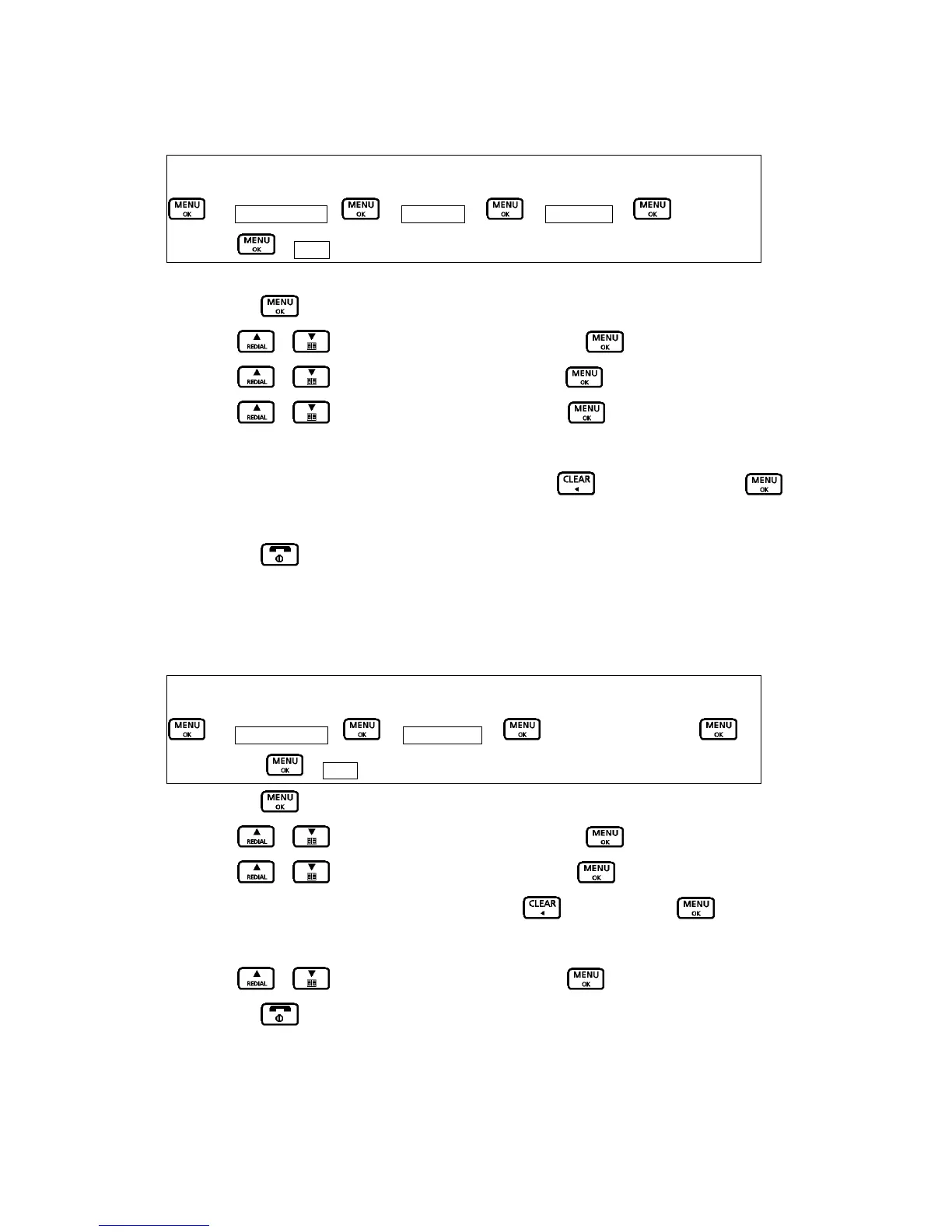
Æ Base Settings – Æ AdditionalÆ Æ Prefix dialÆ Æ enter the
numberÆ Æ Store
1. Press the button to access the main menu.
2. Press
/ button to select “Base Settings”. Press button.
3. Press
/ button to select “Additional” . Press button.
4. Press
/ button to select “Prefix dial” .Press button. The current setting
is displayed.
5. Enter the number using the number keypad or press the
button to clear. Press
button to confirm.
6. Press the
button to exit and return to standby mode.
D.14 CALL BARRING
When switched on, Call Barring prevents calls from being made to a specific number, area code or
international code.
Key Map:-
Æ Base Settings – Æ Call BarringÆ Æ enter the numberÆ Æ
select on/offÆ Æ Store
1. Press the button to access the main menu.
2. Press
/ button to select “Base Settings”. Press button.
3. Press
/ button to select “Call Barring” . Press button.
4. Enter the number using the number keypad or
to clear. Press button to
confirm.
5. Press
/ button to select “On” or “Off”. Press button to confirm.
6. Press the
button to exit and return to standby mode.

 To Next Page
 Loading...