The handset will automatically be allocated with the next available handset number.
If registration is unsuccessful, the display will show “Not registered” and you will need to follow the
registration procedure again.
I.2 DEREGISTERING A HANDSET OR A BASE
If you have more than one handset registered to your base or more than one base registered to
your handset(s), you can deregister both the handset from the base or the base from the handset.
Before deregistering, make sure all handsets and the base are in standby.
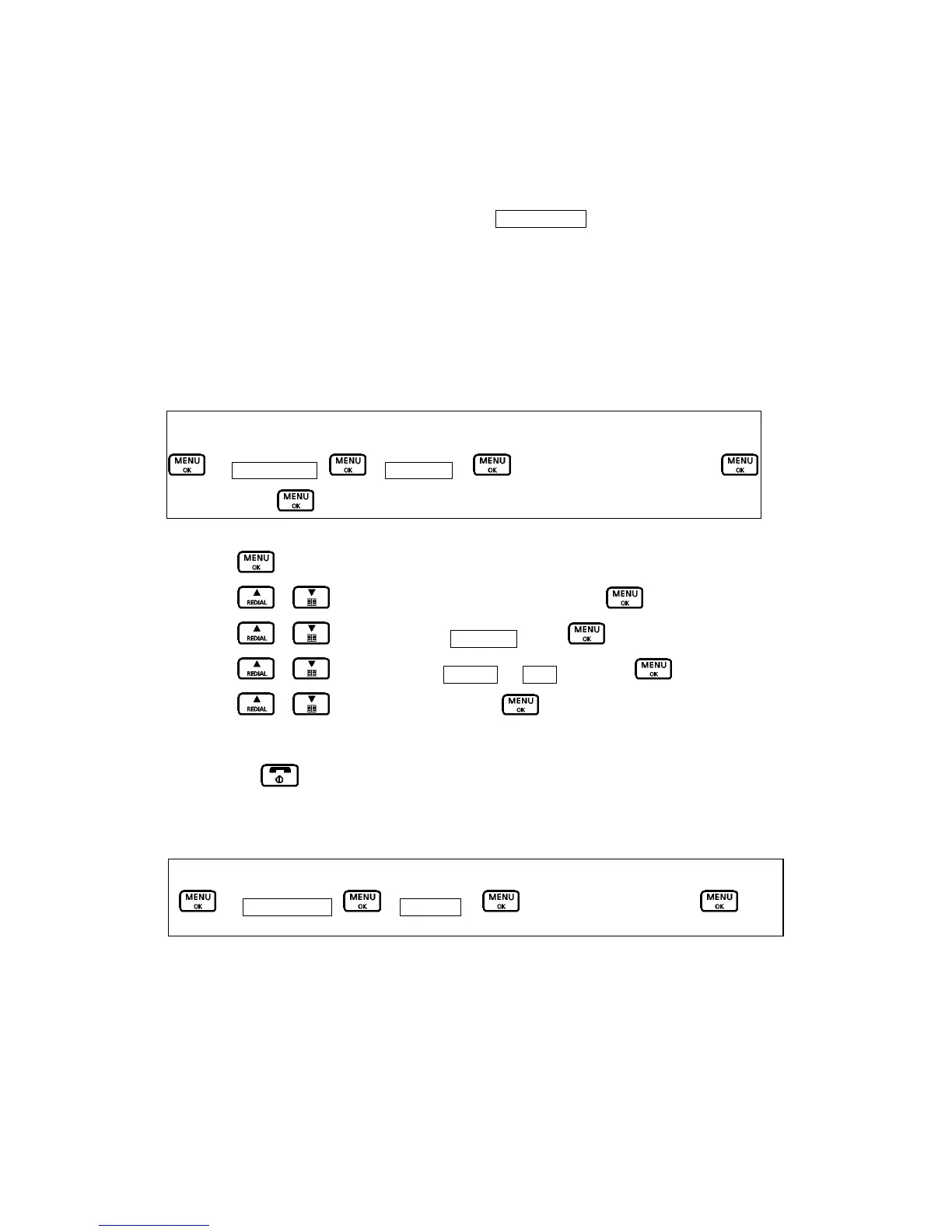
Key Map:-
Æ Add. Settings – Æ DeregisterÆ Æ select the handset or base Æ
Æ select Yes Æ
1. Press
button to access the main menu.
2. Press
/ button to select “Add. Settings” and press .
3. Press
/ button to display “Deregister” press to confirm.
4. Press / button to select “Handset or “Base” and press to confirm.
5. Press / to select “Yes” and press . If the handset deregisters to the base
successfully, you will hear a confirmation tone.
6. Press the
button to exit and return to standby.
I.3 CHANGING THE PIN CODE
The default Base Pin code is 0000. If you want to change to a new PIN code, follow the above
procedures while enter a new 4 digits base PIN code.
Key Map:-
Æ Settings Base – Æ Base PINÆ Æ enter a new PIN code Æ

 To Next Page
 Loading...