See FAQ at support.jadens.com
7. Installation for Mac
JADENS is only compatible with MAC OS V 10.9 or later.
Installation guide video in U-disk for better reference.
a. Connect power and computer
b. Copy driver 'Label Printer Driver.pkg' to desktop and install it.(You can also download Driver for
Mac (JD-328BT) from
http://www.jadens.com/support/download/label-printer-drivers/
Driver version may be updated, see latest info at support.jadens.com.
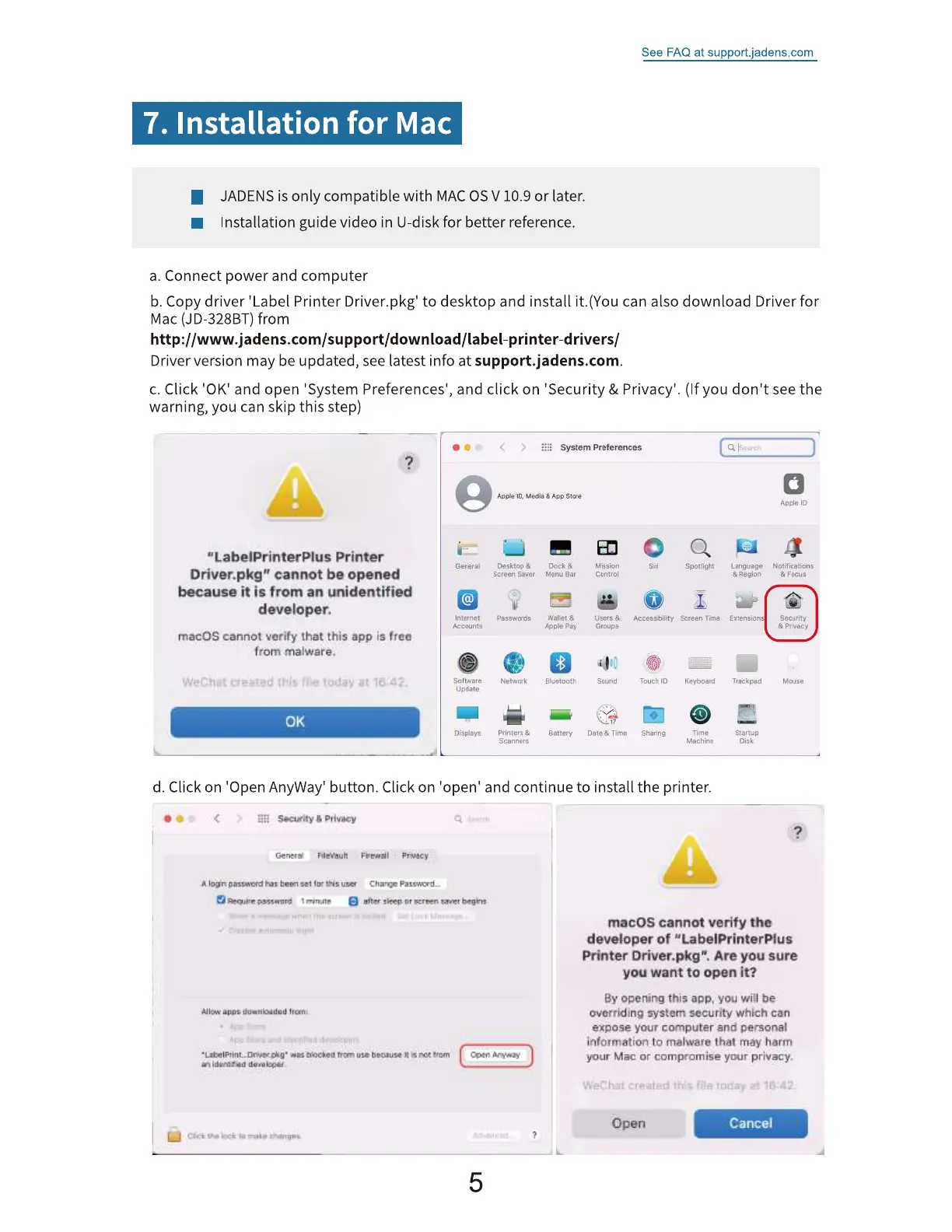
c. Click '0K' and open 'System Preferences', and click on 'Security & Privacy'. (If you don't see the
warning, you can skip this step)
"LabelPrinterPlus Printer
Driver.pkgtj cannot be opened
because it is from an unidentified
developer.
macOS cannot verify that this app is freo
from melwere.
0K
>
System Preferences
'D, Media Apo Store
General
Accounts
Son ware
update
Displays
Desktop
Screen Saver
Passwords
Network
Scannots
Dock K
Menu aar
wall"' &
Bluetooth
Battery
i" ion
Conuoi
O toups
S oond
Date 8 Timo
Accessib'iity
Touch to
Sharing
Spotlight
Screen Time
Keyboard
Time
Machine
La ngu•go
& Region
Extensions
Trackpad
Slan•.p
Disk
Apolo iD
Notif ications
Focus
Secuntv
A Pflvac•,'
Vouse
d. Click on 'Open AnyWay' button. Click on 'open' and continue to install the printer.
GenerS
set fur
apps duenBaded
• • tryn uw because n Coen
macOS cannot verify the
developer of "LabelPrinterPIus
Printer Driver.pkg". Are you sure
you want to open it?
By opening thia app. you will be
overriding system security Which can
expose your computer and persona!
information to malware that may harm
your Mac or compromise your privacy.
Open
Cancel


 To Next Page
 Loading...