8. Installation for Chromebook
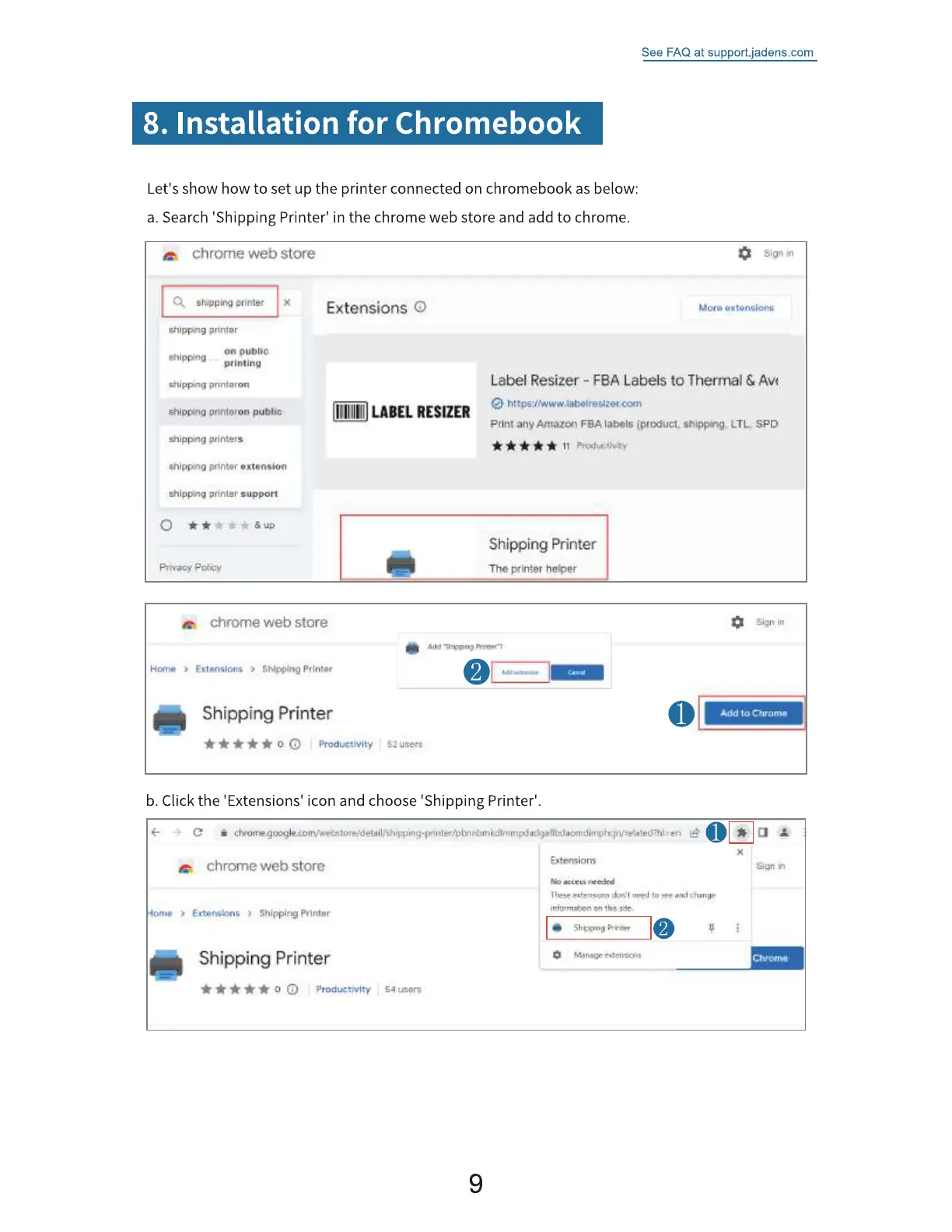
Let's show how to set up the printer connected on chromebook as below:
a. Search 'Shipping Printer' in the chrome web store and add to chrome.
See FAQ at support.jadens.com
Sign
chrome web store
shipp.ng
on oubliC
griming
Gilipp•.nq pnntaron
onntoron pumic
*'lipping printers
*'ippitté
Privacy P
Extensions O
LABEL RESIZER
Label Resizer - FBA Labels to Thermal &
any 'abets spo
11
Shipping Printer
The ptit•ter he-soer
chrome web store
Shipping Printer
b. Click the 'Extensions' icon and choose 'Shipping Printer'.
chrome web store
Shipping Printer
9
Sign in
Add to
Sigh
'o an;i


 To Next Page