HELLO? SPEAKERPHONE? YES!
BLUETOOTH
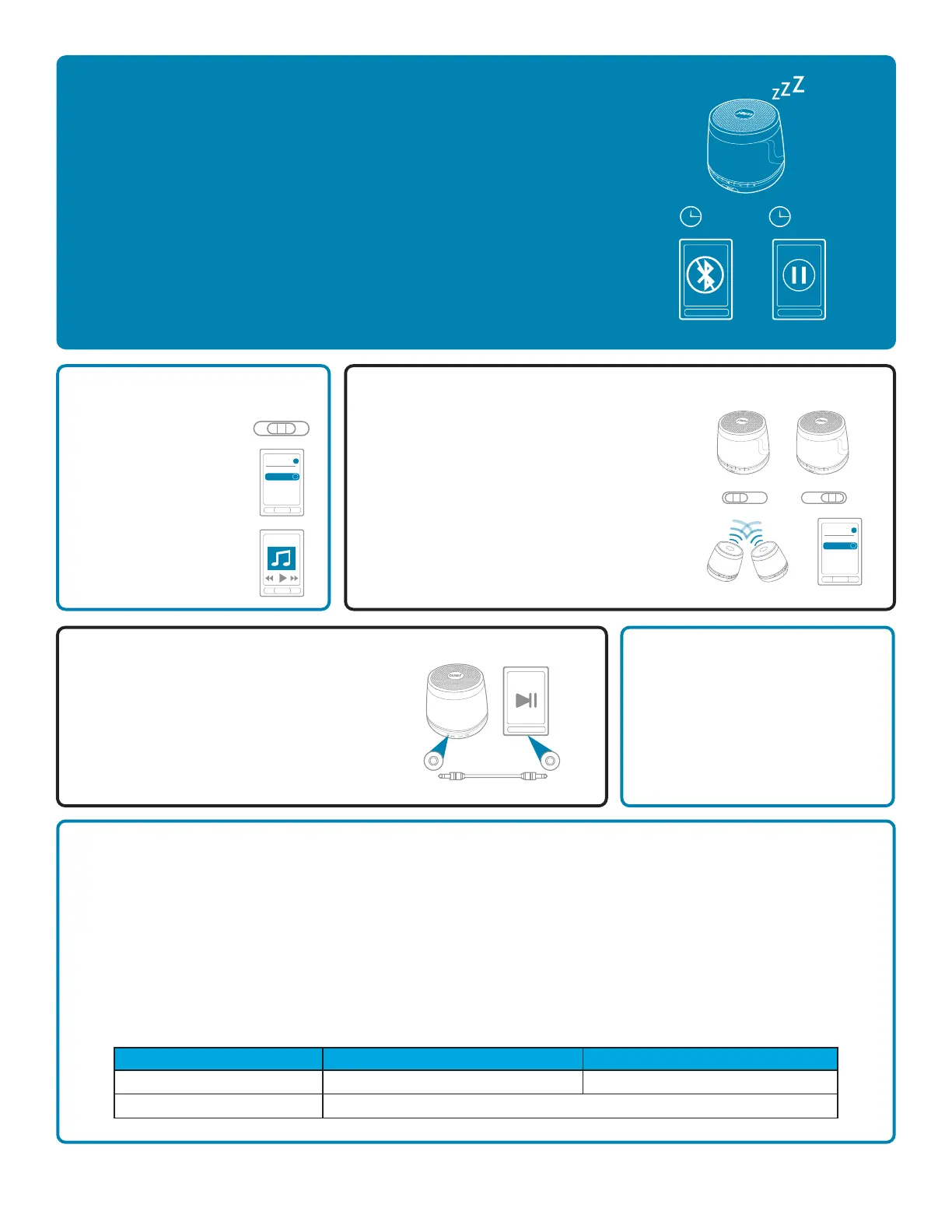
®
CONNECTION, CONTINUED
Like any amazing couple, this one starts with a connection — one
between your device and the speaker’s Bluetooth. Here’s how it works:
1. Make sure the smartphone, tablet, or computer you’re using with the
speaker has Bluetooth.
2. Turn on the speaker (press and hold the power button for 3 seconds)
and look for the little blinking light.
3. Do whatever your device needs you to do on its end.
4. Look for JAM Plus in your device’s Bluetooth list or click YES.
5. Now hit PLAY on your speaker and crank it up — or down if you’re lame.
The device and Bluetooth will find each other every time, as long as the speaker is set
to Bluetooth and your device’s Bluetooth is, you know, on.
If you’re connecting to a computer, you may have some extra steps on that end. You’ll
have to get that information from the computer company.
Depending on your device, you may be prompted to enter a pairing code. If prompted,
enter “0000” as the code.
To disable pairing of an existing device and pair a new device, press and hold the
PLAY/PAUSE button for 5 seconds to activate pairing mode.
Note: If you turn on your JAM Plus but haven’t started the party yet, it will automatically
power off after 2 minutes of unpaired inactivity.
Note: Once you've paired, if you pause the party for 15 minutes or more, the JAM Plus
will automatically shut off to preserve battery power.
Note: You should never have to do this, but in the event the speaker controls are not
operable, press the reset button to reset the speaker.
When friends call asking to join the party — and you know they will — answer the phone without disconnecting from your JAM Plus.
Yes, that’s right. Your speaker is a speakerphone, too. How amazing is that? Here’s how it works:
1. Make sure your phone and speaker are connected through Bluetooth.
2. Answering and ending a call works the same way: simply click the PLAY/PAUSE button on your JAM Plus.
3. If you’d rather not talk, hold down the PLAY/PAUSE button on your JAM Plus for 3 seconds to ignore the call.
THE COOLEST PART: The JAM Plus knows when a call is coming in and pauses the music before ringing. When you hang up, the
music starts where it left off — and so does the party. If it’s you making the call, just start dialing from your phone, and the JAM Plus
automatically does its hands-free thing. Isn’t it refreshing to know your speaker totally gets you?
Check out the chart below for a complete guide on handling calls with your JAM Plus.
Note: When handling calls in JAM
2
mode, only the master speaker (that’s the left one) can control the call.
COMING CLEAN
A soft, dry towel is all you need to
clean off your speaker. Using water,
harsh cleaners, or anything else only
starts messing with the mechanics
inside. So, yeah, don’t do it.
HOOKING UP OLD-SCHOOL AUDIO, JACK
1. Plug one end of the cord into the speaker
and the other into the headphone jack on
your device.
2. Turn on the speaker.
3. Hit PLAY on your device and crank it up —
or down if you’re lame.
You’ll have to play and pause the music from
your device, not your speaker. No problem.
You’re there anyway, right?
1. Turn the speaker over
and set the speaker
mode switch to “Mono.”
2. Press and hold the
power button for 5
seconds to turn on.
3. Follow the instructions
above to pair your
speaker.
4. Press play on your
device and crank it up —
or down if you’re lame.
1. Set the speaker mode switch on speaker 1 to “L.”
2. Set the speaker mode switch on speaker 2 to “R.”
3. Turn on speaker 1 (press and hold the power
button for 5 seconds).
4. Turn on speaker 2 (press and hold the power
button for 5 seconds).
5. The speakers will begin to pair together
automatically. This can take up to 30 seconds.
6. When you hear a tone and the JAM
2
indicator light
is illuminated white, you may pair your device.
7. Follow the instructions above to pair your speakers.
Choose Jam2 from your device’s Bluetooth list.
2m
15m
PAIRING ONE SPEAKER PAIRING TWO JAM PLUS SPEAKERS TOGETHER
L –Mono–R
Bluetooth
Devices
JAM Plus
on
>
Bluetooth
Devices
Jam2
on
>
Track 1
L –Mono–R L –Mono–R
Situation
Short Press Play/Pause Button Long Press Play/Pause Button
1
st
Incoming call
On call
Pick up call
End call
Reject call
Auxiliary cable not included.


 To Next Page
 Loading...