EasyManua.ls Logo

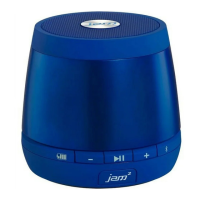
Jam Plus HX-P240 - User Manual

Jam Plus HX-P240
3 pages
Print Icon
To Next Page IconTo Next Page
Loading...
R35
85
75
HEY THERE!
JUST CHARGE IT
WERE HERE TO HELP. CONTACT US!
HX-P240
USER GUIDE AND
WARRANTY INFORMATION
You’ve got questions? We’ve got answers.
Contact a Consumer Relations representative by
phone or email to help answer any questions.
Please be sure to have the model number of your
product available. (Hint: It’s HX-P240)
Register your speaker! Information about where
you bought it and how you’re using it is like
gold for the people who make these speakers.
To register, visit:
USA: www.jamaudio.com/customer-support/product-registration
CAN: canada.jamaudio.com/product-registration
Charging the speaker is so easy you’ve probably figured it out by now, but just in case, you’ve got two options: you can charge it
using your computer or a wall outlet. The JAM Plus needs about 3 hours for up to 6 hours of party time.
The LED lights on your speaker let
you know what it’s doing.
1. The cord that came with the speaker — the
one with the USB on one end and the micro
USB on the other — will work with your
computer.
2. If you want to use the wall outlet, you’ll need
to pick up a power cord with a micro USB the
next time you’re at the store, or use any USB AC
adapter, including the one for your cell phone.
SHED SOME LIGHT
BLUETOOTH
®
CONNECTION — IT’S A SETUP
Like any amazing couple, this one starts with a connection — one
between your device and the speaker’s Bluetooth. Here’s how it works:
1. Make sure the smartphone, tablet, or computer you’re using with the
speaker has Bluetooth.
2. Turn on the speaker (press and hold the power button for 3 seconds)
and look for the little blinking light.
3. Do whatever your device needs you to do on its end.
USA
cservice@jamaudio.com
1.888.802.0040
8:30am–7:00pm EST M–F
cservice@homedicsgroup.ca
1.888.225.7378
8:30am–5:00pm EST M–F
CANADA
4. Look for JAM Plus in your device’s Bluetooth list or click YES.
5. Now hit PLAY on your speaker and crank it up — or down if you’re lame.
The device and Bluetooth will find each other every time, as long as the speaker is set
to Bluetooth and your device’s Bluetooth is, you know, on.
If you’re connecting to a computer, you may have some extra steps on that end. You’ll
have to get that information from the computer company.
Depending on your device, you may be prompted to enter a pairing code. If prompted,
enter “0000” as the code.
To disable pairing of an existing device and pair a new device, press and hold the
PLAY/PAUSE button for 5 seconds to activate pairing mode.
Note: If you turn on your JAM Plus but haven’t started the party yet, it will automatically
power off after 2 minutes of unpaired inactivity.
Note: Once you've paired, if you pause the party for 15 minutes or more, the JAM Plus
will automatically shut off to preserve battery power.
Note: You should never have to do this, but in the event the speaker controls are not
operable, press the reset button to reset the speaker.
Thank you for purchasing
the JAM Plus. Check
out the sections below
for all the important
information about your
new speaker.
Pairing Mode
Bluetooth Light Battery Light
Connected
Charging
Ready to Party
Aux-In Mode
Low Battery
Continued on page 2.
AC adapter not included.
CONTROL YOUR DESTINY ... OR AT LEAST YOUR SPEAKER
Bluetooth
®
Devices
JAM Plus
on
>
3s
or
3h
1. Check out how much juice is in the battery
2. Turn the music down
3. Push it to play, push it again to pause
4. Turn the music up
5. Lets you know when Bluetooth is paired
6. JAM
2
light shows when two JAM Plus
speakers are paired.
7. Here’s where you hook it up old-school
8. The power cord goes here
9. This is the power button
10. Toggle between languages here
11. Reset
12. Speaker mode switch
Bottom:
Back:
7
8
Reset
9
10
11
12
3
5
2
6
1
4

Other manuals for Jam Plus HX-P240

Question and Answer IconNeed help?

Do you have a question about the Jam Plus HX-P240 and is the answer not in the manual?

Summary

Charging the Speaker

Speaker Controls

LED Indicator Lights

Bluetooth Connection Setup

Initial Pairing Steps

Steps to initiate and establish a Bluetooth connection between your device and the speaker.

Completing and Managing Bluetooth Pairing

Details on completing pairing, using a pairing code, and managing device connections.

Pairing a Single Speaker

Pairing Two Speakers (JAM²)

Speakerphone Functionality

Call Handling Guide

Instructions for answering, ending, ignoring calls, and handling calls in JAM² mode.

Regulatory and Safety Information

Important Safeguards

Essential safety precautions for using the electrical product, including warnings.

Overview

The JAM Plus is a portable Bluetooth speaker designed for an enhanced audio experience, offering both single-speaker and stereo pairing options. Its primary function is to play audio wirelessly from Bluetooth-enabled devices, but it also supports wired connections for older-school audio sources. Beyond music playback, the JAM Plus features a built-in speakerphone for hands-free calling, making it a versatile companion for various activities.

Function Description:

The core functionality of the JAM Plus revolves around delivering audio. It connects wirelessly via Bluetooth to smartphones, tablets, and computers, allowing users to stream music, podcasts, or any other audio content. For devices without Bluetooth, an auxiliary input is provided, enabling a wired connection using a standard 3.5mm audio cable.

A standout feature is its ability to pair two JAM Plus speakers together for a true stereo sound experience. When two speakers are paired, one acts as the left channel and the other as the right, creating a more immersive audio landscape. This "JAM² mode" is easily activated through a switch on the speaker's bottom.

The JAM Plus also integrates a speakerphone function. When connected to a smartphone via Bluetooth, it allows users to answer, end, or reject calls directly from the speaker. This hands-free capability is particularly convenient, as the speaker intelligently pauses music for incoming calls and resumes playback once the call is finished.

Powering the device is an internal, non-replaceable lithium battery, which provides several hours of playback on a full charge. The speaker can be charged via a micro USB cable, either by connecting it to a computer's USB port or a wall outlet using a compatible USB AC adapter.

Usage Features:

Operating the JAM Plus is intuitive, with clearly labeled controls and helpful LED indicators.

Controls:

  • Power Button: A press and hold for 3 seconds turns the speaker on or off.
  • Play/Pause Button: A single press plays or pauses audio. This button also manages calls: a short press answers or ends a call, while a long press (3 seconds) rejects an incoming call.
  • Volume Up/Down Buttons: Adjust the audio playback volume.
  • Language Selector Pin Hole: Located on the bottom, this small hole allows users to cycle through different voice prompt languages (English, Spanish, French, Portuguese) or disable voice prompts entirely, using a paperclip or the included pin.
  • Speaker Mode Switch (L-Mono-R): Found on the bottom, this switch is crucial for configuring the speaker. In "Mono" mode, the speaker operates independently. For stereo pairing, one speaker is set to "L" (left channel) and the other to "R" (right channel).
  • Reset Button: A small pinhole reset button is available for troubleshooting in case the speaker controls become unresponsive.

LED Indicators:

  • Bluetooth Light:
    • Blinking: Indicates pairing mode, actively searching for a Bluetooth device.
    • Solid: Shows a successful Bluetooth connection.
  • Battery Light:
    • Red: Signifies low battery.
    • Blinking Red: Indicates the speaker is charging.
    • Solid Green: The battery is fully charged.
  • Aux-In Mode Light: Illuminates when an auxiliary cable is connected, indicating the speaker is playing from a wired source.
  • Ready to Party Light: This light, specifically the "JAM² light," illuminates white when two JAM Plus speakers are successfully paired in stereo mode.

Voice Prompts: The speaker provides audible feedback for various actions, such as powering on, ready to pair, paired, maximum volume, charging, receiving a call, ending a call, rejecting a call, and powering off. These prompts can be customized in language or turned off using the language selector pinhole.

Automatic Power-Off: To conserve battery life, the JAM Plus features an automatic power-off function. If left unpaired for 2 minutes after being turned on, or if paused for 15 minutes or more after being paired, the speaker will automatically shut down.

Maintenance Features:

The JAM Plus is designed for straightforward maintenance, primarily focusing on cleaning and proper handling to ensure longevity.

Cleaning: The manufacturer recommends using only a soft, dry towel to clean the speaker. It explicitly advises against using water, harsh cleaners, or any other liquids, as these can damage the internal mechanics of the device.

Battery Care: The device contains an internal, non-replaceable lithium battery. Users are instructed to dispose of the product in accordance with local, state, province, and country guidelines when it reaches the end of its life cycle. This emphasizes responsible electronic waste management rather than user-level battery maintenance.

Environmental Considerations: The manual highlights that the product contains small parts that could pose a choking hazard for young children, and that all servicing should be performed by authorized HMDX Service Personnel. This implies that the device is not intended for user-level repair or disassembly beyond basic operation.

In summary, the JAM Plus is a user-friendly, versatile portable speaker that prioritizes ease of use, flexible connectivity, and a robust audio experience, including the option for stereo pairing and hands-free calling. Its maintenance is minimal, focusing on simple cleaning and adherence to proper disposal guidelines for its internal battery.

Jam Plus HX-P240 Specifications

General IconGeneral
ModelHX-P240
TypePortable Bluetooth Speaker
Battery LifeUp to 4 hours
Water ResistanceNo
Bluetooth RangeUp to 30 feet
Signal-to-Noise Ratio80 dB
Power SupplyRechargeable Battery