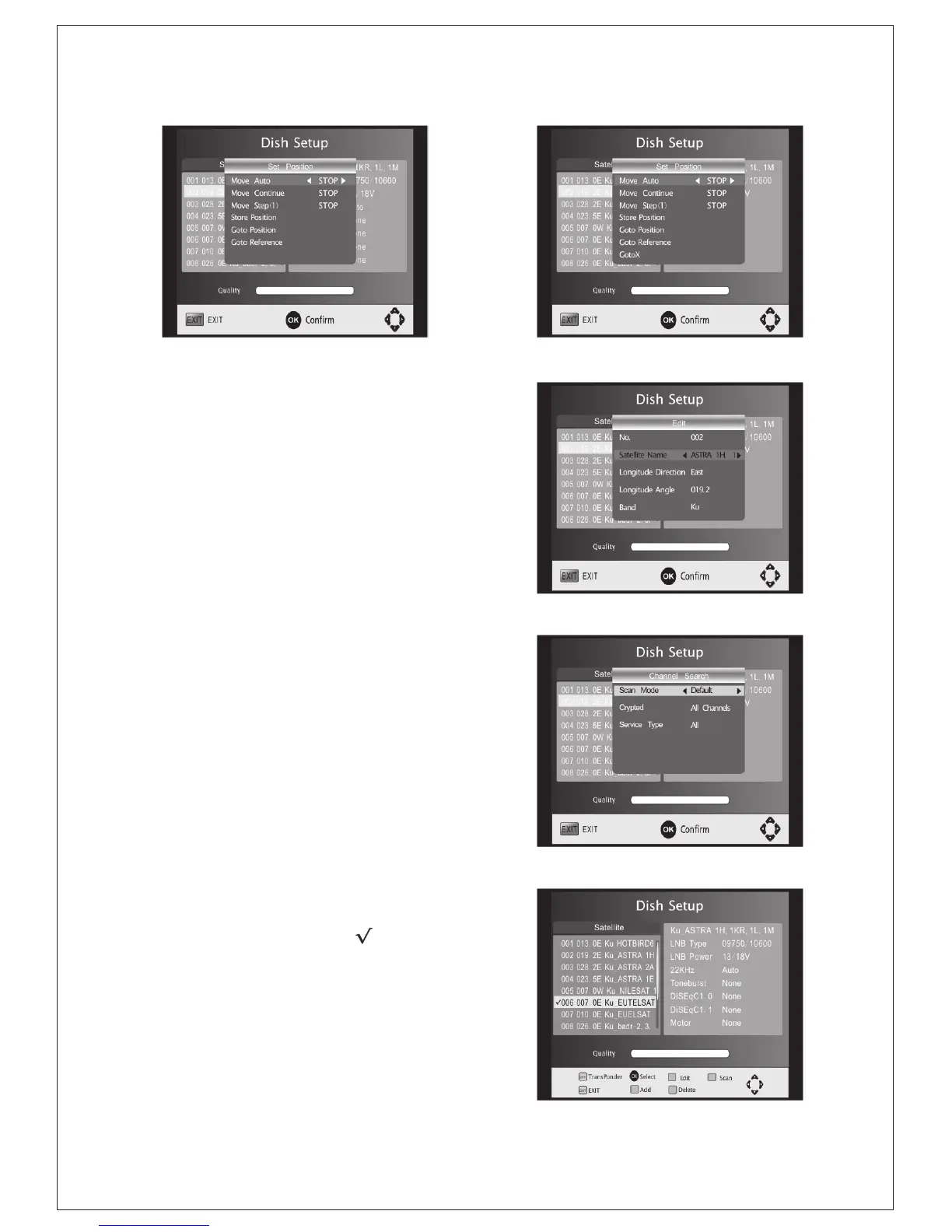
(Figure: DiSEqC1.2) (Figure: DiSEqC1.3)
Add satellites: Press Red to add a new
satellite, in which you must input an unique
longitude, and edit the satellite's name with
soft keyboard.
Edit satellites: Press Green to edit the
focused satellite.
Delete satellite: Press Yellow to delete the
focused satellite. Press OK to confirm.
Single Satellite Scan: Press Blue to pop the
menu of scanning settings.
Scan Mode: Press Left/Right to select
default, which scan the default
transponders built in, Blind Scan and
NetWork, which scan with NIT on.
Crytped: Press Left/Right to select All
Channels or FTA Channels;
Service Type: Press Left/Right to select
ALL , DTV or Radio.
Press OK to start scanning with the above
settings.
Multi-Satellites Scan: Press OK to select
satellites with the mark" “,then press
blue to pop the menu of scanning setting.
After Configuring like single satellite scan,
press OK to start multi-satellites scan.
(Figure: Edit satellite name)
(Figure: Setting of scanning)
(Figure: Multi-satellite select)
-9-


 To Next Page