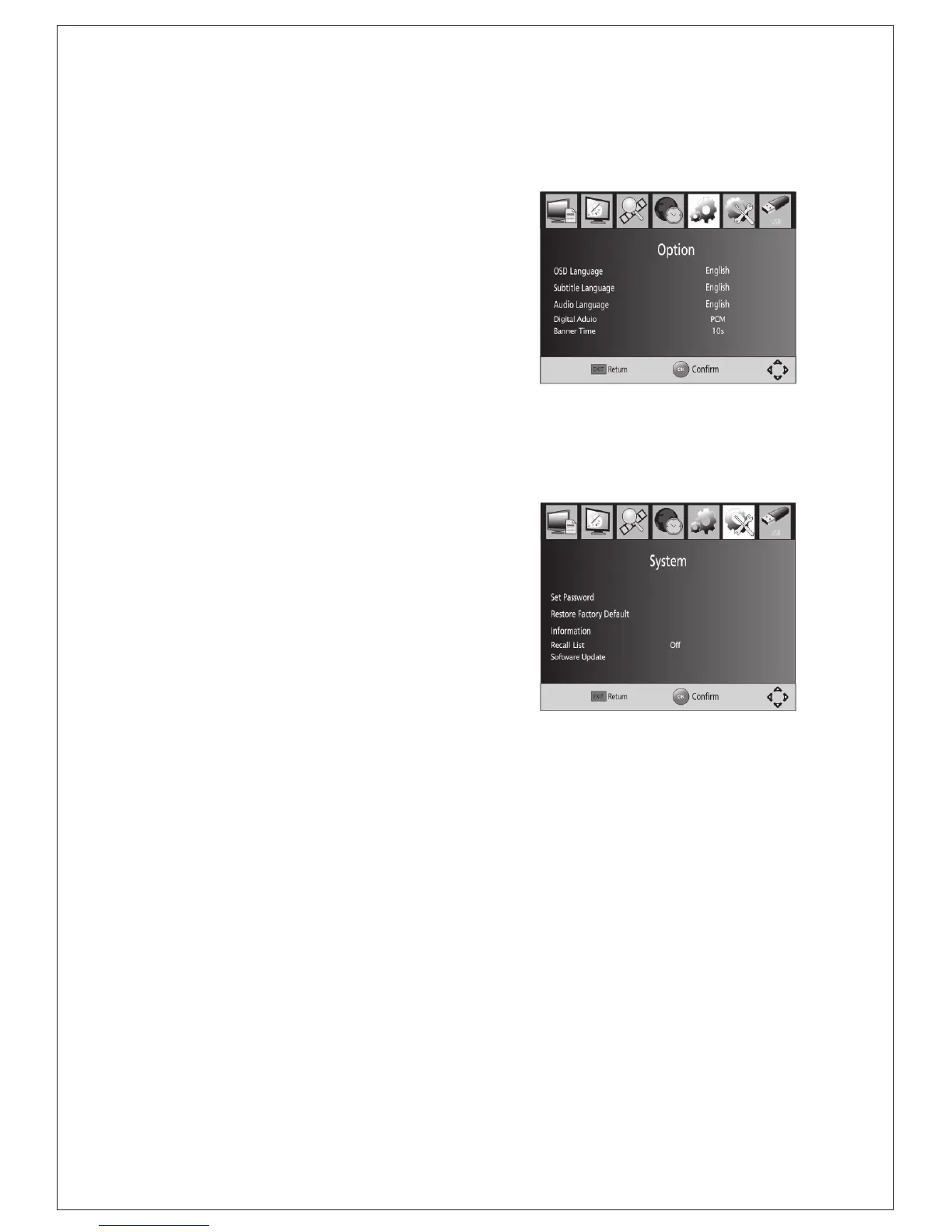
5 Option
To access the Menu, press MENU and
select [Option]. The menu provides
options to adjust the OSD Language,
Subtitle Language and Audio
Language.
Select an option and press RIGHT/LEFT to
adjust the setting. Press EXIT to
exit the Menu.
(1) OSD Language
Select an OSD language.
(2) Audio Language
Select the preferred audio language for
watching TV channels.
If the language is not available, the
default program language will be used.
(3) Subtitle Language
Select the preferred subtitle language.
6 System Setting
To access the Menu, press MENU and
select [System].The menu provides
options to adjust the system settings.
Press the UP/DOWN key to select an option
and press RIGHT/LEFT to adjust the setting.
Press EXIT to exit the Menu .
(4)Digital Audio
Set output mode of Digital Audio.
(5)Banner Time
Set the period of banner auto disappearing.
(Figure: Option)
(Figure: System)
-12-
(1) Set Password
Set or change the password for locked programs. Enter your old
password or the default password '000000'. You will then be asked to
enter your new password. To confirm re-enter your new password. Once it
is confirmed, press EXIT to exit the Menu.
(2) Restore Factory Default
Reset your Set Top Box to the Default Factory Settings.
In Main Menu select [Restore Factory Default] and press OK or RIGHT to
select. Enter your password or the default password '000000' and press
OK to confirm. This option will delete all preset channels and settings.


 To Next Page