The Jaspr Air Purifier is a cylindrical, white air purification device designed to improve indoor air quality. It features a multi-stage filtration system and an intuitive display screen for monitoring and control.
Function Description:
The primary function of the Jaspr Air Purifier is to remove contaminants from the air, thereby creating a healthier indoor environment. It achieves this through a combination of pre-filters, a HEPA filter, and a carbon filter, which work together to capture various particles and odors. The device continuously monitors air quality using a particle sensor and adjusts its operation accordingly, especially when in Smart Mode.
Important Technical Specifications:
The device incorporates a multi-layer filtration system:
- Pre-Filters: These are the initial filters designed to capture larger particles, extending the life of the subsequent filters.
- HEPA Filter: This high-efficiency particulate air filter is crucial for trapping microscopic particles such as dust mites, pollen, pet dander, and mold spores.
- Carbon Filter: This filter is specifically designed to absorb odors, volatile organic compounds (VOCs), and other gaseous pollutants, improving the freshness of the air.
The top of the device features a Display Screen that provides real-time information and control options. Key indicators and controls on the display include:
- Particle Sensor: Shows the amount of particles per million (PPM) of contaminants in the air. Lower numbers indicate healthier air.
- Humidity: Displays the relative humidity inside the room.
- Temperature: Shows the room temperature in degrees Celsius.
- Air Quality: A light indicator that reflects the current air quality level.
- Colour Bars: These glow in different colors to visually represent air quality:
- Green: Low risk
- Yellow: Increase risk
- Orange: High risk
- Red: Critical
- View Fan Speed: A light indicator showing the current fan speed.
- Fan Speed Levels: The device offers multiple fan speed settings (Level 1, Level 2, Level 3, Top Speed) that can be cycled through using a dedicated button.
- Timer: Allows users to set the device to run for a specific number of hours (0 to exit timer mode). If no number is selected, the display reverts to normal after 10 seconds.
- Lock Function: A security feature that locks the display controls, preventing unintended changes. It can be activated or deactivated by holding the timer button for 3 seconds.
- Light On/Off: A button to turn the display light on or off.
Usage Features:
- Smart Mode: This intelligent feature allows the air purifier to automatically adjust its fan speeds based on the detected air quality, ensuring optimal performance without constant manual intervention.
- Intuitive Controls: The display screen provides clear indicators and easy-to-use buttons for managing various settings, including fan speed, timer, and display light.
- Air Inlets and Outlets: Air is drawn in from the bottom (Air Inlets) and expelled from the top (Air Outlets) after passing through the filtration system.
- Placement Guidelines: For optimal performance, the air inlets should be at least 20 cm away from obstructions like walls or furniture. Users are advised not to place any objects near the air inlets or outlets and to keep the device in a clean location to prevent hair or fabric from blocking the airflow.
- Safety Precautions:
- Always turn off and unplug the device before moving it.
- Ensure the cover plate is properly closed and locked for the device to operate.
- Avoid twisting, pinching, or bending the power cord to prevent damage.
- Do not pull the power cord to unplug; grasp the adapter firmly.
- Use only compatible AC sockets and the provided power cord.
- Discontinue use immediately if unusual sounds, smells, excessive heat, or abnormal fan motion are observed.
- Do not sit or stand on the purifier, and avoid tilting it unless accessing the bottom cover.
- When using the purifier with another combustion appliance, ensure the ventilation system is on to prevent carbon monoxide poisoning.
Maintenance Features:
- Filter Replacement Indicator: The colour bars on the display screen will start flashing when it's time to replace the filter, providing a clear visual cue for maintenance.
- Easy Filter Replacement: The filter replacement process is straightforward:
- Flip the device upside down.
- Twist the bottom cap counterclockwise to remove it.
- Remove the old filter and slide in the new one.
- Crucially, remove the plastic wrap from the new filter before installation.
- Place the cap back on and twist it clockwise to lock it.
- Flip the device upright, plug it in, and turn it on.
- Hold down the light button for 3 seconds to stop the flashing colour bars after filter replacement.
- Power Cord Care: Regular inspection and careful handling of the power cord are recommended to prevent damage and ensure longevity.
- Cleaning: Keep the device in a clean location to prevent blockages of the air inlets and outlets by hair or fabric.

 Need help?
 General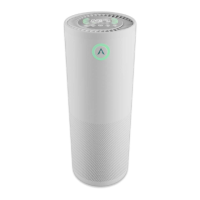

 To Next Page