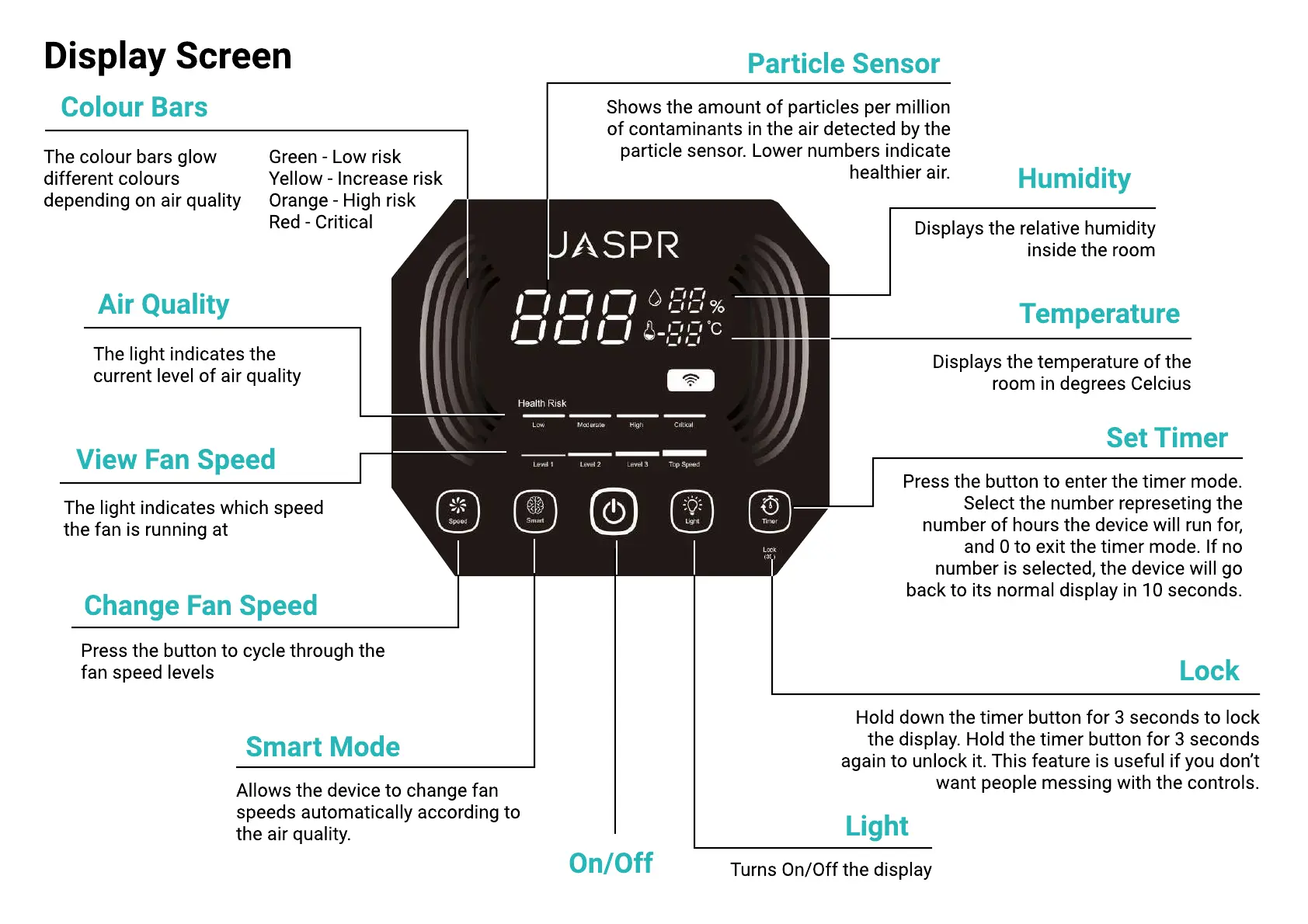
Display Screen
On/Off
Change Fan Speed
View Fan Speed
Air Quality
Smart Mode
Humidity
Temperature
Colour Bars
Particle Sensor
Set Timer
Lock
Light
Allows the device to change fan
speeds automatically according to
the air quality.
Displays the relative humidity
inside the room
Displays the temperature of the
room in degrees Celcius
The colour bars glow
different colours
depending on air quality
Green - Low ris
Yellow - Increase ris
Orange - High ris
Red - Critical
Press the button to enter the timer mode.
Select the number represeting the
number of hours the device will run for,
and 0 to exit the timer mode. If no
number is selected, the device will go
back to its normal display in 10 seconds.
Hold down the timer button for
3
seconds to lock
the display. Hold the timer button for
3
seconds
again to unlock it. This feature is useful if you don
’
t
want people messing with the controls.
Turns On
/
Off the display
The light indicates which speed
the fan is running at
The light indicates the
current level of air quality
Press the button to cycle through the
fan speed levels
Shows the amount of particles per million
of contaminants in the air detected by the
particle sensor. Lower numbers indicate
healthier air.


 To Next Page
 Loading...