BITE ALARM
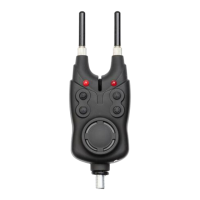
Replacing the battery: remove cover on the back of the bite alarm (according to
arrow direction) and insert 1 R9/6LR61 (9V) battery (not included), observing the
correct polarity (+/-) and then close the cover. Mount the alarm on a buzzer bar
or bank stick.
Press switch ON/OFF (1) and hold three seconds. Thread the fishing line over the
roller sensor (7). A bite is indicated by sound and flashing lights (5). To adjust
volume press „V” control button (2), sensitivity - press „S” button (3), tone - „T”
button (4). To OFF bite indicator press switch ON/OFF (1) and hold three seconds.
Device is equipped with snag bars (9) mounting on screws (10). There is also
possible to connect illuminated hanging indicators (not included) additionaly
using plug (11) at the indicator’ bottom.
LED (6) – night light mode, to on/off press shortly ON/OFF (1) button.
RECEIVER
Replacing the batteries: to remove batteries cover please lift it up in indicated
place (G), then insert 3 alkaline AAA 1,5V batteries (not included) observing the
correct polarity (+/-), and then close the cover.
To ON receiver turn “V” control (C) clockwise. The lowest volume level activates
vibes mode. Turn “T” (B) button to adjust tone. Bite is indicated by sound and
led (A) light color according to right indicator.
To OFF receiver turn “V” control (C) counter-clockwise until click.


 To Next Page
 Loading...