29
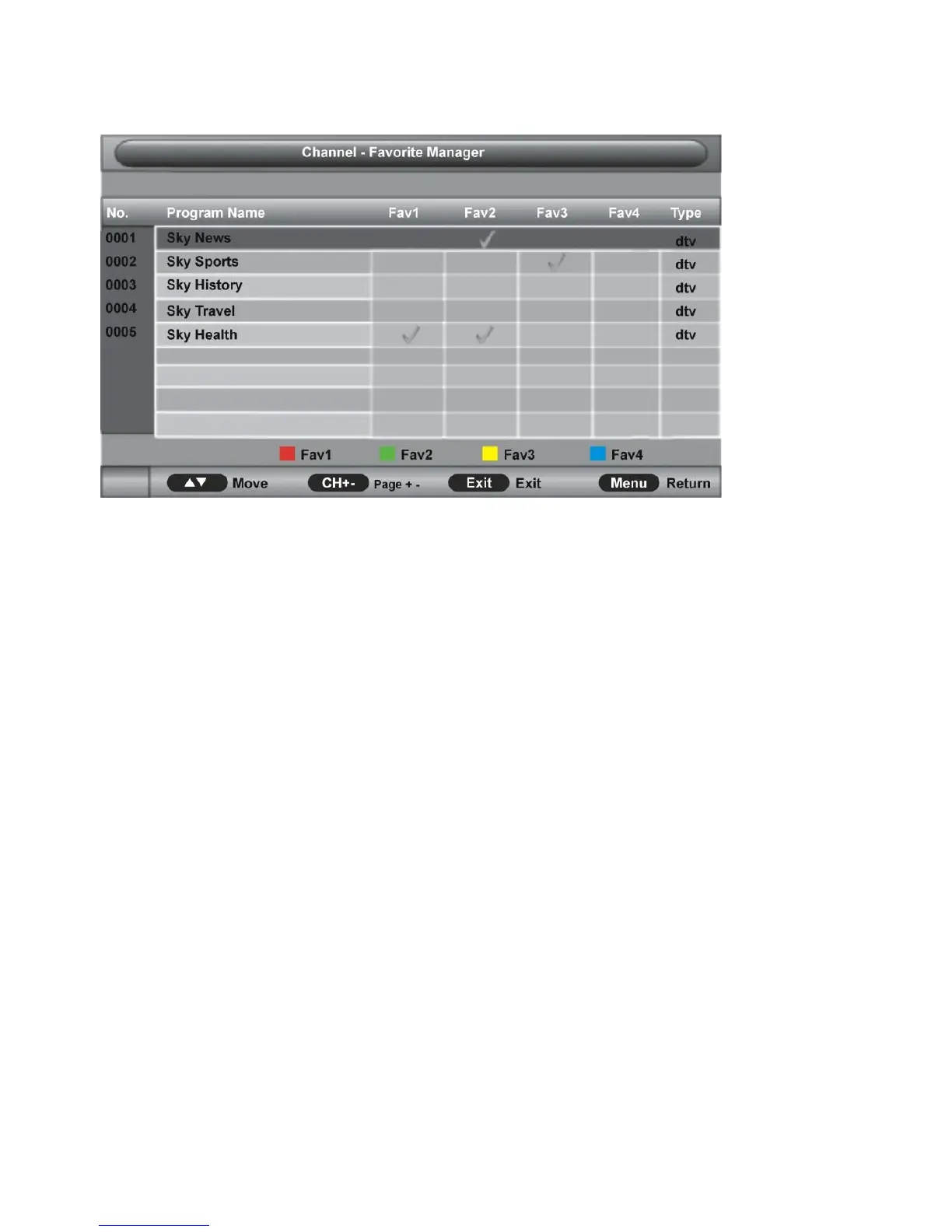
3.2 Favorite Management
Press UP/DOWN navigation buttons to select preferred program.
a) Press RED button on remote control to add/remove highlighted channel to Favorite 1
list.
b) Press GREEN button on remote control to add/remove highlighted channel to Favorite 2
list.
c) Press YELLOW button on remote control to add/remove highlighted channel to Favorite
3 list.
d) Press BLUE button on remote control to add/remove highlighted channel to Favorite 4
list.
3.3 Country
This item is used to select the country that you are living in.
3.4 TV Connection
This item is used to select the connection type of your TV.
Available options: Air, Cable.
3.5 Auto Search
- Press UP/DOWN navigation buttons to select this item and press OK or RIGHT
navigation button to enter submenu.
- Then press UP/DOWN navigation button to select All, DTV or ATV and press OK or
RIGHT navigation button to enter a dialog box. Select OK to start auto searching or
select Cancel to cancel this operation.


 To Next Page
 Loading...