Need help?
Do you have a question about the Jaybird VISTA 2 and is the answer not in the manual?
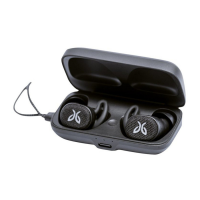
Earbuds charge in case, indicated by LED status.
Charge case via USB-C; LED indicates status.
Manage earbud power via case or app customization.
Control playback, calls, and volume with earbud buttons.
Music pauses automatically when an earbud is removed.
Understand case LED status and button actions.
Customize sound, prompts, controls, and track earbuds.
Monitor device status and adjust general settings.
Personalize audio profiles with equalizer presets.
The Jaybird Vista 2 are true wireless earbuds designed for active lifestyles, offering a blend of robust durability, premium sound, and advanced features for an optimized audio experience.
The Jaybird Vista 2 earbuds provide high-quality audio playback and clear call capabilities, connecting wirelessly to your audio device via Bluetooth. They are equipped with SurroundSense technology, which allows you to amplify ambient sounds for situational awareness, or engage Active Noise Cancellation (ANC) to minimize distractions and focus on your audio. This dual functionality ensures safety in various environments while also providing an immersive listening experience when desired. The earbuds feature a 6mm milled driver, delivering premium sound that can be further customized through a fully adjustable equalizer within the Jaybird app.
For communication, the Vista 2 incorporates four microphones with WindDefense fabric, ensuring high-quality calls even in windy conditions. Voice assistant functionality is also enabled, allowing for hands-free control and access to your device's assistant.
The earbuds are designed for a secure and comfortable fit, featuring three sizes of interchangeable eargels to accommodate different ear shapes. This sport-fit design ensures they stay in place during intense activities.
The Vista 2 offers an impressive battery life, providing up to 8 hours of playback on a single charge. The included charging case extends this significantly, offering two additional recharge cycles for a total of 16 extra hours of playback, bringing the total to 24 hours. A quick 5-minute charge of the earbuds can provide up to 1 hour of playback, making them convenient for last-minute power-ups. The earbuds automatically power off when placed in the charging case and turn on when removed.
Charging the earbuds is straightforward: simply place them into the charging case and close the lid. The left and right LEDs on the case will pulse white while charging and turn solid white once fully charged. A full charge for the earbuds takes approximately 2 hours from a discharged state.
The charging case itself can be charged via a USB-C cable or wirelessly. When charging with a USB-C cable, connect it to the front of the case; the central LED will pulse white while charging and turn solid white when fully charged. A full charge for the case via USB-C takes about 3 hours. For wireless charging, place the case on a Qi-compatible wireless charger mat with the LED light pointing towards you. The central LED will indicate the charging status similarly to cable charging. Wireless charging takes approximately 4 hours for a full charge.
To pair the Vista 2 with a Bluetooth audio device, place both earbuds in the charging case and close the lid. Then, open the case and press and hold the case button until the case LED begins blinking white, indicating pairing mode. On your Bluetooth audio device, navigate to the Bluetooth settings and select "Jaybird Vista 2" from the list of available devices. Once connected, the charging case LED will turn off.
Each earbud features one mechanical button and supports accelerometer-based interaction (double tap). These multi-function buttons can be customized via the Jaybird app to control various functions for music playback and calls.
Music Playback:
Calls:
The earbuds feature an auto-pause function. Removing one earbud from your ear will automatically pause the music. To resume playback, simply place the earbud back into your ear. This feature can be disabled through the Jaybird app if preferred.
The Vista 2 earbuds can be paired directly with compatible smartwatches (such as Apple WatchOS, Samsung, Android Wear, and Garmin devices), allowing you to leave your phone at home while still enjoying music during your workouts. Sync music to your smartwatch and pair the Vista 2 following your smartwatch's user manual instructions for Bluetooth device pairing.
The Jaybird app is central to customizing and managing your Vista 2 experience. It allows you to:
Both earbuds can connect to your audio device, and they will automatically switch to maintain the best possible connection. For optimal Bluetooth performance, it is recommended to minimize the distance between the earbuds and your audio device. Placing your audio device in an armband or belt pocket can help maintain a strong, uninterrupted connection.
The Jaybird Vista 2 boasts "Earthproof Durability" with an IP68 waterproof rating for the earbuds, meaning they are dust and waterproof. They feature military-grade construction, designed to withstand rain, mud, and outdoor adventures. The charging case has an IP54 weatherproof rating, making it resistant to rain and splashing, but it should not be submerged in water. It is crucial to ensure both the earbuds and charging case are completely dry before charging to prevent damage.
Regular cleaning of the eargels is essential for hygienic use.
Clean the eargels regularly to prevent dirt and wax buildup. To clean the earbuds themselves, remove the eargels, then gently wipe away dust and oil with a dry cloth. If necessary, use warm water and mild soap to remove buildup. Always rinse and completely dry all components before reattaching them.
Due to their isolating characteristics, it is advised not to use the earbuds while driving, riding a bike, or in situations where hearing surrounding sounds is critical for safety. Using the earbuds at excessive volumes can lead to permanent hearing damage; always turn the volume down before use. Exercise caution when inserting objects into the ear canal. Do not wear the device while it is connected to a power source (110V or 220V lines).
 General
| Product type | Replacement right earbud |
|---|---|
| Product color | Black |
| Brand compatibility | JayBird |
| Quantity | 1 |
| Master (outer) case width | 212 mm |
| Master (outer) case height | 215 mm |
| Master (outer) case length | 372 mm |
| Master (outer) case weight | 3200 g |
| Package depth | 207 mm |
| Package width | 249.1 mm |
| Package height | 12 mm |
| Package weight | 92 g |


 To Next Page