device through the USB port or SD/MMC card slot..
1. Set the Function Selector (24) on the TAPE/OFF position
2. Select the track no. to be encoded.
3. Press the Record button to start sync encoding and the display will show “USB or CARD” flash.
4. Press the RECORD button (17) again to confirm encode successfully.
5. IF YOU WANT TO CANCEL THE RECORDING PROCESS - Press the STOP/CD/USB/SD button (15) to cancel
encoding.
COPYING FROM MP3 DISC
You can copy the files from mp3 disc and store then into your memory device through the USB port or SD/MMC
card slot.
1. Insert the mp3 disc and press the function button to sleuth the CD function.
2. Press the SKIP +/- button(13,14) to select the track ,then press the RECORD button (17) that you want to
copy.
3. Press the encoding button to start copy the files and the display will show “REC” “USB/CARD” flash.
4. Press the RECORD button (17) again to confirm encode successfully.
5. IF YOU WANT TO CANCEL THE RECORDING PROCESS - Press the STOP/CD/USB/SD button (15) to cancel
encoding.
BASS BOOST
Press the Bass boost button once (10 )to ON position to enjoy a more powerful Bass sound.
REMOTE CONTROL UNIT
PREPARATION BEFORE USE
1. Remove the battery cover from the back of the remote control unit
2. insert a CR2025 (3V) size battery (included). Insert the battery with the + and – terminals matching the
indication inside the battery compartment.
3. Put back the cover.
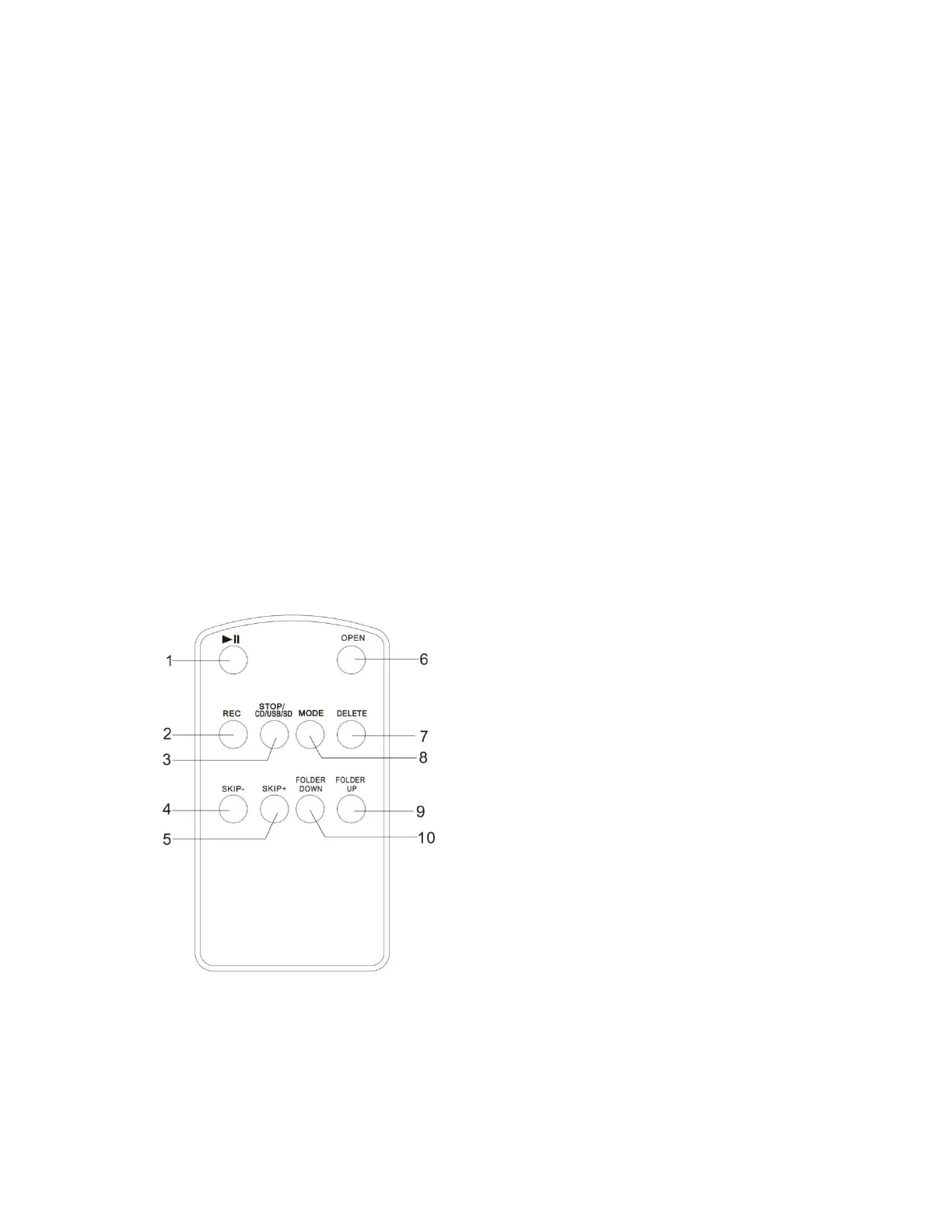
1. PLAY/PAUSE BUTTON
2. RECORD BUTTON
3. STOP/CD/USB/SD BUTTON
4. SKIP- BUTTON
5. SKIP+ BUTTON
6. OPEN BUTTON
7. DELETE FILE BUTTON
8. MODE BUTTON (Repeat 1,Repeat Album, Repeat
All ,Random Program)
9. FOLDER UP
10. FOLDER DOWN
DELETE MP3 FILES BUTTON OPERATION
(1). Insert the USB or SD card.
(2) Select the track no. to be deleted.
(3) Press the DELETE button to start delete track, then
Press the DELETE button again to confirm.
BATTERY REPLACEMENT
When the remote control operation becomes unstable or
the distance from which remote control is possible
becomes shorter, replace the battery with new one.
USING THE REMOTE CONTROL UNIT
• To use remote control unit, point it at the remote sensor (5) and press the button gently


 To Next Page