JAYCO TOWABLE SECTION 4 – VEHICLE OPERATION
4-31
NOTE: The vinyl side of the screen room skirt will face outside of the screen room
area (towards the underside of the unit. This is to help protect the inside of the screen
room from outside elements.
Installing the Screen Room:
NOTE: It will be much easier to set up the screen room if there are 2 people.
1. Unfold the screen room. A grassy area or clean floor is suggested. Lift up one corner
of the screen room to the (outside) corresponding corner of the canopy.
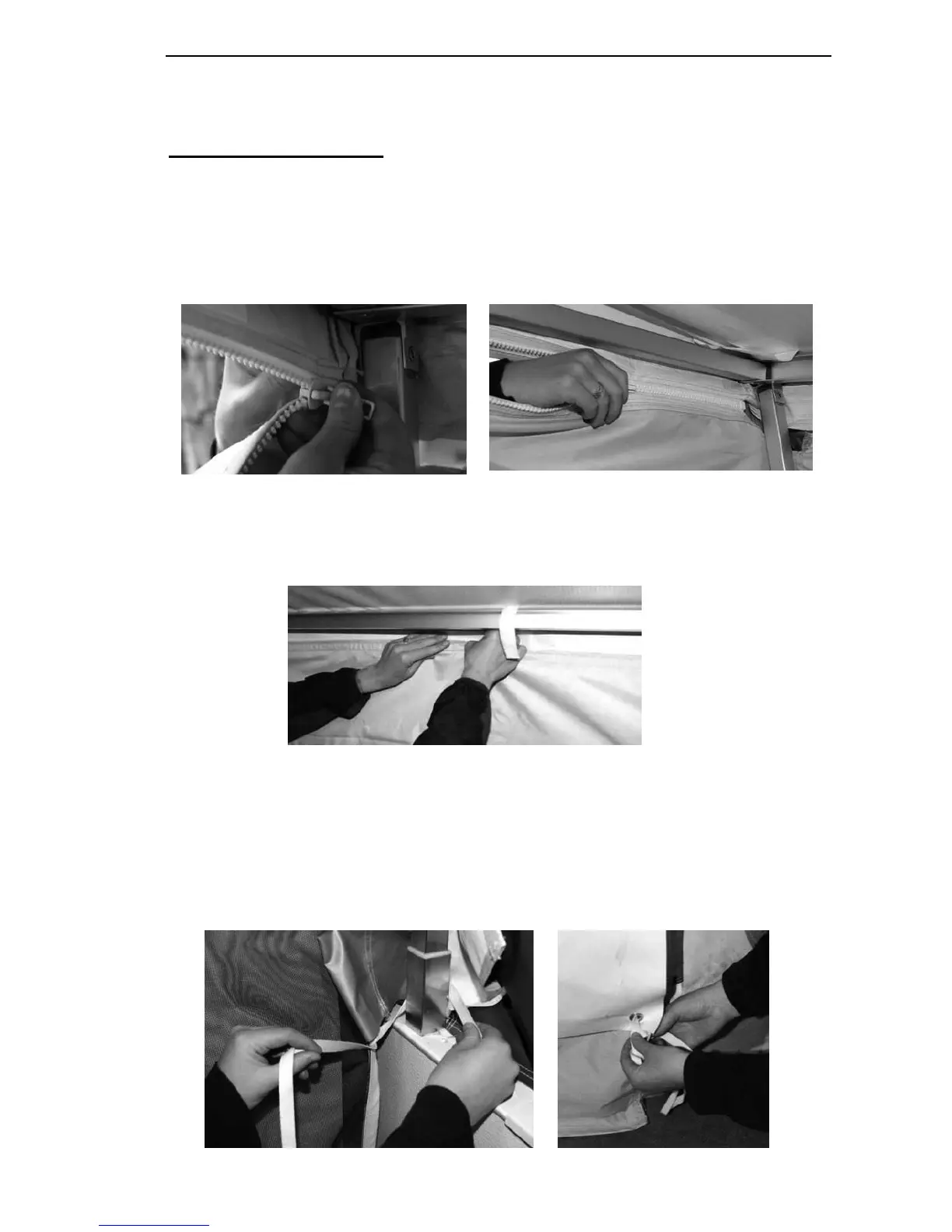
2. Starting at one corner, start the side zipper) and zip it up completely. Repeat on the
other side.
NOTE It may be easier to begin set up if the canopy leg is tilted inward.
3. Attach the Velcro on the front corner. Continue attaching the Velcro across the entire
front of the screen room.
NOTE: It will be easier to attach the Velcro if you have a second person on the
outside putting pressure on the screen room Velcro.
4. Start the lifter covers at the top (this will be much easier if done prior to raising the
roof).
5. Raise the roof of the unit into the camping position. Set all canopy legs in the
upright position.
6. Finish installing the lifter covers around the lifter posts.
7. Tie the sides of the screen room to the unit, and the inside of the screen room to the
legs.




 To Next Page