GENERAL OPERATION
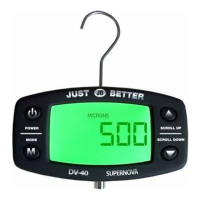
KEY OPERATION OVERVIEW:
• Toturnpoweron,pressthePOWERkeyonce.
• Toturnpowero,pressthePOWERkeyandholdforthreeseconds.
• ToenabletheHIGHLimitAlarm,holdtheMODEkeyandpressUP.
• ToenabletheLOWLimitAlarm,holdtheMODEkeyandpressDOWN.
• TodisabletheAlarm,pressPOWERkeyonce.
• Whenalarmissounding,pressanykeytoturnito(automaticallydisabled).
• Toentertheusersettingsmenu,presstheMODEkeyandholditforfourseconds.
BASIC USER SETUPS AVAILABLE
EachtimetheDV-40powersup,previouslystoredusersettingsareretrieved.
Settingsincludethefollowingitems:
• InternationalStandardUnitsselection,factorydefaultvalueis“MICRONS”.
• HighLimitAlarmsetting“Hi—AL”,factorydefaultvalueis“2000”Microns.
• LowLimitAlarmsetting“Lo—AL”,factorydefaultvalueit“500”Microns.
• Key-pressfeedback(beepPOWER),factorydefaultis“ON”.
• Displayresolution(ON/OFF),factorydefaultis“OFF”.
• Auto-shutdownsetting,factorydefaultis“30”minutes.
• Backlightpersistence,factorydefaultis“10”.
WHEN POWER UP
• WhentheDV-40powersup,thescreenshowsgreetingmessage:“JB,“JUST”,“BETTER”
• Thecenterbarsmovetoindicatetheunitisininitialwarmupstate.Itwilltakeupto30secondsfortheunittogetintonormal
operationmode.
• If“SENSOR”messageisdisplayedonthescreen,thismeansthesensorwireisbrokenorsensorisdisconnected.
BATTERY INDICATOR
Whenthestartupsequenceiscomplete,thebatterystatusindicator(inthelowerleftcorner)isupdatedtoshowcurrentbatterystatus.Whilethe
unitison,thisstatusisupdatedonceeverysecond.Batterylevelindicationisasfollows:
NotVisible TheDV-40isconnectedtoanexternalpowersource.(ACAdapter)
Threebars Batteryvoltageis3.5orabove.
Twobars Batteryvoltageisbetween3.0and3.5Volts.
Onebar Batteryvoltageisbetween2.7and3.0Volts.
Nobars,batteryoutlinevisible Batteryvoltageisbetween2.4and2.7Volts.
Nobars,batteryoutlineashing Batteryvoltageisbetween2.1and2.4Volts.
Oncethebatteryvoltagedropsbelow2.4voltsandthebatteryoutlinestartsashing,theunitwillbeeponceperminutetocallattentionto
thelowbatterycondition.Whenbatteryvoltagefallsbelow2.1volts,ashutdowntimerisactivated.Ifvoltagestaysbelow2.1voltsforthirty
seconds,theDV-40willbeeponceandshutitselfo.Ifpowerisrestoredduringthistime,shutdowniscancelled.
ALARM FUNCTION
LOW LIMIT ALARM
• MODE+DOWNkeyswillenabletheLowlimitalarm.
• LowAlarmcanbeenabledinallcasesincludingwhenthepressureisinOVERRANGEexceptforwhenthesensorisnotconnected.
• EnableLowAlarmwilldisplaythe“LOW”,“ALARM”icon,andwilldisabletheHighAlarm.
• WhenLowLimitalarmisenabledandthepressureislessorequaltothepresetLowAlarmlimitvalue,Alarmwillgoo:Beeper
willsoundeverysecond,andthe“ALARM”,“LOW”iconwillash.
• ThebeepingandashingwillcontinueevenwhenthepressurerisesabovetheLowAlarmlimit.Pressanykeytostopthebeeping/
ashinganddisablethealarm.
HIGH LIMIT ALARM
• MODE+UPkeyswillenabletheHighlimitalarmONLYIFthepressureisbellowthepresetHighAlarmLimit.Ifthepressureishigher
thanthepresetHighAlarmLimit,usercannotenabletheHighlimitalarm.IfLowAlarmwasenabled,tryingtosettheHighLimit
AlarmwilldisabletheLowLimitAlarmeveniftheHighLimitAlarmfailsduetopressurereadingabovetheHighlimit.
• EnableHighAlarmwilldisplaythe“HIGH”,“ALARM”icon,andwilldisabletheLowAlarm.
IMPORTANT
CLEANING VACUUM SENSOR
Fillbrasssensorttingwithafewdropsofrub-
bingalcohol(Isopropyl).Covertheopeningwith
your nger and gently shake the tting allowing
thealcoholtorinsethesensor.Pourthealcohol
outandallowthevacuumsensortodryforrough-
ly20minutesbeforeusingthegauge.


 To Next Page
 Loading...