Toselect(andstore)thedisplayedsetting,presstheMODEkey.
Whenasettingisstored,youwillbereturnedtomenuselections.
Ifyou’redone,PressON/OFFagaintoreturntonormaloperation.
Note:Whileyou’reinthemenusystem,thebacklightwillstayonallofthetimeunlessithasbeendisabledbyselecting“OFF”.
KEY-PRESS FEEDBACK BEEP
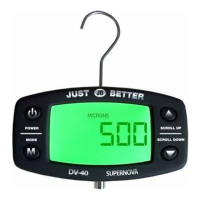
Thekey-pressfeedbackmenuhasonlyONandOFFoptions.When‘beep’ison,theDV-40willmakeasoundeachtimeakeyispressed
(audiblefeedback).
Tochangetheselection,usetheUPorDOWNkey.
Tocancel,pressthePOWERkey.
Toselect(andstore)thesettingshown,presstheMODEkey.
Whenasettingisstored,youwillbereturnedtomenuselections.Ifyou’redone,pressPOWERagaintoreturntonormaloperation.
DISPLAY RESOLUTION HI RES
Highresolutiondisplaymeansthatpressureisshownas-is,in1unitincrements.Thedisplayresolutionmenuallowsyoutoselectwhether
pressurewillbeshownathighresolution.WhenthesettingisOFF,readingsareroundedoaccordingtothepressurebeingdisplayed.
OptionsaresimplyONandOFF.
Tochangetheselection,usetheUPorDOWNkey.
Tocancel,pressthePOWERkey.
Toselect(andstore)thesettingshown,presstheMODEkey.
Whenasettingisstored,youwillbereturnedtomenuselections.
Ifyou’redone,pressPOWERagaintoreturntonormaloperation.
Note:
EvenwhenhighresolutionisON,pressurevaluesabove1000micronsarealwaysroundedoaccordingtothedisplaypressure.
AUTO-SHUTDOWN SETTING AU-0FF
Inordertoconservebatterylife,theDV-40willshutitselfoafteraperiodofinactivity(nokey-press).Thenumberofminutesbeforeauto-shut-
downoccurscanbesetbytheuserasfollows:OFF,10,15,30,45,60,or90minutes.Whenauto-shutdownissetto‘OFF’,theDV-40willnot
shutitselfo.ThisisusefulintestenvironmentswhereanACpoweradapterisavailable.
Tochangetheselection,usetheUPorDOWNkey.
Tocancel,pressthePOWERkey.
Toselect(andstore)thesettingshown,presstheMENUkey.
Whenasettingisstored,youwillbereturnedtomenuselections.
Ifyou’redone,pressPOWERagaintoreturntonormaloperation.
Note:Evenwhenauto-shutdownhasbeendeactivated,alowbatterycondition(lessthan2.1VDC)willstillcausetheDV-40toturnitselfo.
VERSION ID INFORMATION USER ID
Thismenuselectionissimplyprovidedforinformationpurposes.FirmwarereleaseversionsfortheprimaryCPUandthesensorCPUareboth
available.TheMainCPUrmwarerelease(EG:“Fr-1.77”)isdisplayedinitiallyandwhenevertheUPkeyispressed.PressingDNwilldisplaythe
SensorCPUFirmwarerelease(EG:“Sr-6.42”).PresseitherthePOWERkeyortheMODEkeytoreturntoreturnedtomenuselection.
Note:Whenorderingpartsorgettingtechnicalassistance,thepersonthatyoutalktomayaskforthisinformation.
CALIBRATION MENU
Calibrationmenushouldonlybeaccessedinthefactory,noeldcalibrationisrecommended.
Thesensorandthemainunitserialnumberhavetomatcheachotherinordertohavethecorrectmeasurement.
Form DV-41-308
Printed in the USA
©2015 JB Industries, Inc.
JB INDUSTRIES INC.
Aurora IL 60505 USA
TM


 To Previous Page
 Loading...