ENGLISH OPERATION MANUAL
JB SYSTEMS® 4/89 SM-1612 SCANMASTER
FUNCTIONS (FRONT)
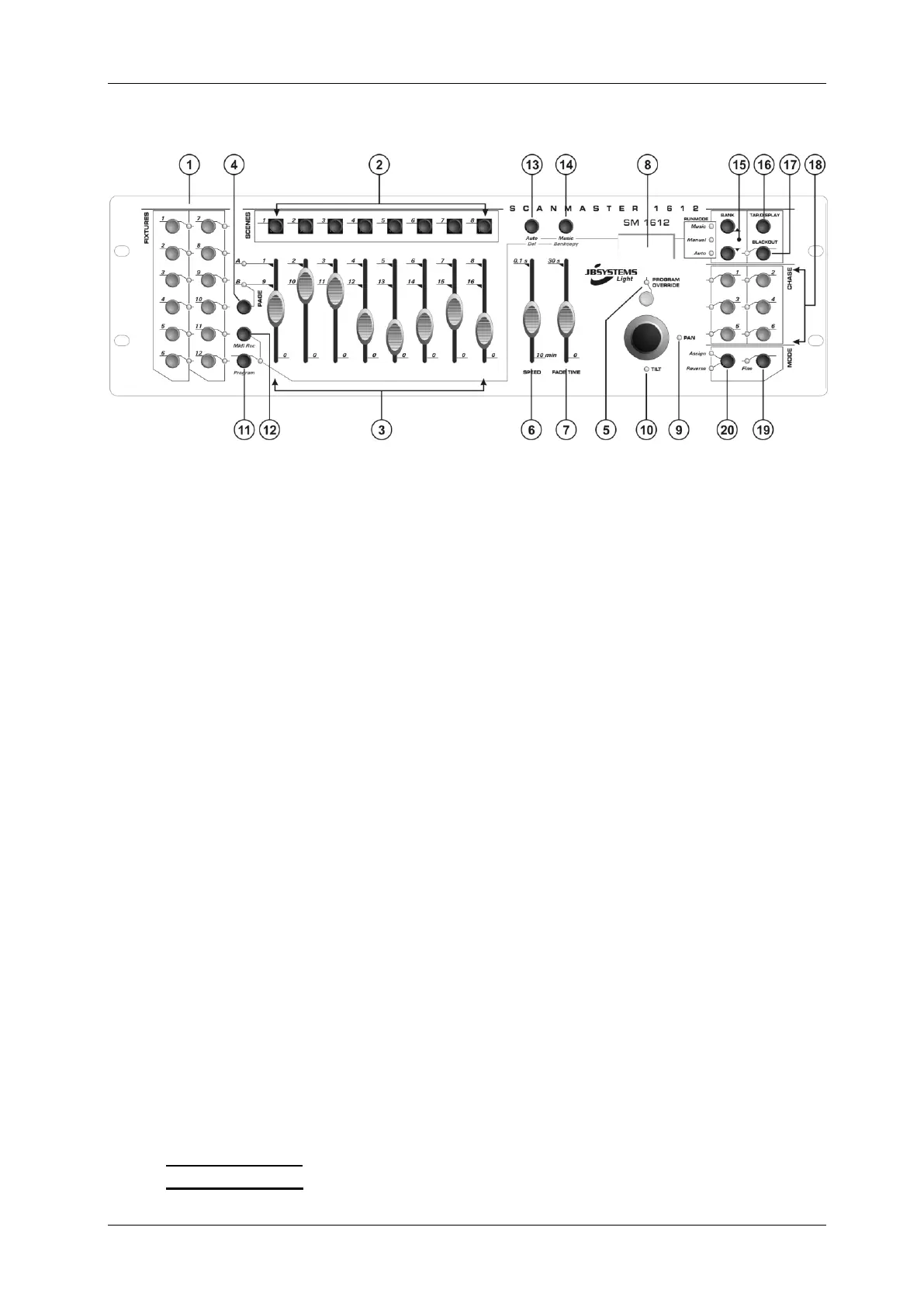
1. FIXTURE BUTTONS: Used to select one or more fixtures.
2. SCENE BUTTONS: Used to load or store a certain scene.
3. FADERS: Used to control the values of the different channels.
4. PAGE SELECT BUTTON: Every fixture can have up to 16channels. These 16
channels are divided over 2 pages with each 8 channels (faders):
PAGE A: channels 18
PAGE B: channels 916
5. OVERRIDE BUTTON: When a chase is running, you can select 1 or more fixtures
and control them independently from the chase running at that moment.
6. SPEED SLIDER: Used to select the chase speed within a range of 0.1seconds to
10minutes.
7. FADE TIME SLIDER: Used to adjust the fade time within a range of 0 to 30sec.
8. LCD DISPLAY: Shows the current activity or programming state. The LCD Display
contains 2 lines of 8 characters each. Below is a list of abbreviations used:
LCD DISPLAY FULL MESSAGE
SN1 scene1 is active
BK1 bank1 is active
CHASE1 chase1 is active
STEP 009 step 9 of a chase
DATA 184 DMX-value the last fader used = 184 (0
255)
SP:1m34s Speed is set to 1minute and 34 seconds.
FT:3.31s Fade time is set to 3,31seconds
ASS04 05 Joystick is assigned to channels 4 & 5 (PAN=4 * TILT=5)
RES10 13 DMX channels 10 & 13 are reversed
9. JOYSTICK PAN: Used to control the panning (horizontal movements) of the
selected fixture(s)
10. JOYSTICK TILT: Used to control the tilt (up/down movements) of the selected
fixture(s)
11. PROGRAM BUTTON: Used to enter or leave the program mode.
12. MIDI/RECORD BUTTON: Used to record actions in memory or to set a MIDI
channel.
13. AUTO/DELETE BUTTON:
Running mode: Used to switch between manual and automatic chase mode.
Program mode: Used to delete scenes or chases.


 To Next Page