EasyManua.ls Logo

JBL E40BT - JBL E40 BT ShareMe Wireless Audio Sharing; ShareMe Functionality

JBL E40BT
20 pages
Print Icon
To Next Page IconTo Next Page
To Previous Page IconTo Previous Page
Loading...
E40BT
Quick Start Guide
Guide
de
demarrage rapide
®
To
use
ShareMe
""
function
EN
CD
®
----
---
-
--·
J:J
------
--
-
' '
' '
••
••
:
~·I
\
~
,'
' '
' '
'
'
.
@]
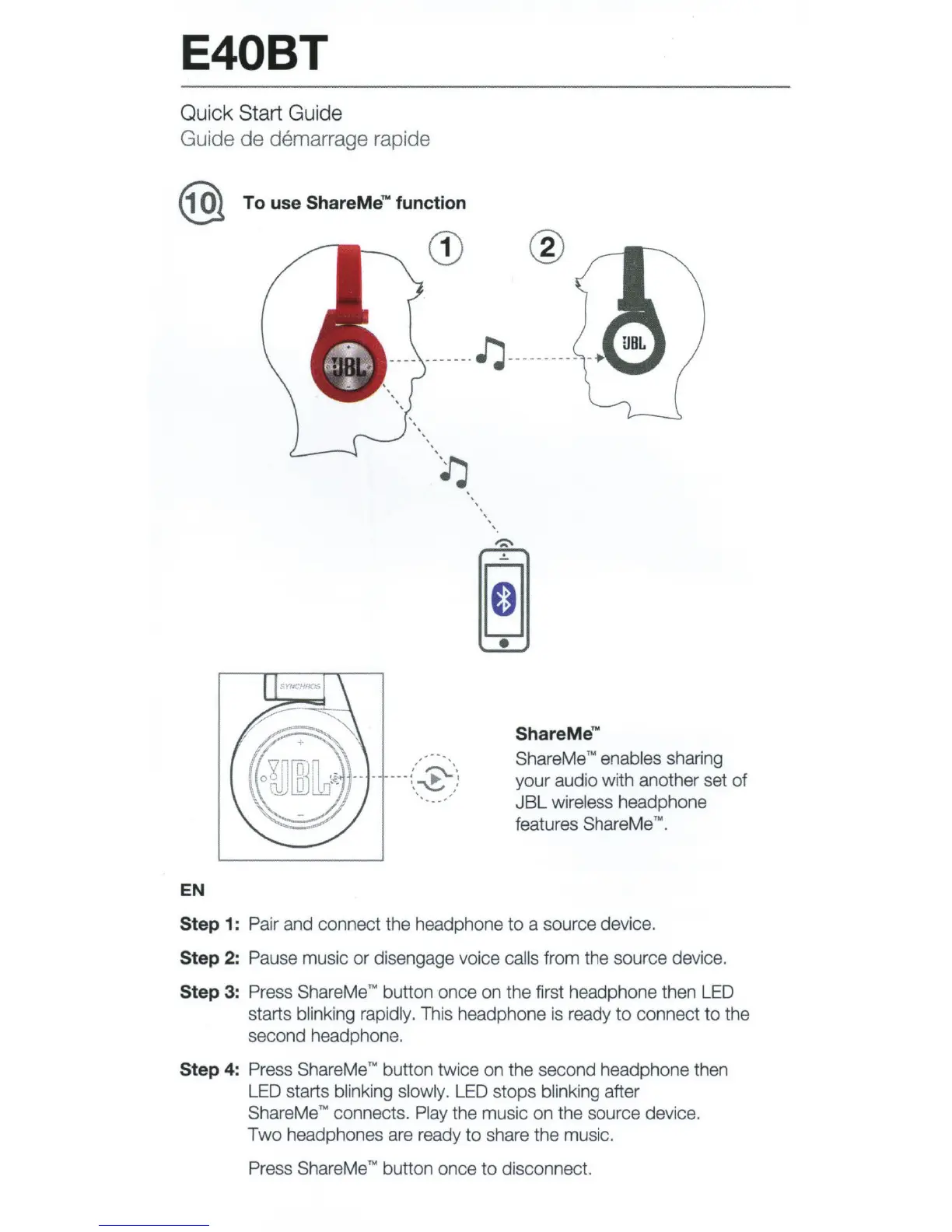
ShareMe
""
ShareMe
TM
enables sharing
your
audio with another set
of
JBL
wireless headphone
features ShareMe
""
.
Step 1: Pair and connect the headphone
to
a source device.
Step 2: Pause music
or
disengage voice calls from
the
source device.
Step
3:
Press Share Me
TM
button once on
the
first headphone then LED
starts blinking rapidly. This headphone is ready
to
connect
to
the
second headphone.
Step 4: Press Share Me TN button twice on
the
second headphone then
LED starts blinking slowly. LED stops blinking after
ShareMe
TM
connects. Play the music
on
the source device.
Two
headphones are ready
to
share the music.
Press ShareMe
TM
button once
to
disconnect.

Related product manuals