EasyManua.ls Logo

JBL Harman PARTYBOX 200 - User Manual

JBL Harman PARTYBOX 200
14 pages
Print Icon
To Next Page IconTo Next Page
Loading...
PARTYBOX 200
PARTYBOX 300
OWNER’S MANUAL
Question and Answer IconNeed help?

Do you have a question about the JBL Harman PARTYBOX 200 and is the answer not in the manual?

Summary

IMPORTANT SAFETY INSTRUCTIONS

General Safety Precautions

Covers 15 points for safe product operation, installation, and handling.

FCC and IC Regulatory Compliance

Details FCC interference, RF exposure, and compliance statements for USA/Canada.

Product Regulations and Compliance

USA Regulatory Information

Covers FCC interference, RF exposure, antenna grounding, and laser safety for USA.

European Union Compliance Information

Details WEEE, RoHS, Battery Directive, and hearing protection for EU countries.

Battery Handling and Disposal

Battery Removal and Recycling

Guidelines for safe battery removal, recycling, and environmentally sound disposal.

Battery Warnings and Symbols

Covers warnings for ingestion, chemical burns, and symbols for hazardous materials.

Product Safety Warnings

Epilepsy Warning

Warns users about potential epileptic seizures from flashing lights.

Declaration of Conformity

States compliance with EMC, LVD, and wireless operation directives.

INTRODUCTION AND WHATS IN THE BOX

Product Introduction

Congratulates user, provides overview and encourages reading safety instructions.

Included Accessories

Lists the main unit, power cord, and DC cable included in the package.

PRODUCT OVERVIEW

Top Panel Controls and Indicators

Details buttons, LED behavior, and battery indicators on the top panel.

Back Panel Connections

Describes AUX, USB, DC, AC, INPUT, OUTPUT, MIC, and GUITAR ports on the back panel.

PLACEMENT AND POWER ON

Speaker Positioning Guidelines

Advises on placing tweeters upwards and ensuring a flat, stable surface for vertical or horizontal orientation.

Connecting to Power

Instructions for plugging into AC power or using a car charger via DC input.

USING YOUR PARTYBOX

Speaker Charging and Battery Check

How to charge the PartyBox 300 and check its battery level.

Bluetooth Connection

Steps to pair and connect a Bluetooth device for audio streaming.

USING YOUR PARTYBOX (Continued)

USB Connection

How to connect a USB storage device to play music and supported audio formats.

AUX Connection

Instructions for connecting a portable audio device using a 3.5mm AUX cable.

Analog INPUT Connection

How to connect analog devices using RCA cables to the INPUT jacks.

USING YOUR PARTYBOX (Continued)

Mix Sound with Microphone or Guitar

Instructions for connecting and mixing microphone or guitar audio with sound source.

Charging External USB Devices

How to use the speaker as a battery charger for rechargeable USB devices.

CARRYING AND SETTINGS

Safe Carrying Procedures

Advises disconnecting cords and holding the product firmly while carrying.

TWS and Demo Mode Settings

How to connect speakers in TWS mode and operate demo mode.

SETTINGS AND SPECIFICATIONS

Standby and Factory Reset

Explains standby mode and steps to restore factory settings.

Product Specifications

Lists technical specifications for PartyBox 300 and 200, including power, dimensions, and connectivity.

TROUBLESHOOTING AND COMPLIANCE

Troubleshooting Common Issues

Guides for system, sound, and Bluetooth problems, including how to reset.

Compliance and Operational Modes

Details EU energy legislation compliance and product behavior in Bluetooth connection/disconnection modes.

TRADEMARK INFORMATION

JBL Trademark

Mentions the JBL trademark.

Summary

IMPORTANT SAFETY INSTRUCTIONS

General Safety Precautions

Covers 15 points for safe product operation, installation, and handling.

FCC and IC Regulatory Compliance

Details FCC interference, RF exposure, and compliance statements for USA/Canada.

Product Regulations and Compliance

USA Regulatory Information

Covers FCC interference, RF exposure, antenna grounding, and laser safety for USA.

European Union Compliance Information

Details WEEE, RoHS, Battery Directive, and hearing protection for EU countries.

Battery Handling and Disposal

Battery Removal and Recycling

Guidelines for safe battery removal, recycling, and environmentally sound disposal.

Battery Warnings and Symbols

Covers warnings for ingestion, chemical burns, and symbols for hazardous materials.

Product Safety Warnings

Epilepsy Warning

Warns users about potential epileptic seizures from flashing lights.

Declaration of Conformity

States compliance with EMC, LVD, and wireless operation directives.

INTRODUCTION AND WHATS IN THE BOX

Product Introduction

Congratulates user, provides overview and encourages reading safety instructions.

Included Accessories

Lists the main unit, power cord, and DC cable included in the package.

PRODUCT OVERVIEW

Top Panel Controls and Indicators

Details buttons, LED behavior, and battery indicators on the top panel.

Back Panel Connections

Describes AUX, USB, DC, AC, INPUT, OUTPUT, MIC, and GUITAR ports on the back panel.

PLACEMENT AND POWER ON

Speaker Positioning Guidelines

Advises on placing tweeters upwards and ensuring a flat, stable surface for vertical or horizontal orientation.

Connecting to Power

Instructions for plugging into AC power or using a car charger via DC input.

USING YOUR PARTYBOX

Speaker Charging and Battery Check

How to charge the PartyBox 300 and check its battery level.

Bluetooth Connection

Steps to pair and connect a Bluetooth device for audio streaming.

USING YOUR PARTYBOX (Continued)

USB Connection

How to connect a USB storage device to play music and supported audio formats.

AUX Connection

Instructions for connecting a portable audio device using a 3.5mm AUX cable.

Analog INPUT Connection

How to connect analog devices using RCA cables to the INPUT jacks.

USING YOUR PARTYBOX (Continued)

Mix Sound with Microphone or Guitar

Instructions for connecting and mixing microphone or guitar audio with sound source.

Charging External USB Devices

How to use the speaker as a battery charger for rechargeable USB devices.

CARRYING AND SETTINGS

Safe Carrying Procedures

Advises disconnecting cords and holding the product firmly while carrying.

TWS and Demo Mode Settings

How to connect speakers in TWS mode and operate demo mode.

SETTINGS AND SPECIFICATIONS

Standby and Factory Reset

Explains standby mode and steps to restore factory settings.

Product Specifications

Lists technical specifications for PartyBox 300 and 200, including power, dimensions, and connectivity.

TROUBLESHOOTING AND COMPLIANCE

Troubleshooting Common Issues

Guides for system, sound, and Bluetooth problems, including how to reset.

Compliance and Operational Modes

Details EU energy legislation compliance and product behavior in Bluetooth connection/disconnection modes.

TRADEMARK INFORMATION

JBL Trademark

Mentions the JBL trademark.

Overview

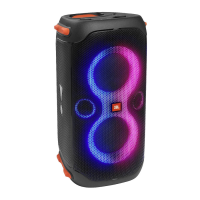
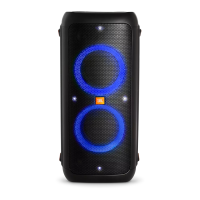
The JBL PartyBox 200 and PartyBox 300 are portable party speakers designed to deliver powerful sound and dynamic light shows for various events. These speakers are built for convenience, offering multiple connectivity options and a robust design suitable for both indoor and outdoor use.

Function Description

The primary function of the PartyBox 200 and 300 is to provide high-quality audio playback from a variety of sources, including Bluetooth-enabled devices, USB storage, and analog audio inputs. They are equipped with powerful speaker drivers to ensure a rich and immersive sound experience. A key feature is the integrated light show, which synchronizes with the music to create a vibrant party atmosphere. The PartyBox 300 also includes a built-in rechargeable battery, allowing for extended portable use without needing a constant power supply.

Beyond basic audio playback, these speakers offer advanced functionalities for mixing sound. Users can connect a microphone and/or a guitar to the speaker, allowing for karaoke sessions or live performances. Dedicated volume controls for the microphone and guitar enable precise mixing with the main audio source. The speakers also support True Wireless Stereo (TWS) mode, which allows two PartyBox units to be connected wirelessly for an even larger and more expansive soundstage.

For added convenience, the PartyBox speakers can act as a power bank, allowing users to charge external USB devices directly from the speaker's USB port. This is particularly useful for keeping smartphones or other gadgets powered during events.

Usage Features

  • Bluetooth Connection: The speakers can easily connect to Bluetooth-enabled smartphones or tablets, streaming audio wirelessly. They can memorize up to 8 paired devices, simplifying reconnection. A PIN code "0000" may be required for some devices.
  • USB Connection: Music stored on USB storage devices (such as MP3 players or flash drives) can be played directly by plugging them into the USB port. The speakers support various audio formats, including .mp3, .wma, and .wav.
  • AUX Connection: For devices without Bluetooth or USB storage, a 3.5mm audio cable can be used to connect to the AUX input, allowing playback from portable audio devices.
  • INPUT Connection: Analog audio devices like TVs or DVD players can be connected using RCA audio cables to the INPUT (L/R) connectors on the back of the speaker.
  • Microphone and Guitar Inputs: Dedicated MIC and GUITAR input jacks, along with individual volume controls, allow for live mixing of vocals and instruments with the main audio. An echo effect can also be adjusted for the microphone.
  • Light Show Modes: The speakers feature multiple light patterns that can be toggled or turned off. A strobe light can also be activated or deactivated.
  • Bass Boost: A "BASS BOOST" button allows users to enhance the bass output, with two levels of boost or the option to turn it off.
  • True Wireless Stereo (TWS) Mode: Two PartyBox speakers can be linked wirelessly to create a stereo sound system, with one speaker acting as the left channel and the other as the right.
  • Placement Flexibility: The speakers can be placed vertically or horizontally, and they automatically optimize sound output based on the orientation. It is recommended to ensure the tweeters are on the upper side for optimal sound quality.
  • Charging External USB Devices: The USB port on the back of the speaker can be used to charge other USB-powered devices.
  • Battery Level Indicator (PartyBox 300 only): The PartyBox 300 features a battery level indicator to show the remaining charge.
  • Demo Mode: A special demo mode showcases the speaker's capabilities with built-in music tracks, disabling other inputs and most buttons.
  • Standby Mode: To conserve power, the speaker enters sleep mode after 20 minutes of inactivity. The PartyBox 300 will auto power off if running on battery with no action for 20 minutes.

Maintenance Features

  • Charging (PartyBox 300 only): The PartyBox 300 is powered by a built-in rechargeable battery and should be fully charged before first use to prolong battery lifespan. Charging is done via AC power.
  • Power Cord Usage: Only the provided power cord should be used for connecting the speaker to a power source.
  • Cleaning: The manual does not specify cleaning instructions, but general electronic device care suggests keeping the unit free from dust and moisture.
  • Troubleshooting: The manual provides a troubleshooting section to help users resolve common issues related to power, sound, and Bluetooth connectivity. It advises users to check basic connections and settings before seeking service.
  • Factory Reset: A factory reset function is available to restore the speaker to its original settings, which can be useful for resolving persistent issues.
  • Battery Disposal: Instructions for the safe removal, recycling, and disposal of batteries are provided, emphasizing environmentally sound practices and compliance with EU directives. Users are warned against incorrect battery replacement and exposure to extreme conditions.
  • Laser Safety: The product uses a laser system, and users are cautioned not to open the cabinet enclosure or defeat safety mechanisms to prevent direct exposure to the laser beam. Servicing should only be performed by qualified personnel.
  • Hearing Protection: Users are advised to avoid listening at high volume levels for prolonged periods to prevent possible hearing damage.
  • Carrying Precautions: When carrying the speaker, all cords should be disconnected, and the product should be held firmly to avoid personal injury or property damage.

JBL Harman PARTYBOX 200 Specifications

General IconGeneral
USB PlaybackYes
Microphone InputYes
Light EffectsYes
Wireless ConnectivityBluetooth
Bluetooth Version4.2
Aux InputYes
Light ShowYes
Bluetooth RangeUp to 10m
Input TerminalsUSB, 1 x Aux
Output TerminalsRCA L/R
Frequency Response45Hz - 20kHz
Power Inputs100–240V AC and 12V DC

Related product manuals